# Agents
> **Availability:** DataHub Cloud only
:::caution Private Beta
Starting in DataHub Cloud v1.0.1, Agents is in **Private Beta** and available only on DataHub Cloud. To enable this feature for your organization, contact the DataHub team.
:::
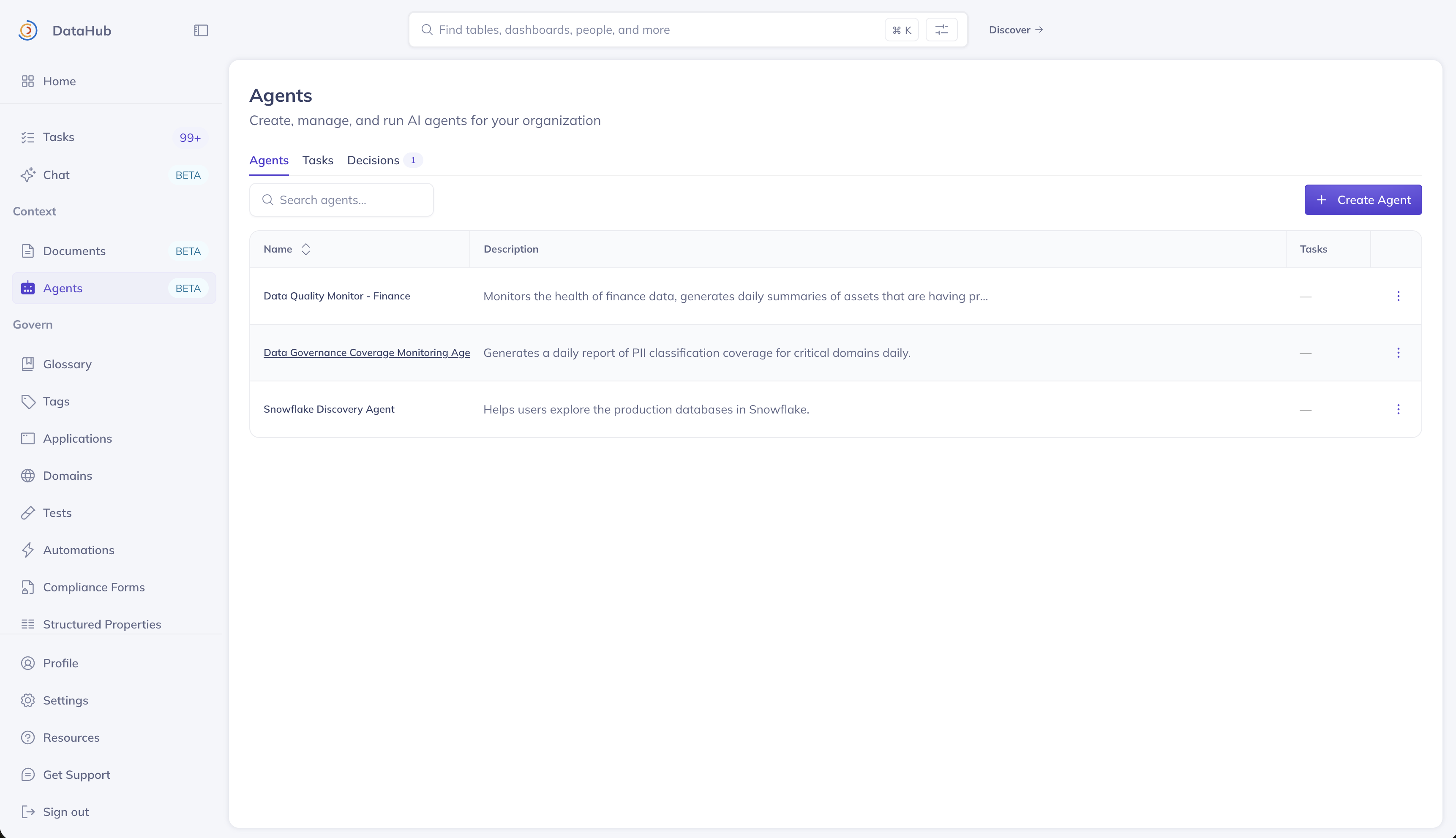
**Agents** lets you create custom AI agents that can autonomously execute tasks against your metadata graph — on a schedule, in response to events, or on demand. Each agent can be configured with specific instructions, tools, plugins, and a scoped view of your data ecosystem.
Agents extends [Ask DataHub](ask-datahub.md) from a conversational assistant into an automation platform with three core concepts:
- **Agents** — Custom, purpose-built AI agents with tailored instructions, tool access, and scope
- **Tasks** — Repeatable units of work assigned to an agent, triggered manually, on a schedule, or by events
- **Decisions** — Human-in-the-loop checkpoints where an agent pauses and requests input before continuing
## Example Use Cases
- **Data discovery agents** — Create agents scoped to specific parts of your ecosystem, such as a "Snowflake Production" agent or a "Marketing Domain" agent, helping users explore and browse relevant data assets through natural conversation.
- **Data quality and governance reports** — Schedule tasks that generate reports on documentation coverage, ownership gaps, classification status, or assertion health across your data assets.
- **Data analytics and debugging agents** — Build agents with [AI Plugins](ask-datahub-plugins/overview.md) to take action directly in tools like Snowflake, GitHub, and more — enabling workflows like query debugging, schema analysis, or cross-platform investigation.
## Prerequisites
To manage agents, tasks, and decisions, a user must have the **Manage Agents** platform privilege. Without it, the Agents section is hidden from the navigation sidebar.
Users without this privilege can still interact with agents that have **Show in Ask DataHub Chat** enabled — they just cannot create or configure them.
## Agents
An agent encapsulates a persona: who it is, what it can do, and what data it can see. Agents come in two flavors:
- **Custom agents** — Created by your team through the UI, fully configurable.
- **Default agents** — Pre-built by DataHub and shipped with the platform. These cannot be edited but can be used for tasks and chat.
### Creating an Agent
Navigate to **Context > Agents** and click **Create Agent**.
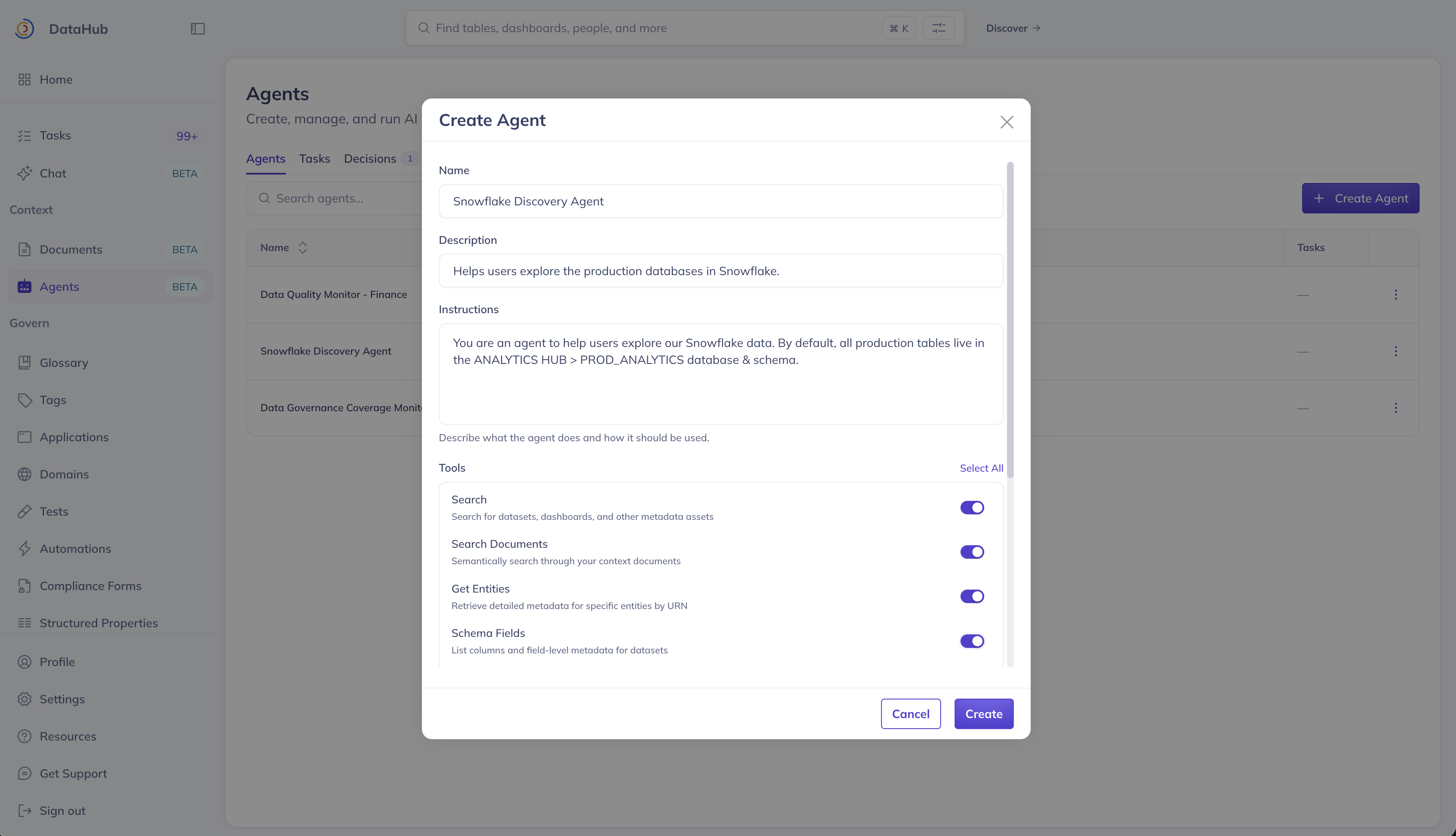
| Field | Description |
| ---------------------------- | ------------------------------------------------------------------------------------------------- |
| **Name** | Display name for the agent. |
| **Description** | Optional summary of the agent's purpose. |
| **Instructions** | Detailed guidance for the agent's behavior. Supports `@` mentions to reference specific assets. |
| **Tools** | Select which DataHub tools the agent can use (e.g. search, lineage, mutations). |
| **AI Plugins** | Connect external MCP servers (e.g. Snowflake, GitHub) to give the agent access to external tools. |
| **View** | Scope the agent's search to a specific View, limiting which assets it can discover. |
| **Show in Ask DataHub Chat** | When enabled, this agent appears as a selectable persona in the Ask DataHub chat interface. |
### Agent Detail Page
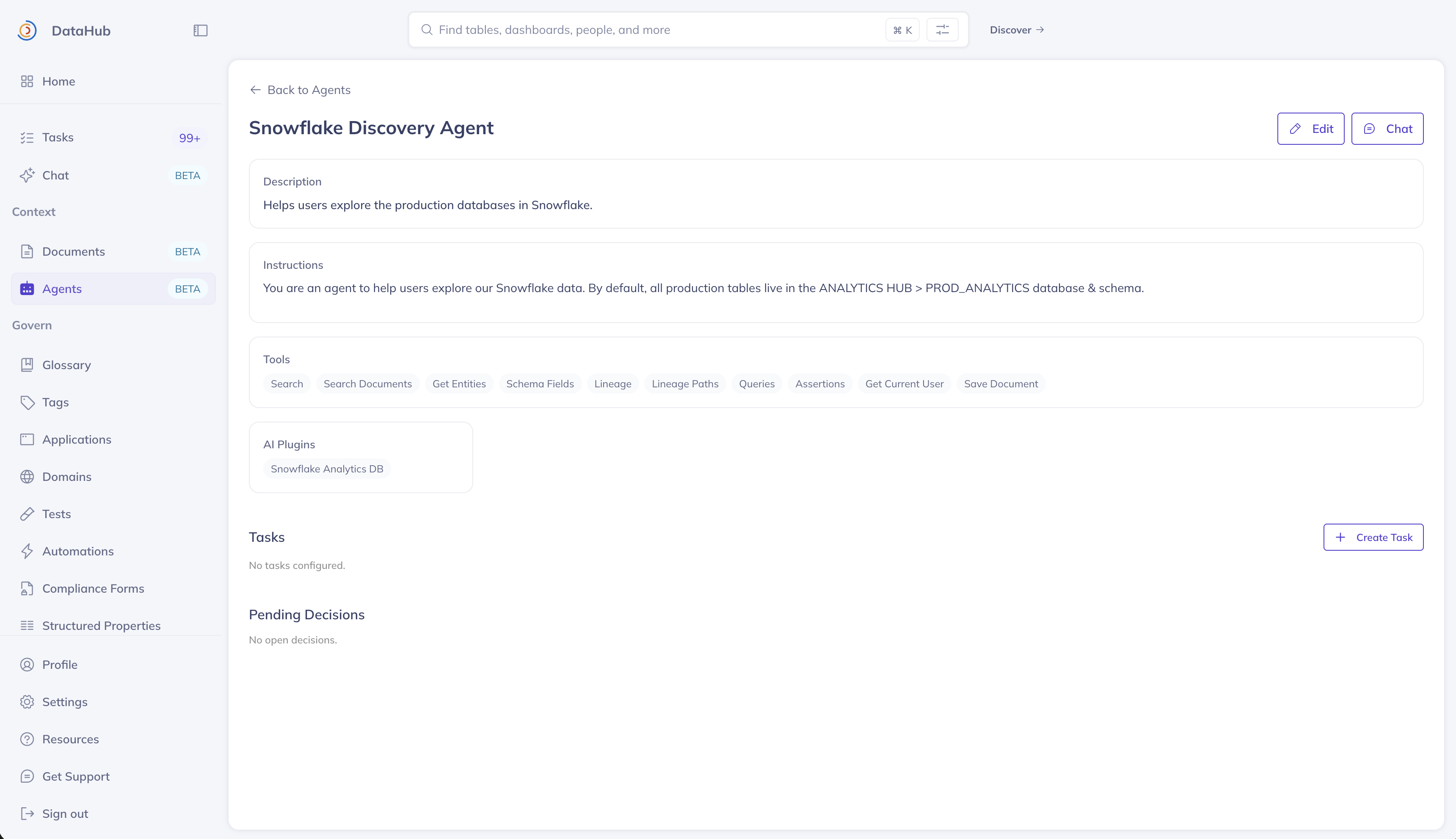
Click any agent to view its configuration, associated tasks, and pending decisions. From here you can:
- **Edit** the agent's configuration
- **Chat** with the agent directly via the chat drawer
- **Create tasks** assigned to this agent
- **Review pending decisions** the agent has requested
## Tasks
A task is a repeatable instruction assigned to an agent. Tasks can run on demand, on a schedule, or in response to metadata events. Each task inherits its agent's base instructions, tool access, plugin access, and default view.
### Creating a Task
Navigate to the **Tasks** tab or open an agent's detail page and click **Create Task**.
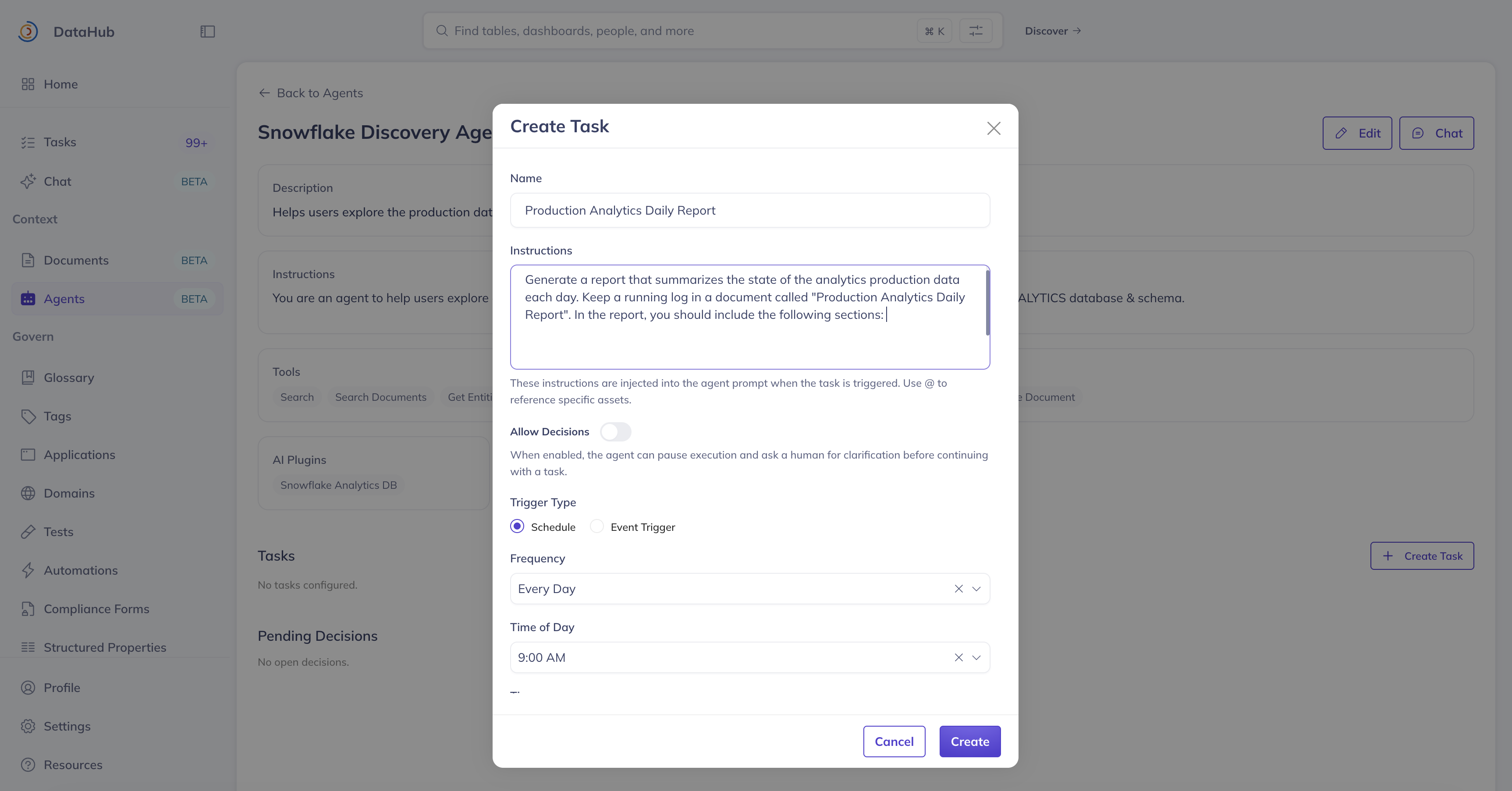
| Field | Description |
| ------------------- | ---------------------------------------------------------------------- |
| **Agent** | The agent that will execute this task. |
| **Name** | Display name for the task. |
| **Instructions** | What the agent should do when this task runs. |
| **Allow Decisions** | When enabled, the agent can pause execution and ask a human for input. |
| **Trigger** | How the task is initiated — **Schedule** or **Event**. |
#### Schedule Triggers
Schedule triggers use a cron-based configuration:
- **Frequency**: Hourly, Daily, or Weekly
- **Day of Week**: (Weekly only) Which day to run
- **Time of Day**: (Daily/Weekly) Hour to run
- **Timezone**: Timezone for the schedule
#### Event Triggers
Event triggers fire when a specific metadata event occurs. Currently supported:
- **Task Completion** — Runs when another specified task completes, enabling task chaining
Additional event types will be added in future releases.
### Running a Task
Regardless of how a task is triggered, you can always run it on demand by clicking **Run Now** from the tasks table or the task detail page. This is useful for testing a task's instructions and verifying its output before enabling a schedule or event trigger.
A modal shows real-time progress including the agent's thinking, tool calls, and results. Closing the modal does not cancel the run.
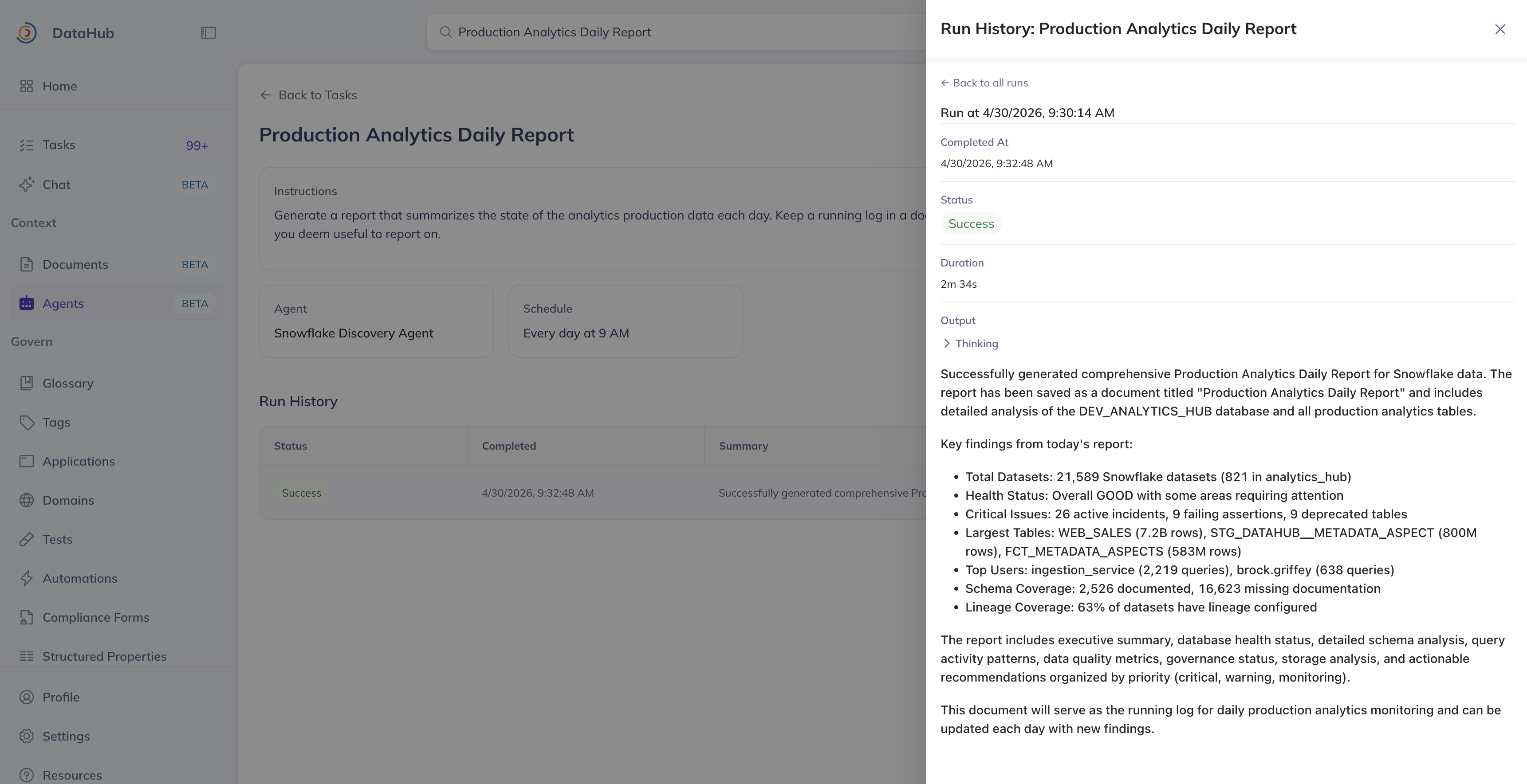
### Task Detail Page
Click any task to view its configuration, run history, and pending decisions.
- **Toggle Active/Inactive** to enable or disable scheduled/event-triggered runs
- **Edit** the task configuration
- **Run** the task on demand
- **View run history** with status, duration, and output for each execution
## Decisions
When a task has **Allow Decisions** enabled, the agent can pause mid-execution to request human input. These requests appear in the **Decisions** tab and on the relevant agent/task detail pages.
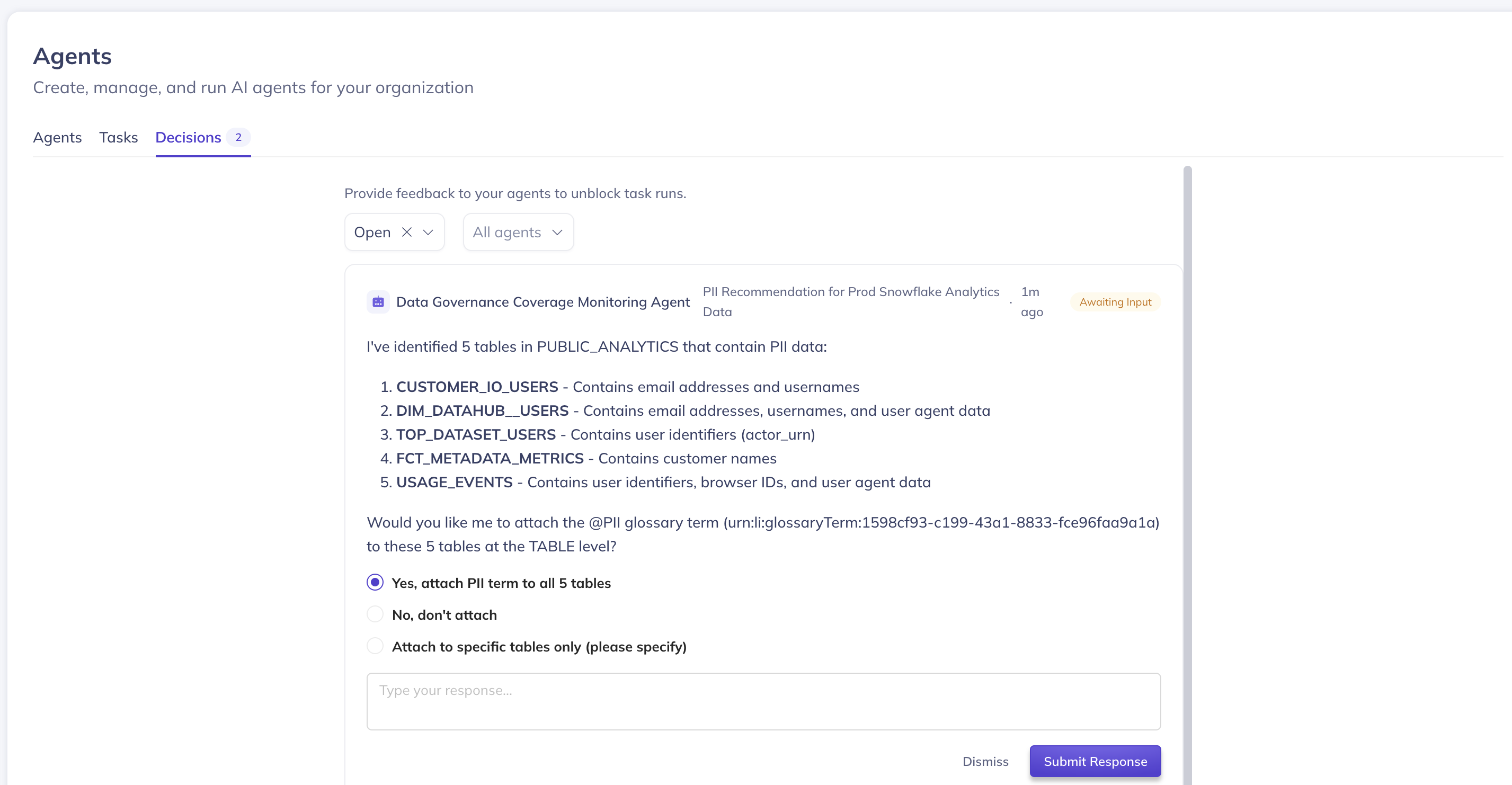
Each decision shows:
- The **question** the agent is asking
- Optional **predefined choices** to select from
- An optional **free-text input** field for additional context
### Responding to a Decision
Click **Respond** to open the decision modal, select an option or provide free-text input, and submit. The agent will resume execution using your response.
You can also **Dismiss** a decision, which aborts the task run.
## FAQ
**Can I use Agents without DataHub Cloud?**
No. Agents is a DataHub Cloud-only feature currently in Private Beta.
**Can multiple tasks share the same agent?**
Yes. An agent is a reusable persona — you can create as many tasks as you need, each with different instructions and triggers, all executed by the same agent.
**What happens if no one responds to a decision?**
The task run remains paused in a "Waiting for Input" state until someone responds or dismisses it. Scheduled re-runs of the same task are not affected.
**How do I control which tools an agent can access?**
Use the **Tools** selector when creating or editing an agent to enable or disable specific DataHub tools. For external tools, configure **AI Plugins** to connect MCP servers and scope access per agent.
**When tasks run, whose permissions do they run with?**
Today, tasks run as the user who **created** the task. This means the task will inherit access to
any AI plugins and privileges that the creator has. In the future, we intend to support running
as a specific service account, which can have restricted permissions.
**Can I audit the tool calls an agent made during a task run?**
Yes. Open the task run details from the run history and expand the thinking block. You will see a full trace of every tool call the agent made, including inputs and outputs. This provides a complete audit trail for compliance and governance purposes.
**What happens if I close the task run modal while a task is running?**
The task continues running in the background. You can check its status and output from the task's run history.
**Can I subscribe to be notified when a task completes via Email, Slack, or Teams?**
Not yet, but coming soon!