# Relating Glossary Terms
> **Availability:** DataHub Cloud only — _Private Beta_
:::caution Private Beta
Ontology is currently in Private Beta. Features, UI, and configuration options are subject to change.
:::
Relationships are what turn a glossary into an ontology. This page covers how to create them in the
UI and through the API.
## Prerequisites
- The terms you want to connect must already exist. See
[Business Glossary](../../../glossary/business-glossary.md) for creating terms and term groups.
- To edit relationships on a term you need the **Manage Glossaries** platform privilege, or
**Edit Entity** on the specific term.
## Choosing the right relationship
The relationship type is what traversal, propagation, and AI tools act on, so it is worth picking
the right one:
| If you want to say… | Use | Direction |
| ------------------------------------------------- | -------------------- | ---------- |
| B is a more specific kind of A | **Inherits (Is A)** | Directed |
| A is made up of B (B is a part or attribute of A) | **Contains (Has A)** | Directed |
| A and B mean the same thing | **Synonym** | Undirected |
| A and B mean opposite things | **Antonym** | Undirected |
| B is A expressed in another language or dialect | **Translates to** | Directed |
| B is one of the allowed values of A | **Valid value** | Directed |
| A and B are connected, but none of the above fits | **Related to** | Undirected |
A **directed** relationship reads differently in each direction, so it also has a reverse label:
_Inherits_ reads back as _Inherited by_, _Contains_ as _Contained by_, _Translates to_ as
_Translated from_, and _Valid value_ as _Valid value for_. An **undirected** relationship reads the
same both ways, and only needs to be created once.
Use **Related to** only when nothing else fits. It records that two terms are connected but not how,
so there is nothing for a traversal to act on. If you find yourself using it a lot, you probably want
a [custom relationship type](custom-relationships.md).
## Adding a relationship in the UI
1. Open the glossary term you want to relate.
2. Go to the **Related Terms** tab.
3. Click **+ Add Terms**.
4. Pick the relationship type, then search for and select one or more terms.
5. Click **Add**.
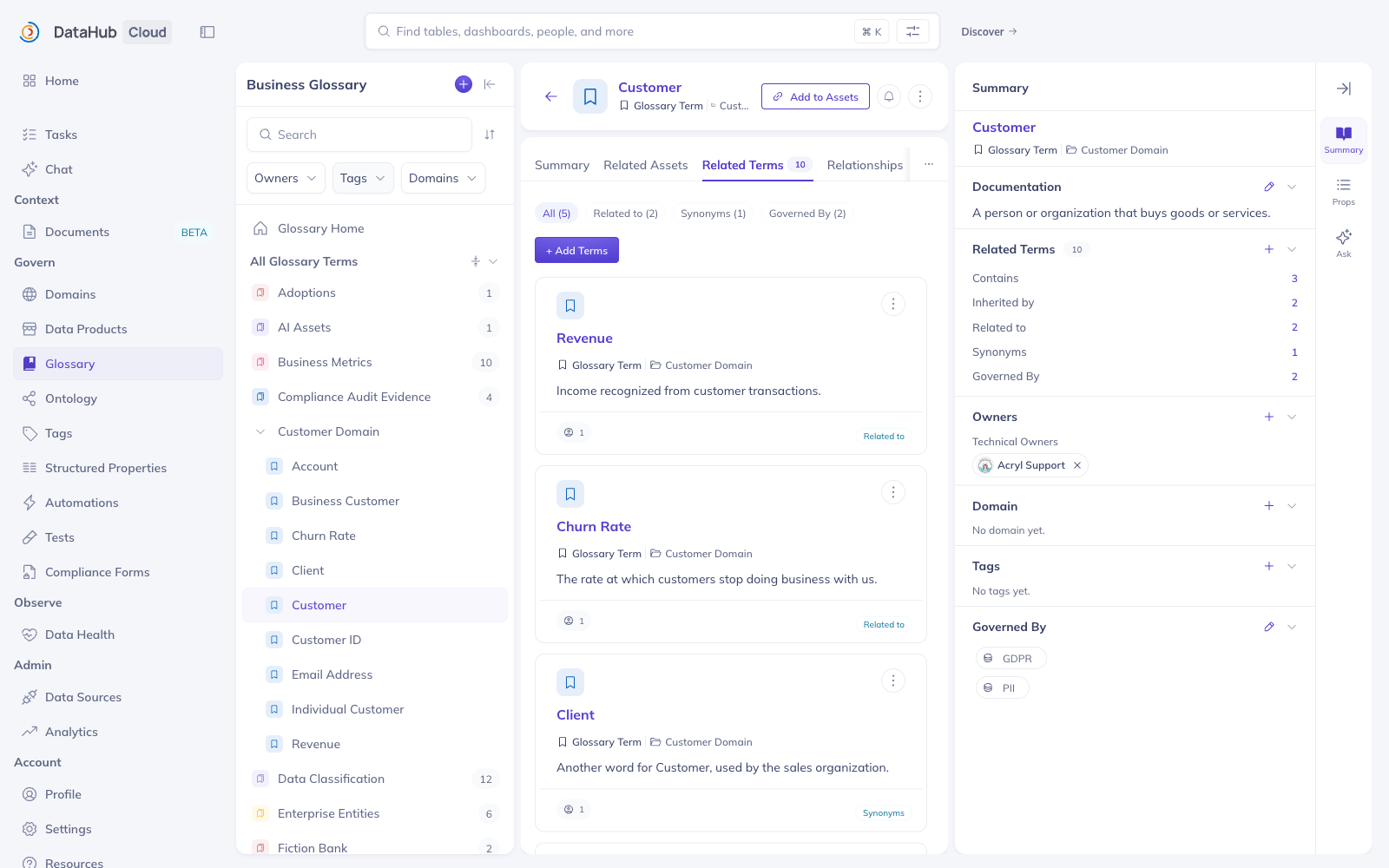
The relationship-type picker lists the built-in types, plus any
[custom relationship types](custom-relationships.md) defined on your instance:
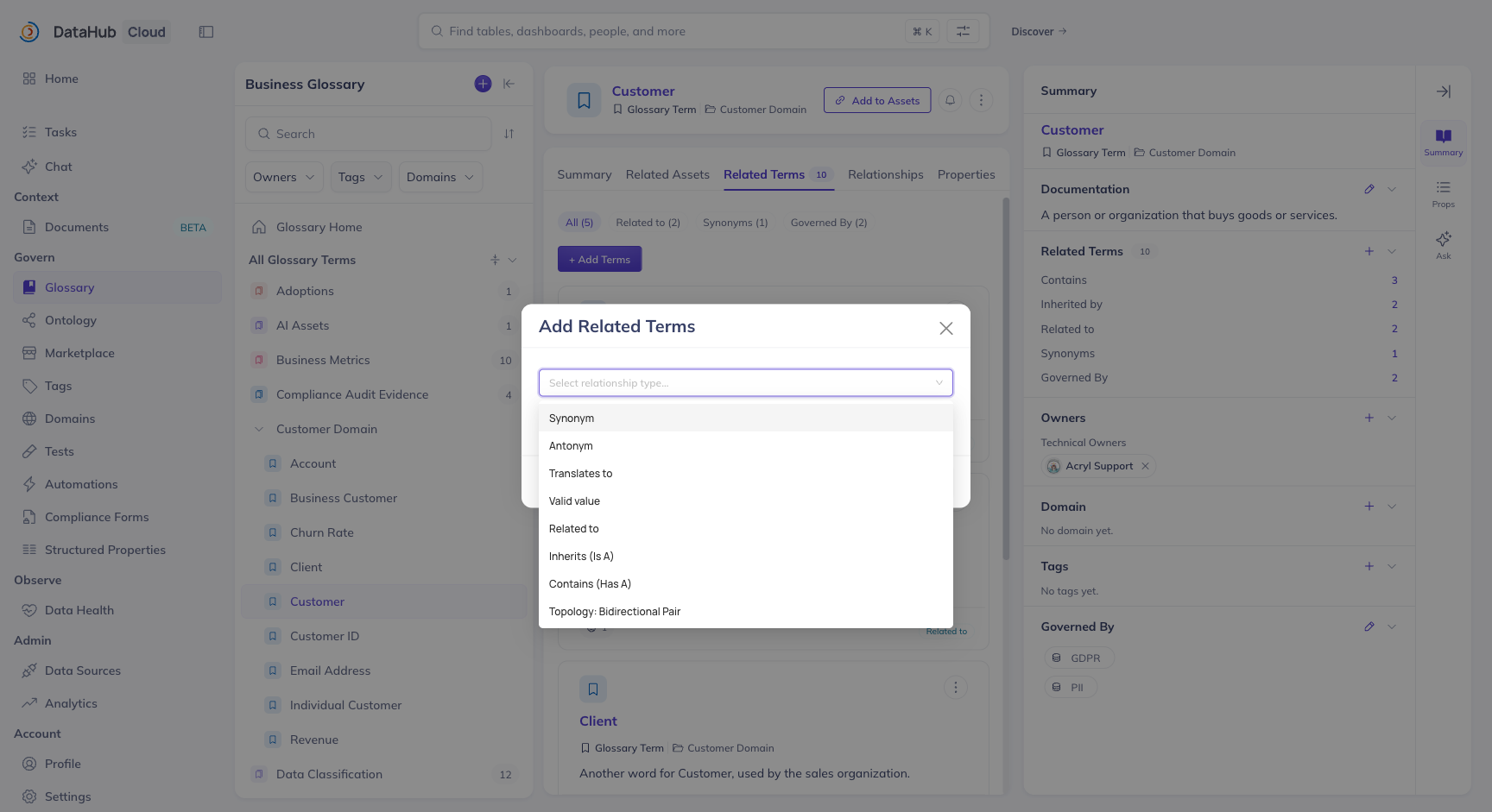
The tab groups relationships by type, with a filter chip per type showing how many of each the term
has — including any [custom relationship types](custom-relationships.md) defined on your instance.
The relationship is written from the term you are on. For a directed relationship, that term is the
_source_: adding **Inherits → Customer** from the _Individual Customer_ page records "Individual
Customer inherits Customer", and _Customer_'s page will show _Individual Customer_ under
**Inherited by**.
Symmetric relationships (**Synonym**, **Antonym**, **Related to**) read the same from either
side, so you only need to create them once, from whichever term is convenient.
To remove a relationship, hover the related term in the **Related Terms** tab and use the remove
action. Removing from either side deletes the edge.
## Adding relationships via the API
The `addRelatedTerms` GraphQL mutation adds one or more terms to a relationship on a source term:
```graphql
mutation {
addRelatedTerms(
input: {
urn: "urn:li:glossaryTerm:individualCustomer"
termUrns: ["urn:li:glossaryTerm:customer"]
relationshipType: isA
}
)
}
```
The `relationshipType` values are:
| Value | Relationship |
| -------------- | ------------- |
| `isA` | Inherits |
| `hasA` | Contains |
| `synonymOf` | Synonym of |
| `antonymOf` | Antonym of |
| `translatesTo` | Translates to |
| `hasValue` | Valid value |
| `isRelatedTo` | Related to |
Use `removeRelatedTerms` with the same input shape to delete relationships.
### Bulk-loading relationships
For anything beyond a handful of edges, load relationships as metadata rather than clicking through
the UI. The `glossaryRelatedTerms` aspect holds all of a term's outgoing relationships, so a single
write per term is enough:
```python
from datahub.emitter.mce_builder import make_term_urn
from datahub.emitter.mcp import MetadataChangeProposalWrapper
from datahub.ingestion.graph.client import DatahubClientConfig, DataHubGraph
from datahub.metadata.schema_classes import GlossaryRelatedTermsClass
graph = DataHubGraph(DatahubClientConfig(server="http://localhost:8080"))
graph.emit(
MetadataChangeProposalWrapper(
entityUrn=make_term_urn("individualCustomer"),
aspect=GlossaryRelatedTermsClass(
isRelatedTerms=[make_term_urn("customer")], # Inherits
hasRelatedTerms=[make_term_urn("customerId")], # Contains
synonymOf=[make_term_urn("retailCustomer")],
),
)
)
```
:::warning
Writing the `glossaryRelatedTerms` aspect **replaces** the term's existing relationships. Read the
current aspect and merge if you are adding to a term that already has relationships.
:::
You can also express `inherits` and `contains` relationships directly in a
[Business Glossary ingestion file](../../../generated/ingestion/sources/business-glossary.md), which
is the cleanest option when the glossary itself is version-controlled.
## What happens next
Every relationship you add materializes as an edge in DataHub's metadata graph. From there it is:
- **Drawn** in the ontology graph — see [Visualizing Your Ontology](visualizing-your-ontology.md).
- **Walkable** from the API and from AI agents — see
[Querying Your Ontology](querying-your-ontology.md).