# Azure AD

## Overview

Microsoft Entra ID is an identity and access management platform. Learn more in the [official Microsoft Entra ID documentation](https://learn.microsoft.com/entra/identity/).

The DataHub integration for Microsoft Entra ID covers identity entities such as users, groups, and memberships. It also captures stateful deletion detection.

## Concept Mapping

While the specific concept mapping is still pending, this shows the generic concept mapping in DataHub.

| Source Concept                         | DataHub Concept     | Notes                                                            |
| -------------------------------------- | ------------------- | ---------------------------------------------------------------- |
| Ownership and collaboration principals | CorpUser, CorpGroup | Emitted by modules that support ownership and identity metadata. |


## Module `azure-ad`
![GA](https://img.shields.io/badge/support%20status-GA-brightgreen)


### Important Capabilities
| Capability | Status | Notes |
| ---------- | ------ | ----- |
| [Detect Deleted Entities](../../../../metadata-ingestion/docs/dev_guides/stateful.md#stale-entity-removal) | ✅ | Enabled by default via stateful ingestion. |

### Overview

The `azure-ad` module ingests metadata from Azure Ad into DataHub. It is intended for production ingestion workflows and module-specific capabilities are documented below.

### Prerequisites

Before running ingestion, ensure network connectivity to the source, valid authentication credentials, and read permissions for metadata APIs required by this module.

#### Required Azure AD Application Permissions

Create a DataHub application in the Azure AD portal and grant these **Application** permissions:

- `Group.Read.All`
- `GroupMember.Read.All`
- `User.Read.All`

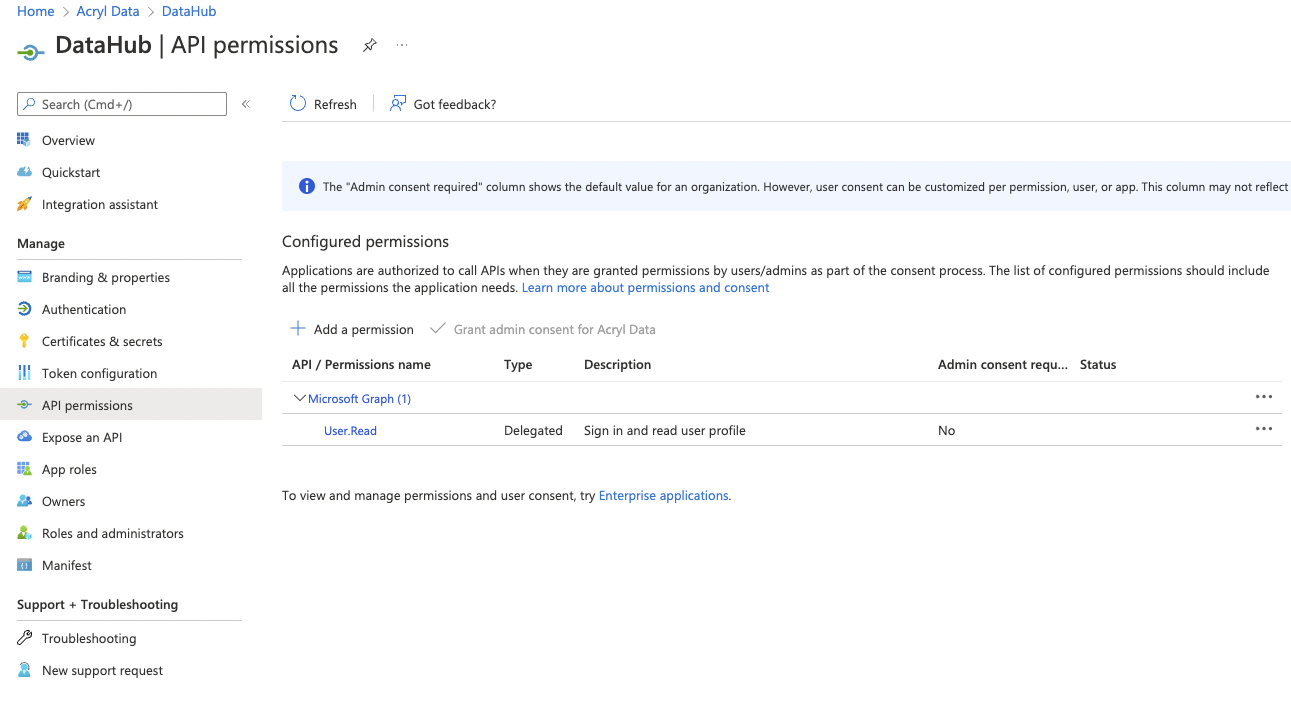
You can add permissions in the **API permissions** tab of your application configuration.

<p align="center">
  <img width="70%"  src="https://raw.githubusercontent.com/datahub-project/static-assets/main/imgs/azure-ad/azure_ad_api_permissions.png"/>
</p>

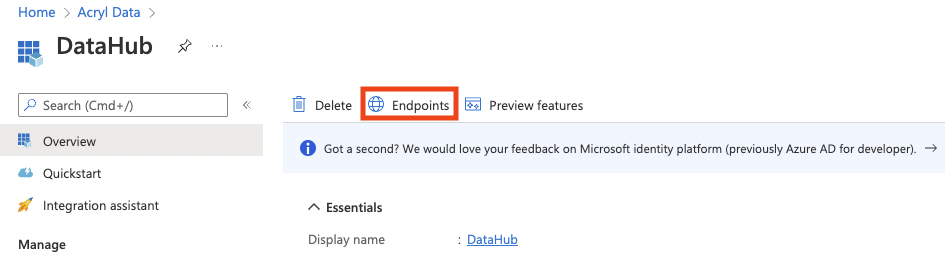
You can verify required endpoint values from the **Endpoints** action in the application overview.

<p align="center">
  <img width="70%"  src="https://raw.githubusercontent.com/datahub-project/static-assets/main/imgs/azure-ad/azure_ad_endpoints.png"/>
</p>

#### SSO Caveat

Users ingested from this connector will only be able to log in to DataHub if Okta OIDC SSO is configured in your DataHub deployment.


### Install the Plugin
```shell
pip install 'acryl-datahub[azure-ad]'
```

### Starter Recipe
Check out the following recipe to get started with ingestion! See [below](#config-details) for full configuration options.


For general pointers on writing and running a recipe, see our [main recipe guide](../../../../metadata-ingestion/README.md#recipes).
```yaml
source:
  type: "azure-ad"
  config:
    client_id: "00000000-0000-0000-0000-000000000000"
    tenant_id: "00000000-0000-0000-0000-000000000000"
    client_secret: "xxxxx"
    redirect: "https://login.microsoftonline.com/common/oauth2/nativeclient"
    authority: "https://login.microsoftonline.com/00000000-0000-0000-0000-000000000000"
    token_url: "https://login.microsoftonline.com/00000000-0000-0000-0000-000000000000/oauth2/token"
    graph_url: "https://graph.microsoft.com/v1.0"
    ingest_users: True
    ingest_groups: True
    groups_pattern:
      allow:
        - ".*"
    users_pattern:
      allow:
        - ".*"

sink:
  # sink configs
```

### Config Details

                
#### Options


Note that a `.` is used to denote nested fields in the YAML recipe.


<div className='config-table'>

| Field | Description |
|:--- |:--- |
| <div className="path-line"><span className="path-main">authority</span>&nbsp;<abbr title="Required">✅</abbr></div> <div className="type-name-line"><span className="type-name">string</span></div> | The authority (https://docs.microsoft.com/en-us/azure/active-directory/develop/msal-client-application-configuration) is a URL that indicates a directory that MSAL can request tokens from.  |
| <div className="path-line"><span className="path-main">client_id</span>&nbsp;<abbr title="Required">✅</abbr></div> <div className="type-name-line"><span className="type-name">string</span></div> | Application ID. Found in your app registration on Azure AD Portal  |
| <div className="path-line"><span className="path-main">client_secret</span>&nbsp;<abbr title="Required">✅</abbr></div> <div className="type-name-line"><span className="type-name">string(password)</span></div> | Client secret. Found in your app registration on Azure AD Portal  |
| <div className="path-line"><span className="path-main">tenant_id</span>&nbsp;<abbr title="Required">✅</abbr></div> <div className="type-name-line"><span className="type-name">string</span></div> | Directory ID. Found in your app registration on Azure AD Portal  |
| <div className="path-line"><span className="path-main">token_url</span>&nbsp;<abbr title="Required">✅</abbr></div> <div className="type-name-line"><span className="type-name">string</span></div> | The token URL that acquires a token from Azure AD for authorizing requests.  This source will only work with v1.0 endpoint.  |
| <div className="path-line"><span className="path-main">azure_ad_response_to_groupname_attr</span></div> <div className="type-name-line"><span className="type-name">string</span></div> | Which Azure AD Group Response attribute to use as input to DataHub group name mapping. <div className="default-line default-line-with-docs">Default: <span className="default-value">displayName</span></div> |
| <div className="path-line"><span className="path-main">azure_ad_response_to_groupname_regex</span></div> <div className="type-name-line"><span className="type-name">string</span></div> | A regex used to parse the DataHub group name from the attribute specified in `azure_ad_response_to_groupname_attr`. <div className="default-line default-line-with-docs">Default: <span className="default-value">(.&#42;)</span></div> |
| <div className="path-line"><span className="path-main">azure_ad_response_to_username_attr</span></div> <div className="type-name-line"><span className="type-name">string</span></div> | Which Azure AD User Response attribute to use as input to DataHub username mapping. <div className="default-line default-line-with-docs">Default: <span className="default-value">userPrincipalName</span></div> |
| <div className="path-line"><span className="path-main">azure_ad_response_to_username_regex</span></div> <div className="type-name-line"><span className="type-name">string</span></div> | A regex used to parse the DataHub username from the attribute specified in `azure_ad_response_to_username_attr`. <div className="default-line default-line-with-docs">Default: <span className="default-value">(.&#42;)</span></div> |
| <div className="path-line"><span className="path-main">graph_url</span></div> <div className="type-name-line"><span className="type-name">string</span></div> | [Microsoft Graph API endpoint](https://docs.microsoft.com/en-us/graph/use-the-api) <div className="default-line default-line-with-docs">Default: <span className="default-value">https://graph.microsoft.com/v1.0</span></div> |
| <div className="path-line"><span className="path-main">ingest_group_membership</span></div> <div className="type-name-line"><span className="type-name">boolean</span></div> | Whether group membership should be ingested into DataHub. ingest_groups must be True if this is True. <div className="default-line default-line-with-docs">Default: <span className="default-value">True</span></div> |
| <div className="path-line"><span className="path-main">ingest_groups</span></div> <div className="type-name-line"><span className="type-name">boolean</span></div> | Whether groups should be ingested into DataHub. <div className="default-line default-line-with-docs">Default: <span className="default-value">True</span></div> |
| <div className="path-line"><span className="path-main">ingest_groups_users</span></div> <div className="type-name-line"><span className="type-name">boolean</span></div> | This option is useful only when `ingest_users` is set to False and `ingest_group_membership` to True. As effect, only the users which belongs to the selected groups will be ingested. <div className="default-line default-line-with-docs">Default: <span className="default-value">True</span></div> |
| <div className="path-line"><span className="path-main">ingest_users</span></div> <div className="type-name-line"><span className="type-name">boolean</span></div> | Whether users should be ingested into DataHub. <div className="default-line default-line-with-docs">Default: <span className="default-value">True</span></div> |
| <div className="path-line"><span className="path-main">mask_group_id</span></div> <div className="type-name-line"><span className="type-name">boolean</span></div> | Whether workunit ID's for groups should be masked to avoid leaking sensitive information. <div className="default-line default-line-with-docs">Default: <span className="default-value">True</span></div> |
| <div className="path-line"><span className="path-main">mask_user_id</span></div> <div className="type-name-line"><span className="type-name">boolean</span></div> | Whether workunit ID's for users should be masked to avoid leaking sensitive information. <div className="default-line default-line-with-docs">Default: <span className="default-value">True</span></div> |
| <div className="path-line"><span className="path-main">platform_instance</span></div> <div className="type-name-line"><span className="type-name">One of string, null</span></div> | The instance of the platform that all assets produced by this recipe belong to. This should be unique within the platform. See https://docs.datahub.com/docs/platform-instances/ for more details. <div className="default-line default-line-with-docs">Default: <span className="default-value">None</span></div> |
| <div className="path-line"><span className="path-main">redirect</span></div> <div className="type-name-line"><span className="type-name">string</span></div> | Redirect URI.  Found in your app registration on Azure AD Portal. <div className="default-line default-line-with-docs">Default: <span className="default-value">https://login.microsoftonline.com/common/oauth2/na...</span></div> |
| <div className="path-line"><span className="path-main">env</span></div> <div className="type-name-line"><span className="type-name">string</span></div> | The environment that all assets produced by this connector belong to <div className="default-line default-line-with-docs">Default: <span className="default-value">PROD</span></div> |
| <div className="path-line"><span className="path-main">groups_pattern</span></div> <div className="type-name-line"><span className="type-name">AllowDenyPattern</span></div> | A class to store allow deny regexes. <br />  <br /> Patterns are matched against the start of the string only, not the entire <br /> string - a pattern does not need to match to the end to be considered a match. <br /> For example, the pattern "prod" matches "prod", "prod_east", and "production". <br /> To require an exact match, anchor your pattern explicitly, e.g. "^prod$".  |
| <div className="path-line"><span className="path-prefix">groups_pattern.</span><span className="path-main">ignoreCase</span></div> <div className="type-name-line"><span className="type-name">One of boolean, null</span></div> | Whether to ignore case sensitivity during pattern matching. <div className="default-line default-line-with-docs">Default: <span className="default-value">True</span></div> |
| <div className="path-line"><span className="path-main">users_pattern</span></div> <div className="type-name-line"><span className="type-name">AllowDenyPattern</span></div> | A class to store allow deny regexes. <br />  <br /> Patterns are matched against the start of the string only, not the entire <br /> string - a pattern does not need to match to the end to be considered a match. <br /> For example, the pattern "prod" matches "prod", "prod_east", and "production". <br /> To require an exact match, anchor your pattern explicitly, e.g. "^prod$".  |
| <div className="path-line"><span className="path-prefix">users_pattern.</span><span className="path-main">ignoreCase</span></div> <div className="type-name-line"><span className="type-name">One of boolean, null</span></div> | Whether to ignore case sensitivity during pattern matching. <div className="default-line default-line-with-docs">Default: <span className="default-value">True</span></div> |
| <div className="path-line"><span className="path-main">stateful_ingestion</span></div> <div className="type-name-line"><span className="type-name">One of StatefulStaleMetadataRemovalConfig, null</span></div> | Azure AD Stateful Ingestion Config. <div className="default-line default-line-with-docs">Default: <span className="default-value">None</span></div> |
| <div className="path-line"><span className="path-prefix">stateful_ingestion.</span><span className="path-main">enabled</span></div> <div className="type-name-line"><span className="type-name">boolean</span></div> | Whether or not to enable stateful ingest. Default: True if a pipeline_name is set and either a datahub-rest sink or `datahub_api` is specified, otherwise False <div className="default-line default-line-with-docs">Default: <span className="default-value">False</span></div> |
| <div className="path-line"><span className="path-prefix">stateful_ingestion.</span><span className="path-main">fail_safe_threshold</span></div> <div className="type-name-line"><span className="type-name">number</span></div> | Prevents large amount of soft deletes & the state from committing from accidental changes to the source configuration if the relative change percent in entities compared to the previous state is above the 'fail_safe_threshold'. <div className="default-line default-line-with-docs">Default: <span className="default-value">75.0</span></div> |
| <div className="path-line"><span className="path-prefix">stateful_ingestion.</span><span className="path-main">remove_stale_metadata</span></div> <div className="type-name-line"><span className="type-name">boolean</span></div> | Soft-deletes the entities present in the last successful run but missing in the current run with stateful_ingestion enabled. <div className="default-line default-line-with-docs">Default: <span className="default-value">True</span></div> |

</div>


#### Schema


The [JSONSchema](https://json-schema.org/) for this configuration is inlined below.


```javascript
{
  "$defs": {
    "AllowDenyPattern": {
      "additionalProperties": false,
      "description": "A class to store allow deny regexes.\n\nPatterns are matched against the start of the string only, not the entire\nstring - a pattern does not need to match to the end to be considered a match.\nFor example, the pattern \"prod\" matches \"prod\", \"prod_east\", and \"production\".\nTo require an exact match, anchor your pattern explicitly, e.g. \"^prod$\".",
      "properties": {
        "allow": {
          "default": [
            ".*"
          ],
          "description": "List of regex patterns to include in ingestion. Patterns match from the start of the string only, not the entire string - anchor with '^...$' for an exact match, e.g. '^prod$'.",
          "items": {
            "type": "string"
          },
          "title": "Allow",
          "type": "array"
        },
        "deny": {
          "default": [],
          "description": "List of regex patterns to exclude from ingestion. Patterns match from the start of the string only, not the entire string - anchor with '^...$' for an exact match, e.g. '^prod$'.",
          "items": {
            "type": "string"
          },
          "title": "Deny",
          "type": "array"
        },
        "ignoreCase": {
          "anyOf": [
            {
              "type": "boolean"
            },
            {
              "type": "null"
            }
          ],
          "default": true,
          "description": "Whether to ignore case sensitivity during pattern matching.",
          "title": "Ignorecase"
        }
      },
      "title": "AllowDenyPattern",
      "type": "object"
    },
    "StatefulStaleMetadataRemovalConfig": {
      "additionalProperties": false,
      "description": "Base specialized config for Stateful Ingestion with stale metadata removal capability.",
      "properties": {
        "enabled": {
          "default": false,
          "description": "Whether or not to enable stateful ingest. Default: True if a pipeline_name is set and either a datahub-rest sink or `datahub_api` is specified, otherwise False",
          "title": "Enabled",
          "type": "boolean"
        },
        "remove_stale_metadata": {
          "default": true,
          "description": "Soft-deletes the entities present in the last successful run but missing in the current run with stateful_ingestion enabled.",
          "title": "Remove Stale Metadata",
          "type": "boolean"
        },
        "fail_safe_threshold": {
          "default": 75.0,
          "description": "Prevents large amount of soft deletes & the state from committing from accidental changes to the source configuration if the relative change percent in entities compared to the previous state is above the 'fail_safe_threshold'.",
          "maximum": 100.0,
          "minimum": 0.0,
          "title": "Fail Safe Threshold",
          "type": "number"
        }
      },
      "title": "StatefulStaleMetadataRemovalConfig",
      "type": "object"
    }
  },
  "additionalProperties": false,
  "description": "Config to create a token and connect to Azure AD instance",
  "properties": {
    "env": {
      "default": "PROD",
      "description": "The environment that all assets produced by this connector belong to",
      "title": "Env",
      "type": "string"
    },
    "platform_instance": {
      "anyOf": [
        {
          "type": "string"
        },
        {
          "type": "null"
        }
      ],
      "default": null,
      "description": "The instance of the platform that all assets produced by this recipe belong to. This should be unique within the platform. See https://docs.datahub.com/docs/platform-instances/ for more details.",
      "title": "Platform Instance"
    },
    "stateful_ingestion": {
      "anyOf": [
        {
          "$ref": "#/$defs/StatefulStaleMetadataRemovalConfig"
        },
        {
          "type": "null"
        }
      ],
      "default": null,
      "description": "Azure AD Stateful Ingestion Config."
    },
    "client_id": {
      "description": "Application ID. Found in your app registration on Azure AD Portal",
      "title": "Client Id",
      "type": "string"
    },
    "tenant_id": {
      "description": "Directory ID. Found in your app registration on Azure AD Portal",
      "title": "Tenant Id",
      "type": "string"
    },
    "client_secret": {
      "description": "Client secret. Found in your app registration on Azure AD Portal",
      "format": "password",
      "title": "Client Secret",
      "type": "string",
      "writeOnly": true
    },
    "authority": {
      "description": "The authority (https://docs.microsoft.com/en-us/azure/active-directory/develop/msal-client-application-configuration) is a URL that indicates a directory that MSAL can request tokens from.",
      "title": "Authority",
      "type": "string"
    },
    "token_url": {
      "description": "The token URL that acquires a token from Azure AD for authorizing requests.  This source will only work with v1.0 endpoint.",
      "title": "Token Url",
      "type": "string"
    },
    "redirect": {
      "default": "https://login.microsoftonline.com/common/oauth2/nativeclient",
      "description": "Redirect URI.  Found in your app registration on Azure AD Portal.",
      "title": "Redirect",
      "type": "string"
    },
    "graph_url": {
      "default": "https://graph.microsoft.com/v1.0",
      "description": "[Microsoft Graph API endpoint](https://docs.microsoft.com/en-us/graph/use-the-api)",
      "title": "Graph Url",
      "type": "string"
    },
    "azure_ad_response_to_username_attr": {
      "default": "userPrincipalName",
      "description": "Which Azure AD User Response attribute to use as input to DataHub username mapping.",
      "title": "Azure Ad Response To Username Attr",
      "type": "string"
    },
    "azure_ad_response_to_username_regex": {
      "default": "(.*)",
      "description": "A regex used to parse the DataHub username from the attribute specified in `azure_ad_response_to_username_attr`.",
      "title": "Azure Ad Response To Username Regex",
      "type": "string"
    },
    "azure_ad_response_to_groupname_attr": {
      "default": "displayName",
      "description": "Which Azure AD Group Response attribute to use as input to DataHub group name mapping.",
      "title": "Azure Ad Response To Groupname Attr",
      "type": "string"
    },
    "azure_ad_response_to_groupname_regex": {
      "default": "(.*)",
      "description": "A regex used to parse the DataHub group name from the attribute specified in `azure_ad_response_to_groupname_attr`.",
      "title": "Azure Ad Response To Groupname Regex",
      "type": "string"
    },
    "ingest_users": {
      "default": true,
      "description": "Whether users should be ingested into DataHub.",
      "title": "Ingest Users",
      "type": "boolean"
    },
    "ingest_groups": {
      "default": true,
      "description": "Whether groups should be ingested into DataHub.",
      "title": "Ingest Groups",
      "type": "boolean"
    },
    "ingest_group_membership": {
      "default": true,
      "description": "Whether group membership should be ingested into DataHub. ingest_groups must be True if this is True.",
      "title": "Ingest Group Membership",
      "type": "boolean"
    },
    "ingest_groups_users": {
      "default": true,
      "description": "This option is useful only when `ingest_users` is set to False and `ingest_group_membership` to True. As effect, only the users which belongs to the selected groups will be ingested.",
      "title": "Ingest Groups Users",
      "type": "boolean"
    },
    "users_pattern": {
      "$ref": "#/$defs/AllowDenyPattern",
      "default": {
        "allow": [
          ".*"
        ],
        "deny": [],
        "ignoreCase": true
      },
      "description": "regex patterns for users to filter in ingestion."
    },
    "groups_pattern": {
      "$ref": "#/$defs/AllowDenyPattern",
      "default": {
        "allow": [
          ".*"
        ],
        "deny": [],
        "ignoreCase": true
      },
      "description": "regex patterns for groups to include in ingestion."
    },
    "mask_group_id": {
      "default": true,
      "description": "Whether workunit ID's for groups should be masked to avoid leaking sensitive information.",
      "title": "Mask Group Id",
      "type": "boolean"
    },
    "mask_user_id": {
      "default": true,
      "description": "Whether workunit ID's for users should be masked to avoid leaking sensitive information.",
      "title": "Mask User Id",
      "type": "boolean"
    }
  },
  "required": [
    "client_id",
    "tenant_id",
    "client_secret",
    "authority",
    "token_url"
  ],
  "title": "AzureADConfig",
  "type": "object"
}
```


As a prerequisite, you should [create a DataHub Application](https://docs.microsoft.com/en-us/graph/toolkit/get-started/add-aad-app-registration) within the Azure AD Portal with the permissions
to read your organization's Users and Groups. The following permissions are required, with the `Application` permission type:

- `Group.Read.All`
- `GroupMember.Read.All`
- `User.Read.All`

You can add a permission by navigating to the permissions tab in your DataHub application on the Azure AD portal.

<p align="center">
  <img width="70%"  src="https://raw.githubusercontent.com/datahub-project/static-assets/main/imgs/azure-ad/azure_ad_api_permissions.png"/>
</p>

You can view the necessary endpoints to configure by clicking on the Endpoints button in the Overview tab.

<p align="center">
  <img width="70%"  src="https://raw.githubusercontent.com/datahub-project/static-assets/main/imgs/azure-ad/azure_ad_endpoints.png"/>
</p>

### Capabilities

Use the **Important Capabilities** table above as the source of truth for supported features and whether additional configuration is required.

#### Extracting DataHub Users

##### Usernames

Usernames serve as unique identifiers for users on DataHub. This connector extracts usernames using the
"userPrincipalName" field of an [Azure AD User Response](https://docs.microsoft.com/en-us/graph/api/user-list?view=graph-rest-1.0&tabs=http#response-1),
which is the unique identifier for your Azure AD users.

If this is not how you wish to map to DataHub usernames, you can provide a custom mapping using the configurations options detailed below. Namely, `azure_ad_response_to_username_attr`
and `azure_ad_response_to_username_regex`.

##### Responses

This connector also extracts basic user response information from Azure. The following fields of the Azure User Response are extracted
and mapped to the DataHub `CorpUserInfo` aspect:

- display name
- first name
- last name
- email
- title
- country

This connector emits both `corpUserInfo.active` and the `corpUserStatus` aspect for each user. Azure AD `accountEnabled: false` maps to DataHub `SUSPENDED` (and `active: false`); enabled or missing values map to `ACTIVE` (and `active: true`).

#### Extracting DataHub Groups

##### Group Names

Group names serve as unique identifiers for groups on DataHub. This connector extracts group names using the "name" attribute of an Azure Group Response.
By default, a URL-encoded version of the full group name is used as the unique identifier (CorpGroupKey) and the raw "name" attribute is mapped
as the display name that will appear in DataHub's UI.

If this is not how you wish to map to DataHub group names, you can provide a custom mapping using the configurations options detailed below. Namely, `azure_ad_response_to_groupname_attr`
and `azure_ad_response_to_groupname_regex`.

##### Responses

This connector also extracts basic group information from Azure. The following fields of the [Azure AD Group Response](https://docs.microsoft.com/en-us/graph/api/group-list?view=graph-rest-1.0&tabs=http#response-1) are extracted and mapped to the
DataHub `CorpGroupInfo` aspect:

- name
- description

#### Extracting Group Membership

This connector additional extracts the edges between Users and Groups that are stored in [Azure AD](https://docs.microsoft.com/en-us/graph/api/group-list-members?view=graph-rest-1.0&tabs=http#response-1). It maps them to the `GroupMembership` aspect
associated with DataHub users (CorpUsers).

### Limitations

Module behavior is constrained by source APIs, permissions, and metadata exposed by the platform. Refer to capability notes for unsupported or conditional features.

### Troubleshooting

If ingestion fails, validate credentials, permissions, connectivity, and scope filters first. Then review ingestion logs for source-specific errors and adjust configuration accordingly.


### Code Coordinates
- Class Name: `datahub.ingestion.source.identity.azure_ad.AzureADSource`
- Browse on [GitHub](https://github.com/datahub-project/datahub/blob/master/metadata-ingestion/src/datahub/ingestion/source/identity/azure_ad.py)


:::tip Questions?

If you've got any questions on configuring ingestion for Azure AD, feel free to ping us on [our Slack](https://datahub.com/slack).
:::


:::note 💡 **Contributing to this documentation**
This page is auto-generated from the underlying source code. To make changes, please edit the relevant source files in the [metadata-ingestion](https://github.com/datahub-project/datahub/tree/master/metadata-ingestion) directory. 

**Tip:** For quick typo fixes or documentation updates, you can click the ✏️ **Edit** icon directly in the GitHub UI to open a Pull Request. For larger changes and PR naming conventions, please refer to our [Contributing Guide](/docs/contributing).
:::