DataHub Actions Concepts
The Actions framework includes pluggable components for filtering, transforming, and reacting to important DataHub, such as
- Tag Additions / Removals
- Glossary Term Additions / Removals
- Schema Field Additions / Removals
- Owner Additions / Removals
& more, in real time.
DataHub Actions comes with open library of freely available Filters, Transformers, Actions, Events, and more.
Finally, the framework is highly configurable & scalable. Notable highlights include:
- Distributed Actions: Ability to scale-out processing for a single action. Support for running the same Action configuration across multiple nodes to load balance the traffic from the event stream.
- At-least Once Delivery: Native support for independent processing state for each Action via post-processing acking to achieve at-least once semantics.
- Robust Error Handling: Configurable failure policies featuring event-retry, dead letter queue, and failed-event continuation policy to achieve the guarantees required by your organization.
Use Cases
Real-time use cases broadly fall into the following categories:
- Notifications: Generate organization-specific notifications when a change is made on DataHub. For example, send an email to the governance team when a "PII" tag is added to any data asset.
- Workflow Integration: Integrate DataHub into your organization's internal workflows. For example, create a Jira ticket when specific Tags or Terms are proposed on a Dataset.
- Synchronization: Syncing changes made in DataHub into a 3rd party system. For example, reflecting Tag additions in DataHub into Snowflake.
- Auditing: Audit who is making what changes on DataHub through time.
and more!
Concepts
The Actions Framework consists of a few core concepts--
- Pipelines
- Events and Event Sources
- Filters
- Transformers
- Actions
Each of these will be described in detail below.
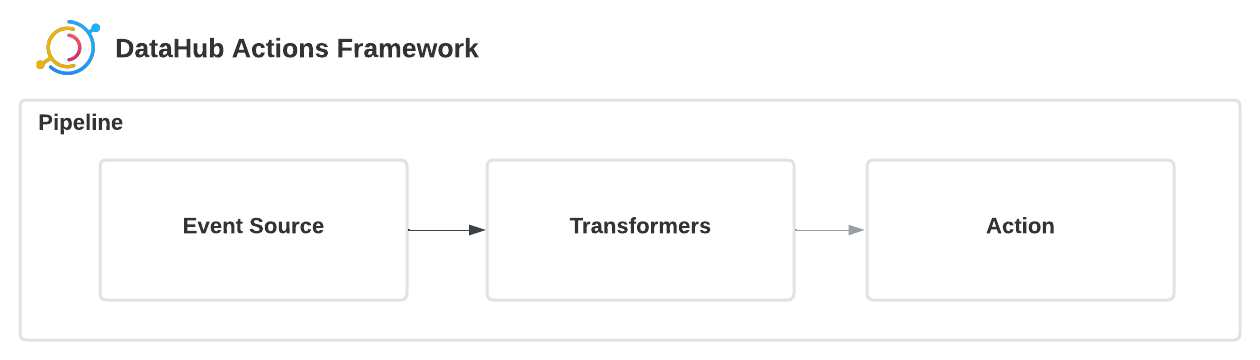
In the Actions Framework, Events flow continuously from left-to-right.
Pipelines
A Pipeline is a continuously running process which performs the following functions:
- Polls events from a configured Event Source (described below)
- Applies configured Filters to the Event (events that don't match are dropped)
- Applies configured Transformations to the Event
- Executes the configured Action on the resulting Event
in addition to handling initialization, errors, retries, logging, and more.
Each Action Configuration file corresponds to a unique Pipeline. In practice, each Pipeline has its very own Event Source, Filters, Transforms, and Actions. This makes it easy to maintain state for mission-critical Actions independently.
Importantly, each Action must have a unique name. This serves as a stable identifier across Pipeline run which can be useful in saving the Pipeline's consumer state (ie. resiliency + reliability). For example, the Kafka Event Source (default) uses the pipeline name as the Kafka Consumer Group id. This enables you to easily scale-out your Actions by running multiple processes with the same exact configuration file. Each will simply become different consumers in the same consumer group, sharing traffic of the DataHub Events stream.
Events
Events are data objects representing changes that have occurred on DataHub. Strictly speaking, the only requirement that the Actions framework imposes is that these objects must be
a. Convertible to JSON b. Convertible from JSON
So that in the event of processing failures, events can be written and read from a failed events file.
Event Types
Each Event instance inside the framework corresponds to a single Event Type, which is common name (e.g. "EntityChangeEvent_v1") which can be used to understand the shape of the Event. This can be thought of as a "topic" or "stream" name. That being said, Events associated with a single type are not expected to change in backwards-breaking ways across versions.
Event Sources
Events are produced to the framework by Event Sources. Event Sources may include their own guarantees, configurations, behaviors, and semantics. They usually produce a fixed set of Event Types.
In addition to sourcing events, Event Sources are also responsible for acking the successful processing of an event by implementing the ack method. This is invoked by the framework once the Event is guaranteed to have reached the configured Action successfully.
Filters
Filters are pluggable components which decide whether an event should continue downstream to the Transformers and Action. An event that does not pass a filter is silently dropped — the Action is never invoked for it.
Multiple filters can be configured in a pipeline. They are evaluated in order with AND semantics: an event must satisfy every filter to proceed.
event_type Filter
The built-in event_type filter lets you route events by type and optional body predicates. It is the recommended replacement for the legacy filter: section.
The filter config contains a map from event type string to an optional body predicate. An event passes the filter when its type appears as a key in the map and its body satisfies the predicate (if any).
Semantics:
- Across event_type keys: OR — the event must match any listed type.
- Across body predicate list items: OR — the event body must satisfy any predicate dict.
- Across keys within a single predicate dict: AND — every key/value pair must match.
Example — pass MetadataChangeLogEvent_v1 for schemaField documentation aspects, and EntityChangeEvent_v1 for documentation-category ECE events:
filters:
  - type: event_type
    config:
      filter:
        MetadataChangeLogEvent_v1:
          event:
            - entityType: schemaField
              aspectName: documentation
        EntityChangeEvent_v1:
          event:
            - category: DOCUMENTATION
              entityType: schemaField
Example — pass only EntityChangeEvent_v1 events (drop all MCL events without deserializing them when enable_pre_deserialization_filter: true is set on the Kafka source):
filters:
  - type: event_type
    config:
      filter:
        EntityChangeEvent_v1: {}
Performance: MCL pre-deserialization filtering
When the Kafka event source is configured with enable_mcl_pre_deserialization_filter: true, it uses the pipeline's event_type filter criteria to drop eligible MetadataChangeLog (MCL) messages before the expensive MetadataChangeLogClass.from_obj() avrogen deserialization call. This can reduce CPU usage significantly for pipelines that consume only a small fraction of the MCL stream.
Why MCL only?
MCL messages have entityType, aspectName, entityUrn, and changeType as top-level Avro fields that are accessible on the raw Kafka message without any deserialization. EntityChangeEvent (ECE) messages arrive inside a PlatformEvent envelope with a JSON-encoded payload — fields like category and operation can only be read after deserializing that envelope, meaning the deserialization cost has already been paid before any field access is possible. Therefore, ECE delivery is never affected by this flag.
source:
  type: kafka
  config:
    # ... connection config ...
    enable_mcl_pre_deserialization_filter: true
Legacy filter: section (deprecated)
The original filter: config section is still supported but deprecated. It accepts a single event type and a flat body predicate:
filter:
  event_type: "EntityChangeEvent_v1"
  event:
    category: "TAG"
    operation: "ADD"
When both filter: and filters: are present, the filter: section is converted to a Transformer that runs first, and the filters: section is evaluated before transformers (as described above). Migrate to filters: to get the improved pipeline-level semantics and optional performance benefits.
Transformers
Transformers are pluggable components which take an Event as input, and produce an Event (or nothing) as output. This can be used to enrich the information of an Event prior to sending it to an Action.
Multiple Transformers can be configured to run in sequence, filtering and transforming an event in multiple steps.
Transformers can also be used to generate a completely new type of Event (i.e. registered at runtime via the Event Registry) which can subsequently serve as input to an Action.
Transformers can be easily customized and plugged in to meet an organization's unique requirements. For more information on developing a Transformer, check out Developing a Transformer
Action
Actions are pluggable components which take an Event as input and perform some business logic. Examples may be sending a Slack notification, logging to a file, or creating a Jira ticket, etc.
Each Pipeline can be configured to have a single Action which runs after the filtering and transformations have occurred.
Actions can be easily customized and plugged in to meet an organization's unique requirements. For more information on developing a Action, check out Developing a Action