Removing the SQS Dependency for a Remote Executor Pool
This upgrade path is in Beta. It is opt-in per pool. Existing pools continue to use SQS by default and are unaffected unless you choose to upgrade them. This feature is disabled by default. Please, contact DataHub support to enable it in your instance.
Why upgrade
Today, each Remote Executor Pool uses an AWS SQS queue to distribute work, which means your executor deployment needs AWS credentials and outbound access to SQS endpoints. The new channel removes that dependency - only your existing DataHub Cloud GMS endpoint is needed to be accessible by your Remote Executor. No need to connect to AWS SQS endpoint.
The change is visible in the DataHub UI as a Channel column on the pool (values: SQS, KAFKA). All other functionality - pool management, executor health, ingestion source assignment - is unchanged.
Prerequisites
- DataHub Cloud must enable the feature on your instance. Contact your CSM/CCE to request enablement. Without this server-side toggle, the upgrade cannot proceed.
- Remote Executor version v2.0.0 or above is required. All executors in the pool must be upgraded to v2.0.0+ before Kafka channels can be enabled. Earlier versions are SQS-only and cannot be switched to the Kafka channel.
- Helm chart
acryl-datahub-executor-worker≥ 0.0.43. - The pool you intend to upgrade is a normal Remote Executor Pool (not the built-in default).
New pools created on your instance continue to use SQS by default. You can choose to upgrade each pool individually using the procedure below.
How the channel switch works
A few rules first:
- A Remote Executor runs one channel at a time (either
SQSorKAFKA). The Executor Coordinator on the DataHub Cloud side handles both channels, so SQS and Kafka pools can co-exist on the same instance. - A pool should have all its executors on the same channel. Mixing is only expected as a transient state during an upgrade.
- Remote Executors default to
SQSeven when they are channel-aware. They only switch toKAFKAwhen you explicitly opt in by setting both:- the Helm value
channel: KAFKAon the executor worker instance, and - the corresponding environment variable on the executor container (set automatically by the Helm chart when the value above is provided).
- the Helm value
With that in mind, the per-pool upgrade flow is:
- You deploy Kafka-enabled executors (version
≥ 2.0.0,channel: KAFKA) into the pool. They join but stay inWaitingstate - they do not receive work yet. - Once ≥ 50% of the pool's executors report the new channel, DataHub flips the pool's channel automatically. The pool enters
DRAINING:- New work is sent on the new channel.
- Old executors keep finishing in-flight work from SQS.
- When SQS is empty (or a safety timeout fires), the pool moves to
READYon the new channel. The old executors are marked incompatible and can be removed.
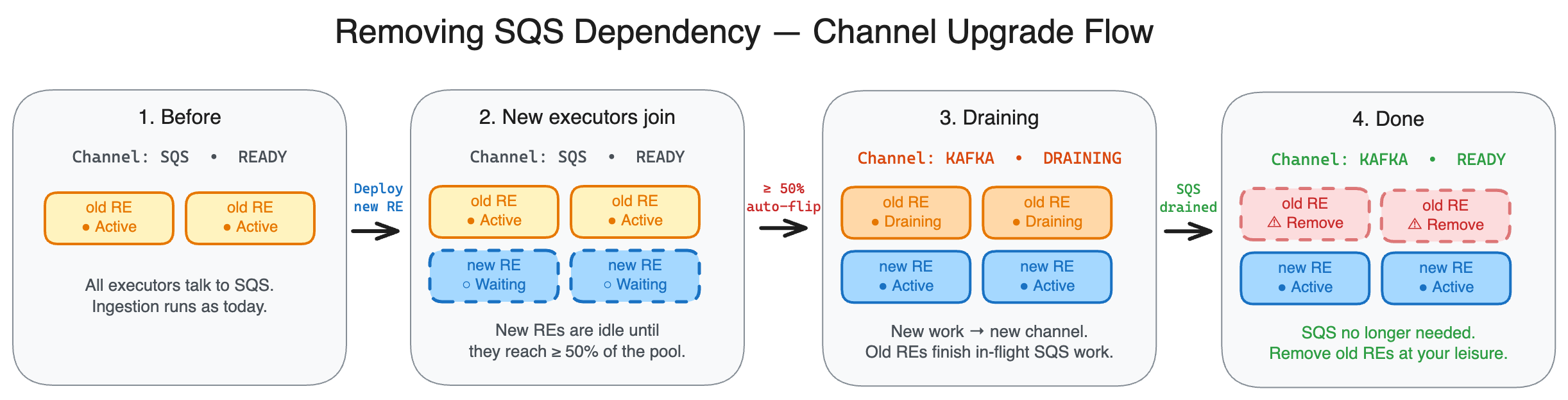
You can watch the pool's progress at any time in Data Sources → Executors.
Upgrade strategies
Option 1: Zero-downtime (recommended)
Deploy executors built for the new channel alongside your existing ones, temporarily doubling capacity.
- In your Helm values, add a second
acryl-datahub-executor-workerinstance withchannel: KAFKAnext to your existing one. Keep your existing instance's replica count unchanged. - Apply the change. The new executors register and show as
Waiting. - Once ≥ 50% of the pool's executors are on the new channel, the pool auto-flips and starts draining SQS.
- Wait until the pool shows the new channel and status
READYin the UI (SQS drain complete). - Remove the old instance from your Helm values and re-apply.
Pros: no work interruption, no in-flight messages lost. Cons: requires ~2× resources during the migration window.
Option 2: Rolling restart
Replace executors in place using your existing deployment automation.
Trade-offs:
- New executors stay
Waitinguntil they cross the 50% threshold, so the pool's effective capacity dips during the rollout. - If all old executors are removed before SQS is drained, any in-flight SQS messages are abandoned when the safety timeout fires. The Sweeper will reschedule eligible ingestions within ~1 hour; assertion and monitor runs that were in flight at cutover are lost.
Suitable for: low-traffic pools, ingestion-only pools, or planned quiet windows. Not recommended for: high-throughput assertion or monitor pools.
Verifying the upgrade
In Data Sources → Executors:
- The pool's Channel column shows
KAFKAand status isREADY(notDRAINING). - Each executor in the pool shows
KAFKAin its Channel column.
If something looks wrong, check the executor logs and contact DataHub support.
FAQ
Do I have to upgrade? Not immediately. Pools default to SQS and continue working. Upgrade, if you want to remove SQS access from your environment. Ultimately SQS channel will be completely removed.
Can I upgrade some pools and leave others on SQS? Yes. The upgrade is per-pool and independent.
Can I roll back to SQS after upgrading a pool? No. The switch is one-way per pool. If you need to revert, create a fresh pool.