DataHub Lite (Experimental)
What is it?
DataHub Lite is a lightweight embeddable version of DataHub with no external dependencies. It is intended to enable local developer tooling use-cases such as simple access to metadata for scripts and other tools. DataHub Lite is compatible with the DataHub metadata format and all the ingestion connectors that DataHub supports. DataHub Lite stores metadata in an embedded SQL database. Two storage engines are available: SQLite (the default, with no extra dependencies) and DuckDB. Both are exposed through the same CLI, Python API, and REST API. See Choosing a storage engine.
Features
- Designed for the CLI
- Available as a Python library or REST API
- Ingest metadata from all DataHub ingestion sources
- Metadata Reads
- navigate metadata using a hierarchy
- get metadata for an entity
- search / query metadata across all entities
- Forward metadata automatically to a central GMS or Kafka instance
Architecture
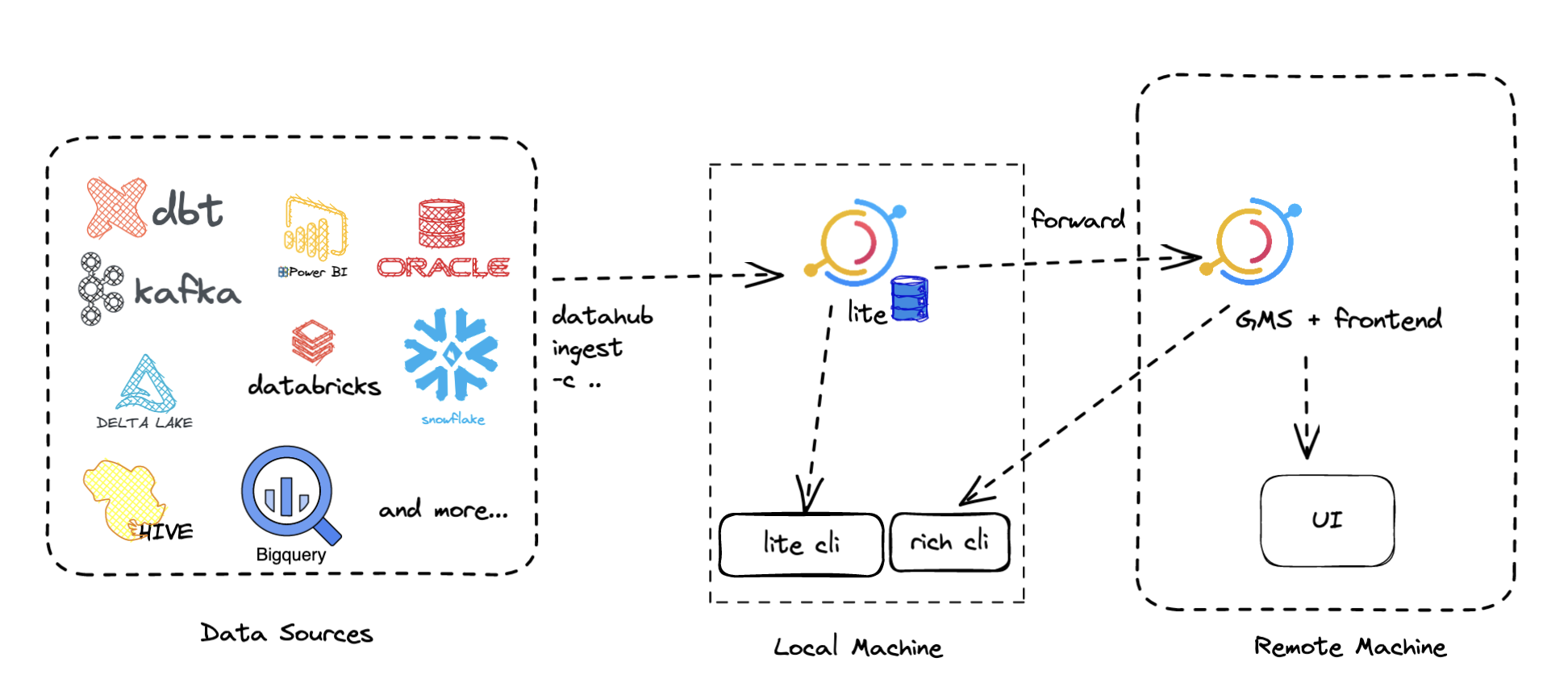
What is it not?
DataHub Lite is NOT meant to be a replacement for the production Java DataHub server (datahub-gms). It does not offer the full set of API-s that the DataHub GMS server does. The following features are NOT supported:
- Full-text search with ranking and relevance features
- Graph traversal of relationships (e.g. lineage)
- Metadata change stream over Kafka (only forwarding of writes is supported)
- GraphQL API
Prerequisites
To use datahub lite commands, you need to install acryl-datahub > 0.9.6 (install instructions) and the datahub-lite plugin.
pip install acryl-datahub[datahub-lite]
To use the DuckDB storage engine instead of the default SQLite one, also install the duckdb extra:
pip install acryl-datahub[datahub-lite,duckdb]
Importing Metadata
To ingest metadata into DataHub Lite, all you have to do is change the sink: in your recipe to be a datahub-lite instance. See the detailed sink docs here.
For example, here is a simple recipe file that ingests mysql metadata into datahub-lite.
# mysql.in.dhub.yaml
source:
  type: mysql
  config:
    host_port: localhost:3306
    username: datahub
    password: datahub

sink:
  type: datahub-lite
By default, lite will create a local instance under ~/.datahub/lite/.
Ingesting metadata into DataHub Lite is as simple as running ingestion:
datahub ingest -c mysql.in.dhub.yaml
DataHub Lite currently doesn't support stateful ingestion, so you'll have to turn off stateful ingestion in your recipe to use it. This will be fixed shortly.
Forwarding to a central DataHub GMS over REST or Kafka
DataHub Lite can be configured to forward all writes to a central DataHub GMS using either the REST API or the Kafka API. To configure forwarding, add a forward_to section to your DataHub Lite config that conforms to a valid DataHub Sink configuration. Here is an example:
# mysql.in.dhub.yaml with forwarding to datahub-gms over REST
source:
  type: mysql
  config:
    host_port: localhost:3306
    username: datahub
    password: datahub

sink:
  type: datahub-lite
  config:
    forward_to:
      type: datahub-rest
      config:
        server: "http://datahub-gms:8080"
Forwarding is currently best-effort, so there can be losses in metadata if the remote server is down. For a reliable sync mechanism, look at the exporting metadata section to generate a standard metadata file.
Importing from a file
As a convenient short-cut, you can import metadata from any standard DataHub metadata json file (e.g. generated via using a file sink) by issuing a datahub lite import command.
> datahub lite import --file metadata_events.json
Exploring Metadata
The datahub lite group of commands provides a set of capabilities for you to explore the metadata you just ingested.
List (ls)
Listing functions like a directory structure that is customized based on the kind of system being explored. DataHub's metadata is automatically organized into databases, tables, views, dashboards, charts, etc.
Using the ls command below is much more pleasant when you have tab completion enabled on your shell. Check out the Setting up Tab Completion section at the bottom of the guide.
> datahub lite ls /
databases
bi_tools
tags
# Stepping down one level
> datahub lite ls /databases
mysql
# Stepping down another level
> datahub lite ls /databases/mysql
instances
...
# At the final level
> datahub lite ls /databases/mysql/instances/default/databases/datahub/tables/
metadata_aspect_v2

# Listing a leaf entity functions just like the unix ls command
> datahub lite ls /databases/mysql/instances/default/databases/datahub/tables/metadata_aspect_v2
metadata_aspect_v2
Read (get)
Once you have located a path of interest, you can read metadata at that entity, by issuing a get. You can additionally filter the metadata retrieved from an entity by the aspect type of the metadata (e.g. to request the schema, filter by the schemaMetadata aspect).
Aside: If you are curious what all types of entities and aspects DataHub supports, check out the metadata model of entities like Dataset, Dashboard etc.
The general template for the get responses looks like:
{
    "urn": <urn_of_the_entity>,
    <aspect_name>: {
        "value": <aspect_value>,    # aspect value as a dictionary
        "systemMetadata": <system_metadata> # present if details are requested
    }
}
Here is what executing a get command looks like:
Get metadata for an entity by path
> datahub lite get --path /databases/mysql/instances/default/databases/datahub/tables/metadata_aspect_v2
{
  "urn": "urn:li:dataset:(urn:li:dataPlatform:mysql,datahub.metadata_aspect_v2,PROD)",
  "container": {
    "value": {
      "container": "urn:li:container:21d4204e13d5b984c58acad468ecdbdd"
    }
  },
  "status": {
    "value": {
      "removed": false
    }
  },
  "datasetProperties": {
    "value": {
      "customProperties": {},
      "name": "metadata_aspect_v2",
      "tags": []
    }
  },
  "schemaMetadata": {
    "value": {
      "schemaName": "datahub.metadata_aspect_v2",
      "platform": "urn:li:dataPlatform:mysql",
      "version": 0,
      "created": {
        "time": 0,
        "actor": "urn:li:corpuser:unknown"
      },
      "lastModified": {
        "time": 0,
        "actor": "urn:li:corpuser:unknown"
      },
      "hash": "",
      "platformSchema": {
        "com.linkedin.schema.MySqlDDL": {
          "tableSchema": ""
        }
      },
      "fields": [
        {
          "fieldPath": "urn",
          "nullable": false,
          "type": {
            "type": {
              "com.linkedin.schema.StringType": {}
            }
          },
          "nativeDataType": "VARCHAR(collation='utf8mb4_bin', length=500)",
          "recursive": false,
          "isPartOfKey": true
        },
        {
          "fieldPath": "aspect",
          "nullable": false,
          "type": {
            "type": {
              "com.linkedin.schema.StringType": {}
            }
          },
          "nativeDataType": "VARCHAR(collation='utf8mb4_bin', length=200)",
          "recursive": false,
          "isPartOfKey": true
        },
        {
          "fieldPath": "version",
          "nullable": false,
          "type": {
            "type": {
              "com.linkedin.schema.NumberType": {}
            }
          },
          "nativeDataType": "BIGINT(display_width=20)",
          "recursive": false,
          "isPartOfKey": true
        },
        {
          "fieldPath": "metadata",
          "nullable": false,
          "type": {
            "type": {
              "com.linkedin.schema.StringType": {}
            }
          },
          "nativeDataType": "LONGTEXT(collation='utf8mb4_bin')",
          "recursive": false,
          "isPartOfKey": false
        },
        {
          "fieldPath": "systemmetadata",
          "nullable": true,
          "type": {
            "type": {
              "com.linkedin.schema.StringType": {}
            }
          },
          "nativeDataType": "LONGTEXT(collation='utf8mb4_bin')",
          "recursive": false,
          "isPartOfKey": false
        },
        {
          "fieldPath": "createdon",
          "nullable": false,
          "type": {
            "type": {
              "com.linkedin.schema.TimeType": {}
            }
          },
          "nativeDataType": "DATETIME(fsp=6)",
          "recursive": false,
          "isPartOfKey": false
        },
        {
          "fieldPath": "createdby",
          "nullable": false,
          "type": {
            "type": {
              "com.linkedin.schema.StringType": {}
            }
          },
          "nativeDataType": "VARCHAR(collation='utf8mb4_bin', length=255)",
          "recursive": false,
          "isPartOfKey": false
        },
        {
          "fieldPath": "createdfor",
          "nullable": true,
          "type": {
            "type": {
              "com.linkedin.schema.StringType": {}
            }
          },
          "nativeDataType": "VARCHAR(collation='utf8mb4_bin', length=255)",
          "recursive": false,
          "isPartOfKey": false
        }
      ]
    }
  },
  "subTypes": {
    "value": {
      "typeNames": [
        "table"
      ]
    }
  }
}
Get metadata for an entity filtered by specific aspect
> datahub lite get --path /databases/mysql/instances/default/databases/datahub/tables/metadata_aspect_v2 --aspect status
{
  "urn": "urn:li:dataset:(urn:li:dataPlatform:mysql,datahub.metadata_aspect_v2,PROD)",
  "status": {
    "value": {
      "removed": false
    }
  }
}
Using the get command by path is much more pleasant when you have tab completion enabled on your shell. Check out the Setting up Tab Completion section at the bottom of the guide.
Get metadata using the urn of the entity
> datahub lite get --urn "urn:li:dataset:(urn:li:dataPlatform:mysql,datahub.metadata_aspect_v2,PROD)" --aspect status
{
  "urn": "urn:li:dataset:(urn:li:dataPlatform:mysql,datahub.metadata_aspect_v2,PROD)",
  "status": {
    "value": {
      "removed": false
    }
  }
}
Get metadata with additional details (systemMetadata)
> datahub lite get --path /databases/mysql/instances/default/databases/datahub/tables/metadata_aspect_v2 --aspect status --verbose
{
  "urn": "urn:li:dataset:(urn:li:dataPlatform:mysql,datahub.metadata_aspect_v2,PROD)",
  "status": {
    "value": {
      "removed": false
    },
    "systemMetadata": {
      "lastObserved": 1673982834666,
      "runId": "mysql-2023_01_17-11_13_12",
      "properties": {
        "sysVersion": 1
      }
    }
  }
}
Point-in-time Queries
DataHub Lite preserves every version of metadata ingested, just like DataHub GMS. You can also query the metadata as of a specific point in time by adding the --asof parameter to your get command.
> datahub lite get "urn:li:dataset:(urn:li:dataPlatform:mysql,datahub.metadata_aspect_v2,PROD)" --aspect status --asof 2020-01-01
null

> datahub lite get "urn:li:dataset:(urn:li:dataPlatform:mysql,datahub.metadata_aspect_v2,PROD)" --aspect status --asof 2023-01-16
{
  "urn": "urn:li:dataset:(urn:li:dataPlatform:mysql,datahub.metadata_aspect_v2,PROD)",
  "status": {
    "removed": false
  }
}
Search (search)
DataHub Lite also allows you to search using queries within the metadata using the datahub lite search command.
You can provide a free form search query like: "customer" and DataHub Lite will attempt to find entities that match the name customer either in the id of the entity or within the name fields of aspects in the entities.
> datahub lite search pet
{"id": "urn:li:dataset:(urn:li:dataPlatform:looker,long_tail_companions.explore.long_tail_pets,PROD)", "aspect": "urn", "snippet": null}
{"id": "urn:li:dataset:(urn:li:dataPlatform:looker,long_tail_companions.explore.long_tail_pets,PROD)", "aspect": "datasetProperties", "snippet": "{\"customProperties\": {\"looker.explore.label\": \"Long Tail Pets\", \"looker.explore.file\": \"long_tail_companions.model.lkml\"}, \"externalUrl\": \"https://acryl.cloud.looker.com/explore/long_tail_companions/long_tail_pets\", \"name\": \"Long Tail Pets\", \"tags\": []}"}
You can also query the metadata precisely using your storage engine's JSON functions and operators, for SQLite or DuckDB.
Writing these functions requires that you understand the DataHub metadata model and how the data is laid out in DataHub Lite.
The -> and ->> operators used below work on both engines, so exact-flavor queries are portable. They are the one place a SQLite version floor applies: ->> arrived in SQLite 3.38, so on an older system library (Ubuntu 22.04 ships 3.37) write these queries with json_extract(metadata, '$.path') instead. Free-form search above has no such requirement.
For example, to find all entities whose datasetProperties aspect includes the view_definition in its customProperties sub-field, we can issue the following command:
> datahub lite search --aspect datasetProperties --flavor exact "metadata -> '$.customProperties' ->> '$.view_definition' IS NOT NULL"
{"id": "urn:li:dataset:(urn:li:dataPlatform:mysql,information_schema.INNODB_MUTEXES,PROD)", "aspect": "datasetProperties", "snippet": "{\"customProperties\": {\"view_definition\": \"CREATE TEMPORARY TABLE `INNODB_MUTEXES` (\\n  `NAME` varchar(4000) NOT NULL DEFAULT '',\\n  `CREATE_FILE` varchar(4000) NOT NULL DEFAULT '',\\n  `CREATE_LINE` int(11) unsigned NOT NULL DEFAULT 0,\\n  `OS_WAITS` bigint(21) unsigned NOT NULL DEFAULT 0\\n) ENGINE=MEMORY DEFAULT CHARSET=utf8\", \"is_view\": \"True\"}, \"name\": \"INNODB_MUTEXES\", \"tags\": []}"}
{"id": "urn:li:dataset:(urn:li:dataPlatform:mysql,information_schema.user_variables,PROD)", "aspect": "datasetProperties", "snippet": "{\"customProperties\": {\"view_definition\": \"CREATE TEMPORARY TABLE `user_variables` (\\n  `VARIABLE_NAME` varchar(64) NOT NULL DEFAULT '',\\n  `VARIABLE_VALUE` varchar(2048) DEFAULT NULL,\\n  `VARIABLE_TYPE` varchar(64) NOT NULL DEFAULT '',\\n  `CHARACTER_SET_NAME` varchar(32) DEFAULT NULL\\n) ENGINE=MEMORY DEFAULT CHARSET=utf8\", \"is_view\": \"True\"}, \"name\": \"user_variables\", \"tags\": []}"}
{"id": "urn:li:dataset:(urn:li:dataPlatform:mysql,information_schema.INNODB_TABLESPACES_ENCRYPTION,PROD)", "aspect": "datasetProperties", "snippet": "{\"customProperties\": {\"view_definition\": \"CREATE TEMPORARY TABLE `INNODB_TABLESPACES_ENCRYPTION` (\\n  `SPACE` int(11) unsigned NOT NULL DEFAULT 0,\\n  `NAME` varchar(655) DEFAULT NULL,\\n  `ENCRYPTION_SCHEME` int(11) unsigned NOT NULL DEFAULT 0,\\n  `KEYSERVER_REQUESTS` int(11) unsigned NOT NULL DEFAULT 0,\\n  `MIN_KEY_VERSION` int(11) unsigned NOT NULL DEFAULT 0,\\n  `CURRENT_KEY_VERSION` int(11) unsigned NOT NULL DEFAULT 0,\\n  `KEY_ROTATION_PAGE_NUMBER` bigint(21) unsigned DEFAULT NULL,\\n  `KEY_ROTATION_MAX_PAGE_NUMBER` bigint(21) unsigned DEFAULT NULL,\\n  `CURRENT_KEY_ID` int(11) unsigned NOT NULL DEFAULT 0,\\n  `ROTATING_OR_FLUSHING` int(1) NOT NULL DEFAULT 0\\n) ENGINE=MEMORY DEFAULT CHARSET=utf8\", \"is_view\": \"True\"}, \"name\": \"INNODB_TABLESPACES_ENCRYPTION\", \"tags\": []}"}
Search will return results that include the id of the entity that matched along with the aspect and the content of the aspect as part of the snippet field. If you just want the id of the entity to be returned, use the --no-details flag.
> datahub lite search --aspect datasetProperties --flavor exact "metadata -> '$.customProperties' ->> '$.view_definition' IS NOT NULL" --no-details
urn:li:dataset:(urn:li:dataPlatform:mysql,information_schema.INNODB_SYS_FOREIGN,PROD)
urn:li:dataset:(urn:li:dataPlatform:mysql,information_schema.INNODB_CMPMEM_RESET,PROD)
urn:li:dataset:(urn:li:dataPlatform:mysql,information_schema.INNODB_FT_DEFAULT_STOPWORD,PROD)
urn:li:dataset:(urn:li:dataPlatform:mysql,information_schema.INNODB_SYS_TABLES,PROD)
...
urn:li:dataset:(urn:li:dataPlatform:mysql,information_schema.INNODB_SYS_COLUMNS,PROD)
urn:li:dataset:(urn:li:dataPlatform:mysql,information_schema.INNODB_FT_CONFIG,PROD)
urn:li:dataset:(urn:li:dataPlatform:mysql,information_schema.USER_STATISTICS,PROD)
List Urns (list-urns)
List all the ids in the DataHub Lite instance.
> datahub lite list-urns
urn:li:container:21d4204e13d5b984c58acad468ecdbdd
urn:li:dataset:(urn:li:dataPlatform:mysql,datahub.metadata_aspect_v2,PROD)

urn:li:container:aa82e8309ce84acc350640647a54ca3b
urn:li:dataset:(urn:li:dataPlatform:mysql,information_schema.ALL_PLUGINS,PROD)
urn:li:dataset:(urn:li:dataPlatform:mysql,information_schema.APPLICABLE_ROLES,PROD)
urn:li:dataset:(urn:li:dataPlatform:mysql,information_schema.CHARACTER_SETS,PROD)
urn:li:dataset:(urn:li:dataPlatform:mysql,information_schema.CHECK_CONSTRAINTS,PROD)
urn:li:dataset:(urn:li:dataPlatform:mysql,information_schema.COLLATIONS,PROD)
urn:li:dataset:(urn:li:dataPlatform:mysql,information_schema.COLLATION_CHARACTER_SET_APPLICABILITY,PROD)
urn:li:dataset:(urn:li:dataPlatform:mysql,information_schema.COLUMNS,PROD)
...
HTTP Server (serve)
DataHub Lite can be run as a lightweight HTTP server, exposing an OpenAPI spec over FastAPI.
> datahub lite serve
INFO:     Started server process [33364]
INFO:     Waiting for application startup.
INFO:     Application startup complete.
INFO:     Uvicorn running on http://127.0.0.1:8979 (Press CTRL+C to quit)
OpenAPI docs are available via your browser at the same port: http://localhost:8979
The server exposes similar commands as the lite cli commands over HTTP:
- entities: list of all entity ids and get metadata for an entity
- browse: traverse the entity hierarchy in a path based way
- search: execute search against the metadata
Server Configuration
Configuration for the server is picked up from the standard location for the datahub cli: ~/.datahubenv and can be created using datahub lite init.
Here is a sample config file with the lite section filled out:
gms:
  server: http://localhost:8080
  token: ''
lite:
  config:
    file: /Users/<username>/.datahub/lite/datahub.db
  type: sqlite
  forward_to:
    type: datahub-rest
    server: "http://datahub-gms:8080
Versioned aspects and transactions
Both SQLite and DuckDB support versioned reads and atomic writes through the Python API. These operations do not require an existing database to be migrated, and do not add HTTP server endpoints.
from datahub.emitter.mcp import MetadataChangeProposalWrapper
from datahub.lite.lite_util import get_datahub_lite
from datahub.metadata.schema_classes import DatasetPropertiesClass

lite = get_datahub_lite({"type": "sqlite", "config": {"file": "catalog.db"}})
urn = "urn:li:dataset:(urn:li:dataPlatform:mysql,my_db.my_schema.events,PROD)"
try:
    versions = lite.write(
        MetadataChangeProposalWrapper(
            entityUrn=urn,
            aspect=DatasetPropertiesClass(name="Events"),
        ),
        if_version_match=-1,
    )
    base_version = versions["datasetProperties"]
    with lite.transaction():
        lite.write(
            MetadataChangeProposalWrapper(
                entityUrn=urn,
                aspect=DatasetPropertiesClass(name="Updated events"),
            ),
            if_version_match=base_version,
        )
        # Additional writes, including other URNs, join this transaction.
        staged = lite.get_aspect(urn, "datasetProperties")
        assert staged is not None and staged.version == base_version + 1

    base = lite.get_aspect(urn, "datasetProperties", version=base_version)
    history = lite.list_versions(urn, "datasetProperties")
finally:
    lite.close()
Version and metadata semantics
Version numbers start at 1, independently for each URN and aspect. A change adds a numbered row; repeating the current value keeps its version. Returning to an older value after an intervening change adds another version. Use content comparison, rather than version equality, to determine whether an edit returns to its base.
get_aspect(urn, aspect_name, version=None) returns an AspectVersion containing
value (a typed aspect), version, system_metadata, and createdon. Omitting the
version selects the highest numbered row. Explicit versions must be positive;
missing aspects or versions return None. list_versions(urn, aspect_name)
returns all numbered snapshots, oldest first, or an empty list. Returned typed
values and system metadata are detached, mutable copies: editing them does not
change persisted history or subsequent reads.
Numbered rows retain their original metadata. createdon is the supplied
systemMetadata.lastObserved, or the write time when it is absent. It is an
observation timestamp, not a transaction commit timestamp. The aspect number is
also recorded in system_metadata.properties["sysVersion"].
The internal version-0 row holds the current value. On a changed write, its value
and createdon match the new numbered row. A repeated value updates only the live
row's lastObserved; get(details=True) exposes that live metadata, while
get_aspect() retains the numbered snapshot's original observation time.
Existing version-0 timestamps are corrected when a changed value is written.
Free-text and exact search return current values only. An old name no longer matches free-text search after a rename. Browse, entity iteration, and export continue to expose current values; use the history API for earlier values.
Atomic and conditional writes
Each standalone write() is atomic across all aspects in its MCP or MCE and their
edge updates. with lite.transaction(): groups multiple writes into one commit.
Reads inside the block see its writes. Any failed write, including an invalid
write argument, or failed database statement (including reads) makes the block
rollback-only: even if the caller catches the error, later writes are rejected and
leaving the block raises LiteTransactionError. An exception escaping the block
rolls it back. Versions returned before the block commits are provisional.
Reindexing rebuilds the browse edges in one transaction; a failed rebuild leaves
the previous index intact.
Transactions cannot be nested. Calling reindex(), close(), or destroy() inside
a transaction raises. A Lite instance is single-threaded; do not share it across
threads. SQLite acquires its write lock when the transaction begins, including
before a conditional write's version check. Another writer may wait or receive a
database lock-timeout error; keep transactions short and perform network calls
outside them. DuckDB's normal connection and writer-conflict restrictions apply.
write(mcp, if_version_match=N) succeeds only if the current aspect version is N.
Use -1 to require that the aspect does not exist. A mismatch raises
LiteVersionConflict, with expected_version and current_version attributes;
current_version is -1 for an absent aspect. The condition is checked even if the
payload is unchanged. MCEs cannot carry a version condition. write() returns a
mapping from aspect names to their resulting version numbers.
With forward_to configured, successful standalone writes are forwarded after
local persistence, and failed local writes are not forwarded. Explicit
transactions are unsupported and raise NotImplementedError. Version conditions
apply to the local store only. Local persistence and delivery to the forwarding
sink are not a distributed transaction.
Version history from the CLI
datahub lite get --urn 'urn:li:tag:example' --aspect tagProperties --version 1
datahub lite history --urn 'urn:li:tag:example' --aspect tagProperties
Versioned get requires one URN and exactly one aspect, and cannot be combined with
--path or --asof. It returns JSON with version, value, systemMetadata, and
createdon, or null for a missing version. history returns an array of those
objects in ascending version order, or [] for a missing aspect. Ordinary get
continues to return the current value.
Admin Commands
Export Metadata (export)
The export command allows you to export the contents of DataHub Lite into a metadata events file that you can then send to another DataHub instance (e.g. over REST).
> datahub lite export --file datahub_lite_export.json
Successfully exported 1785 events to datahub_lite_export.json
Clear (nuke)
If you want to clear your DataHub lite instance, you can just issue the nuke command.
> datahub lite nuke
DataHub Lite destroyed at <path>
Use a different file (init)
By default, DataHub Lite will create and use a local SQLite database located at ~/.datahub/lite/datahub.db.
If you want to use a different location, you can configure it using the datahub lite init command.
> datahub lite init --type sqlite --file my_local_datahub.db
Will replace datahub lite config type='sqlite' config={'file': '/Users/<username>/.datahub/lite/datahub.db', 'options': {}} with type='sqlite' config={'file': 'my_local_datahub.db', 'options': {}} [y/N]: y
DataHub Lite inited at my_local_datahub.db
Choosing a storage engine
DataHub Lite's storage layer is pluggable. The engine is selected by the type field of the lite config
section, and both built-in engines share the same table schema, CLI, Python API, and REST API.
| Engine | type | Install | Notes |
|---|---|---|---|
| SQLite | sqlite | acryl-datahub[datahub-lite] | Default. Ships with Python, so it works everywhere, including Linux arm. |
| DuckDB | duckdb | acryl-datahub[datahub-lite,duckdb] | Columnar; faster for large analytical scans over the aspect table. |
Switch engines with datahub lite init --type <engine>:
> datahub lite init --type duckdb --file my_local_datahub.duckdb
The two file formats are not interchangeable. A DuckDB file cannot be opened with type: sqlite, or the
other way around. To move an existing instance to the other engine, export it first and re-import:
> datahub lite export --file lite_export.json
> datahub lite init --type sqlite
> datahub lite import --file lite_export.json
The options config dictionary is passed through to the engine: SQLite applies each entry as a PRAGMA
(see the SQLite spec), and DuckDB as a connection config setting
(see the DuckDB spec).
Reindex
DataHub Lite maintains a few derived tables to make access possible via both the native id (urn) as well as the logical path of the entity. The reindex command recomputes these indexes.
Caveat Emptor!
DataHub Lite is a very new project. Do not use it for production use-cases. The API-s and storage formats are subject to change and we get feedback from early adopters. That said, we are really interested in accepting PR-s and suggestions for improvements to this fledgling project.
Advanced Options
Tab Completion
Using the datahub lite commands like ls or get is much more pleasant when you have tab completion enabled on your shell. Tab completion is supported on the command line through the Click Shell completion module.
To set up shell completion for your shell, follow the instructions below based on your shell variant:
Option 1: Inline eval (easy, less performant)
- Zsh
- Bash
Add this to ~/.zshrc:
eval "$(_DATAHUB_COMPLETE=zsh_source datahub)"
Add this to ~/.bashrc:
eval "$(_DATAHUB_COMPLETE=bash_source datahub)"
Option 2: External completion script (recommended, better performance)
Using eval means that the command is invoked and evaluated every time a shell is started, which can delay shell responsiveness. To speed it up, write the generated script to a file, then source that.
- Zsh
- Bash
- Fish
Save the script somewhere.
# the additional sed patches completion to be path oriented and not add spaces between each completed token
_DATAHUB_COMPLETE=zsh_source datahub | sed 's;compadd;compadd -S /;' > ~/.datahub-complete.zsh
Source the file in ~/.zshrc.
. ~/.datahub-complete.zsh
_DATAHUB_COMPLETE=bash_source datahub > ~/.datahub-complete.bash
Source the file in ~/.bashrc.
. ~/.datahub-complete.bash
Save the script to ~/.config/fish/completions/datahub.fish:
_DATAHUB_COMPLETE=fish_source datahub > ~/.config/fish/completions/datahub.fish