Search
The search bar is an important mechanism for discovering data assets in DataHub. From the search bar, you can find Datasets, Columns, Dashboards, Charts, Data Pipelines, and more. Simply type in a term and press 'enter'.
Prefer to explore hands-on? Take the interactive tour below, then read on for the details.
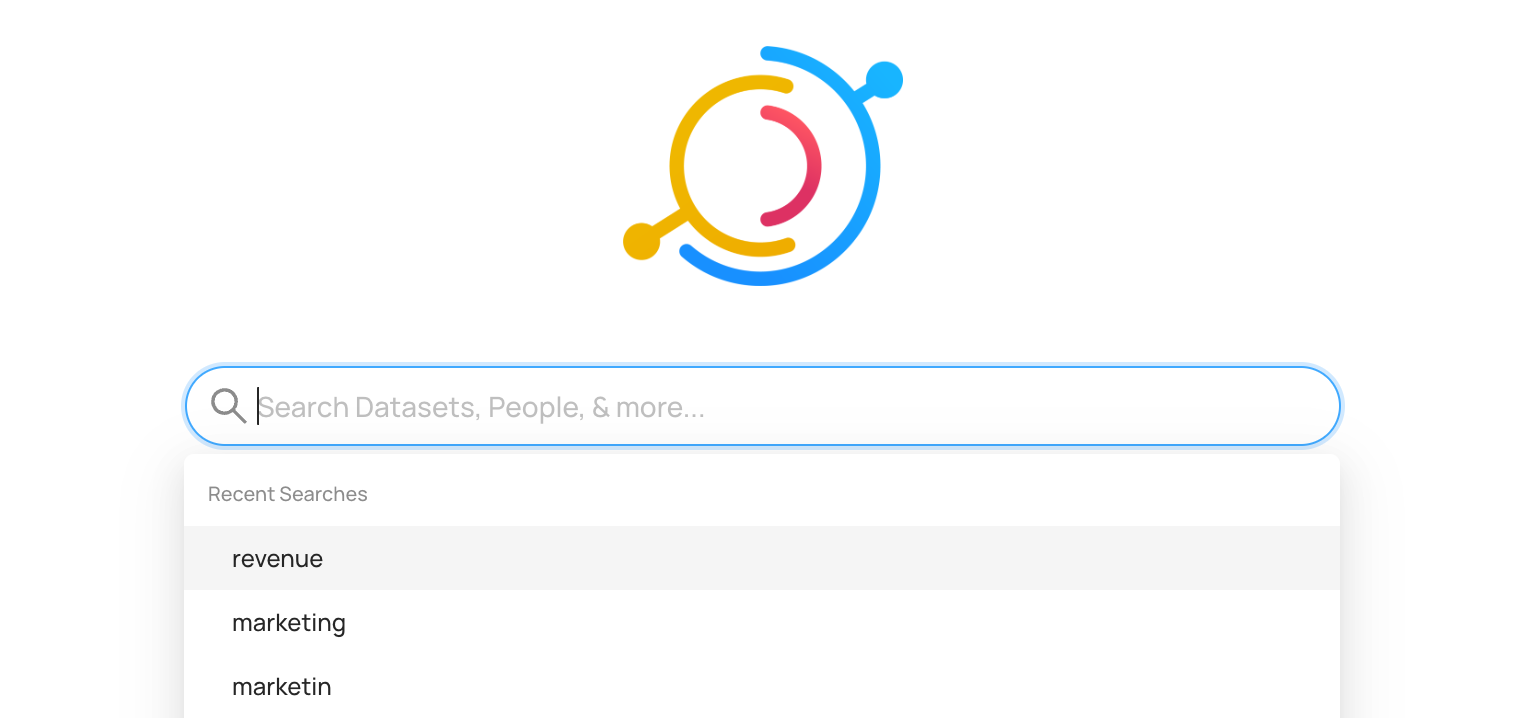
Advanced queries and the filter sidebar helps fine tuning queries. For programmatic users DataHub provides a GraphQL API as well.
Search Setup, Prerequisites, and Permissions
Search is available for all users. Although Search works out of the box, the more relevant data you ingest, the better the results are.
Using Search
Searching is as easy as typing in relevant business terms and pressing 'enter' to view matching data assets.
By default, search terms will match against different aspects of a data assets. This includes asset names, descriptions, tags, terms, owners, and even specific attributes like the names of columns in a table.
Search Operators
The default boolean logic used to interpret text in a query string is AND. For example, a query of information about orders is interpreted as information AND about AND orders.
With Search V3 keyword reads on, a query matches any of its words, tolerates small typos, and ranks results that match more of the words, in names first, at the top. The operators described below (-, +, |, parentheses, ~ and *) are treated as plain text, so logging -snowflake also matches snowflake; a bare * still matches everything. Use a structured query (/q) for boolean logic. With the default search configuration, a quoted query matches names, titles, qualified names, ids and URNs, and, for 4 or more words, descriptions that hold all of its words in any order. A quoted name with dots, such as db.schema.table, also matches the other fields searched by default, such as ids, tags and custom properties, that hold all of its parts.
Filters
The filters sidebar sits on the left hand side of search results, and lets users find assets by drilling down. You can quickly filter by Data Platform (e.g. Snowflake), Tags, Glossary Terms, Domain, Owners, and more with a single click.
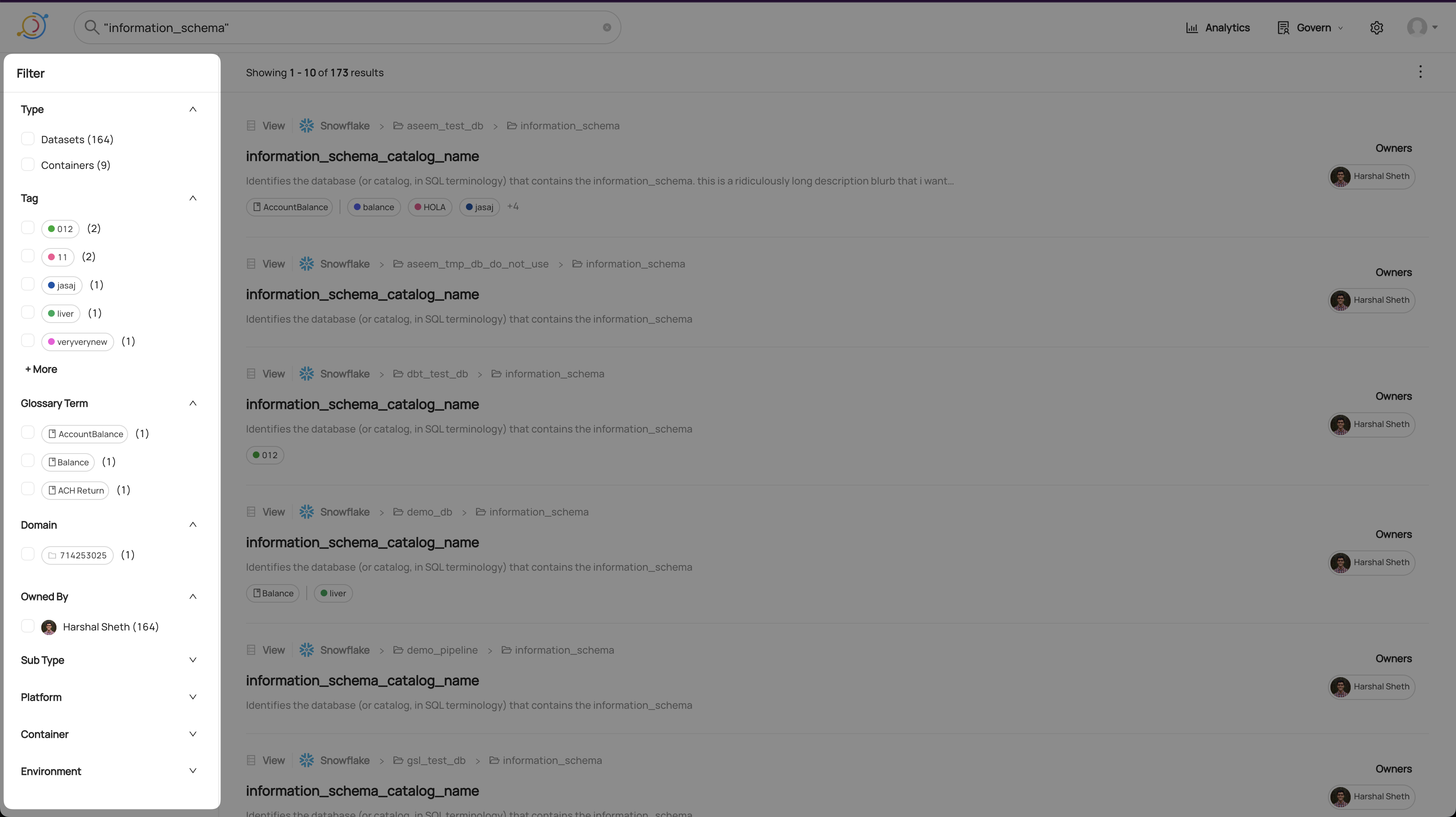
Advanced Filters
Using the Advanced Filter view, you can apply more complex filters. To get there, click 'Advanced' in the top right of the filter panel:
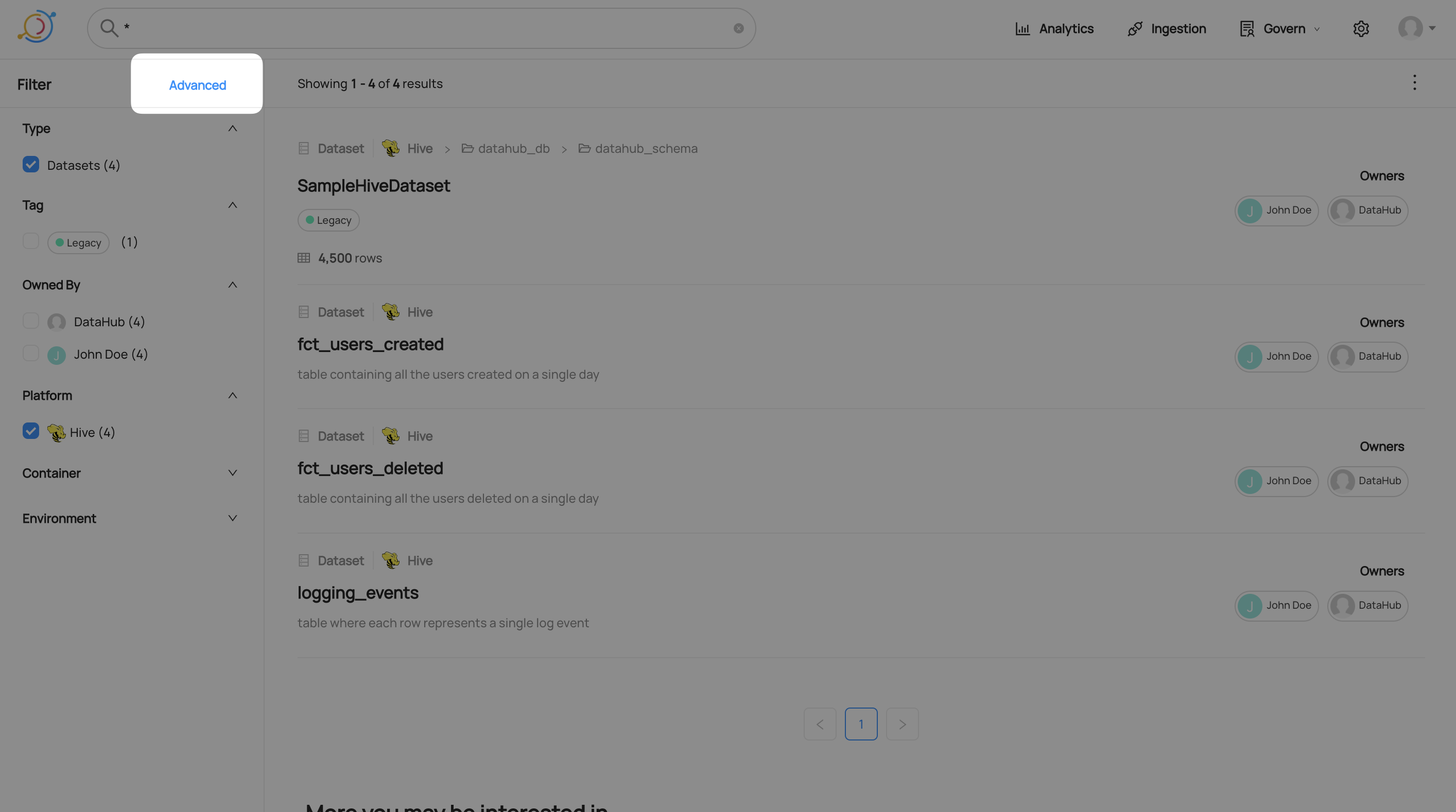
Adding an Advanced Filter
Currently, Advanced Filters support filtering by Column Name, Container, Domain, Description (entity or column level), Tag (entity or column level), Glossary Term (entity or column level), Owner, Entity Type, Subtype, Environment and soft-deleted status.
To add a new filter, click the add filter menu, choose a filter type, and then fill in the values you want to filter by.
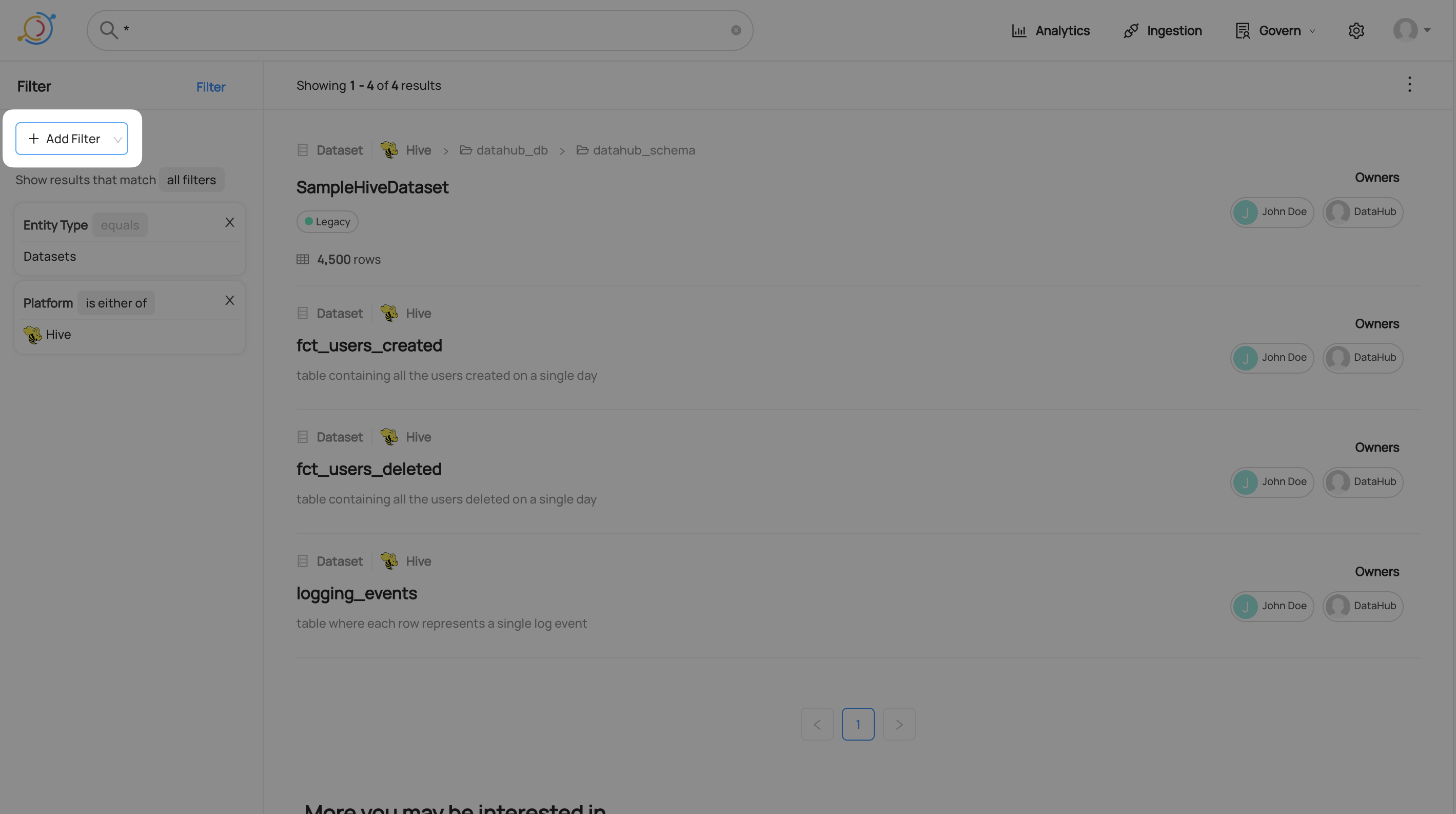
Matching Any Advanced Filter
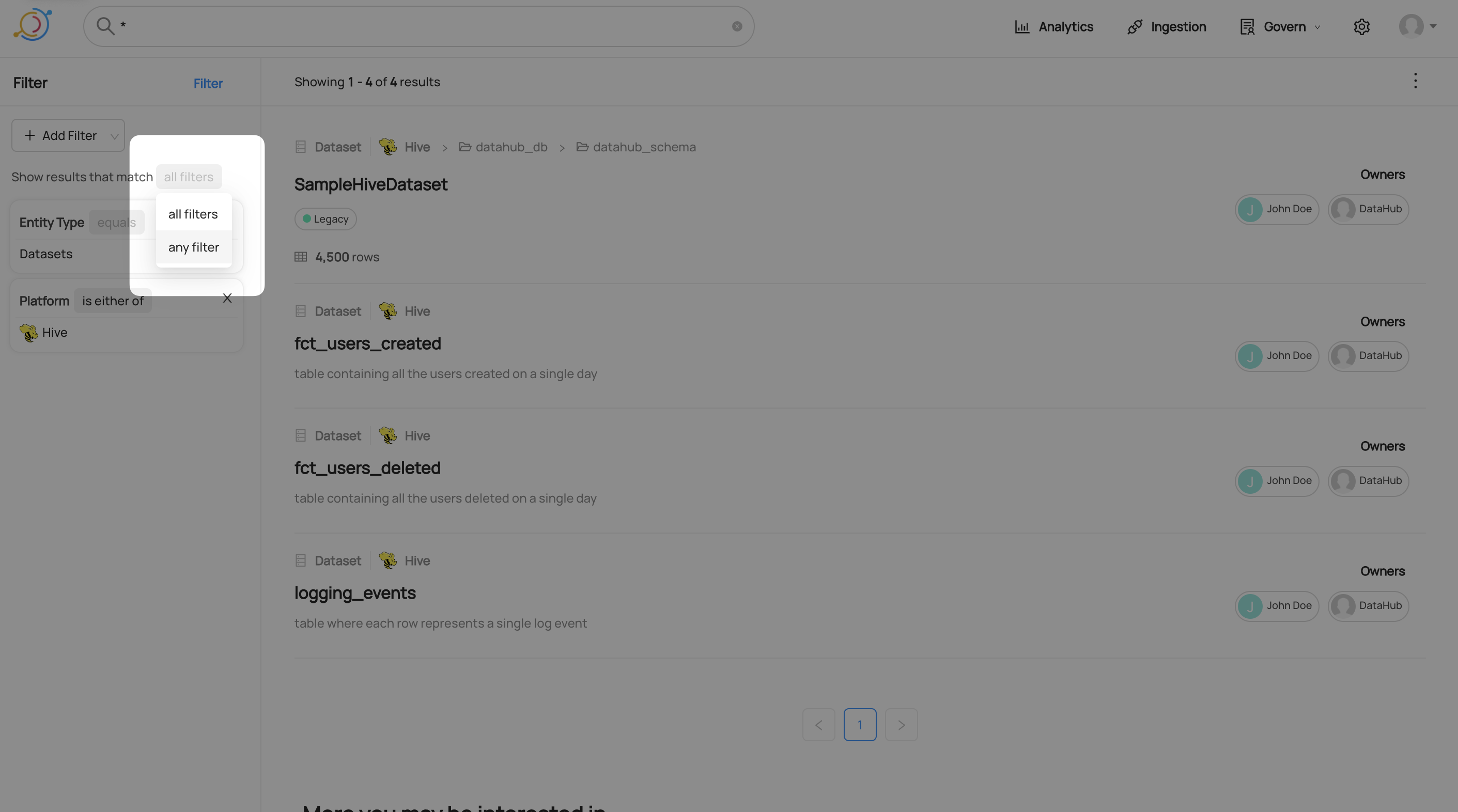
By default, all filters must be matched in order for a result to appear. For example, if you add a tag filter and a platform filter, all results will have the tag and the platform. You can set the results to match any filter instead. Click on all filters and select any filter from the drop-down menu.
Negating An Advanced Filter
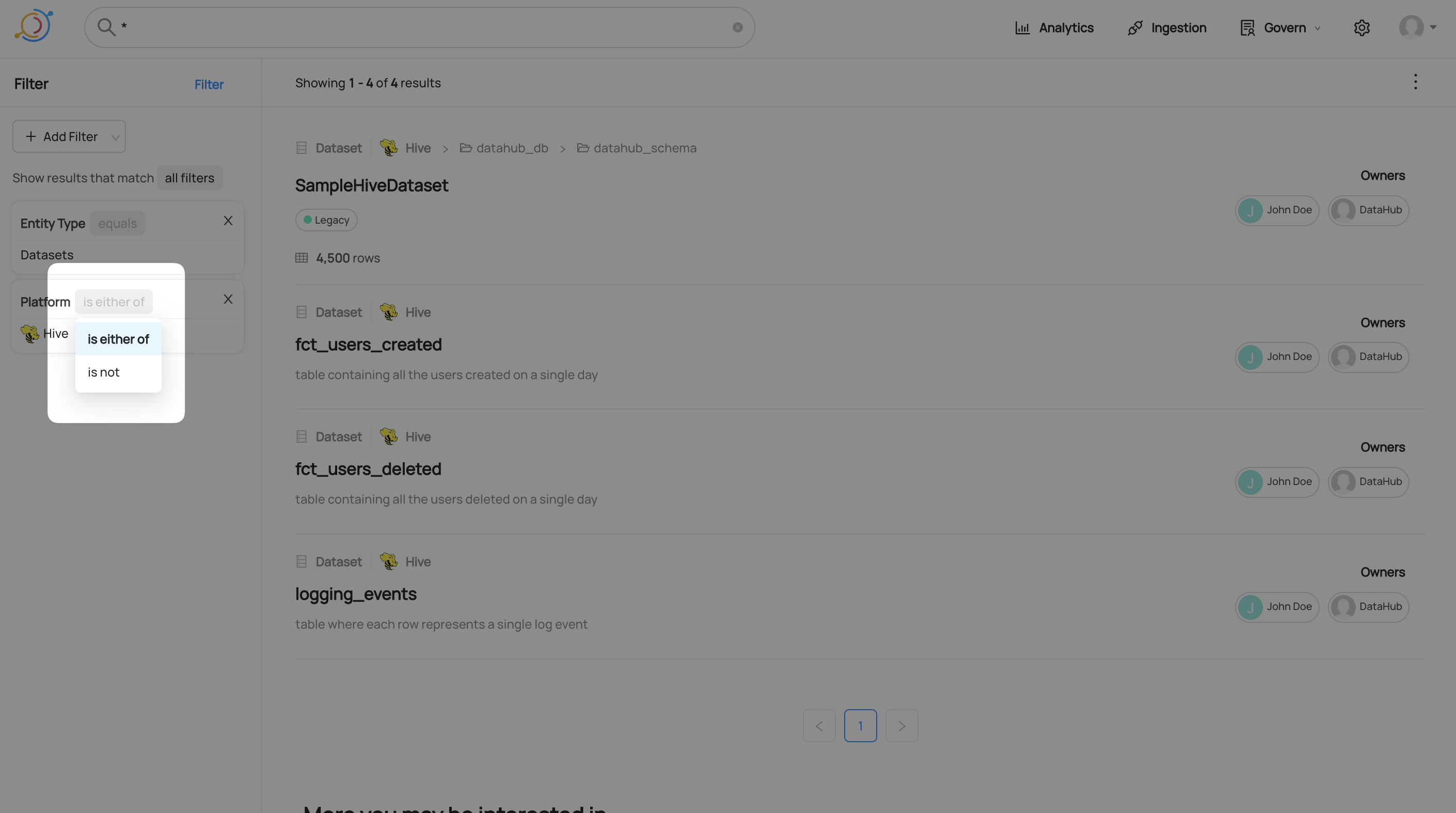
After creating a filter, you can choose whether results should or should not match it. Change this by clicking the operation in the top right of the filter and selecting the negated operation.
Results
Search results appear ranked by their relevance. In DataHub Core ranking is based on how closely the query matched textual fields of an asset and its metadata. In DataHub Cloud, ranking is based on a combination of textual relevance, usage (queries / views), and change frequency.
With better metadata comes better results. Learn more about ingestion technical metadata in the metadata ingestion guide.
Advanced queries
The search bar supports advanced queries with pattern matching, logical expressions and filtering by specific field matches.
The following are use cases with example search phrases. Additionally, an example link is provided for our demo instance. These examples are non exhaustive and using Datasets as a reference.
If you want to:
Exact match on term or phrase
"pet profile"Sample resultspet profileSample results- Enclosing one or more terms with double quotes will enforce exact matching on these terms, preventing further tokenization.
Exclude terms
logging -snowflakeSample results- Results can be excluded by term using
-to negate the term.
Term boolean logic with precedence
logging + (-snowflake | os_audit_log)Sample results()can be used to set precedence of boolean term expressions
Find a dataset with the word mask in the name:
/q name: *mask*Sample results- This will return entities with mask in the name. Names tends to be connected by other symbols, hence the wildcard symbols before and after the word.
Find a dataset with a property, encoding
/q customProperties: encoding*Sample results- Dataset Properties are indexed in ElasticSearch the manner of key=value. Hence if you know the precise key-value pair, you can search using
"key=value". However, if you only know the key, you can use wildcards to replace the value and that is what is being done here.
Find an entity with an unversioned structured property
/q structuredProperties.io_acryl_privacy_retentionTime01:60- This will return results for an unversioned structured property's qualified name
io.acryl.private.retentionTime01and value60. /q _exists_:structuredProperties.io_acryl_privacy_retentionTime01- In this example, the query will return any entity which has any value for the unversioned structured property with qualified name
io.acryl.private.retentionTime01.
Find an entity with a versioned structured property
/q structuredProperties._versioned.io_acryl_privacy_retentionTime.20240614080000.number:365- This query will return results for a versioned structured property with qualified name
io.acryl.privacy.retentionTime, version20240614080000, typenumberand value365. /q _exists_:structuredProperties._versioned.io_acryl_privacy_retentionTime.20240614080000.number- Returns results for a versioned structured property with qualified name
io.acryl.privacy.retentionTime, version20240614080000and typenumber. /q structuredProperties._versioned.io_acryl_privacy_retentionTime.\*.\*:365- Returns results for a versioned structured property with any version and type with a values of
365
Find a dataset with a column name, latitude
/q fieldPaths: latitudeSample results/q fieldPaths: *latitudeto include columns that may use V2 fieldPaths such as [version=2.0].[type=string].latitude- fieldPaths is the name of the attribute that holds the column name in Datasets.
Find a dataset with the term latitude in the field description
/q editedFieldDescriptions: latitude OR fieldDescriptions: latitudeSample results- Datasets has 2 attributes that contains field description. fieldDescription comes from the SchemaMetadata aspect, while editedFieldDescriptions comes from the EditableSchemaMetadata aspect. EditableSchemaMetadata holds information that comes from UI edits, while SchemaMetadata holds data from ingestion of the dataset.
Find a dataset with the term logical in the dataset description
/q editedDescription: *logical* OR description: *logical*Sample results- Similar to field descriptions, dataset descriptions can be found in 2 aspects, hence the need to search 2 attributes.
Find a dataset which resides in one of the browsing folders, for instance, the hive folder
/q browsePaths: *hive*Sample results- BrowsePath is stored as a complete string, for instance
/datasets/prod/hive/SampleKafkaDataset, hence the need for wildcards on both ends of the term to return a result.
Find a dataset without the name field
/q -_exists_:nameSample results- the
-is negating the existence of the field name.
Find whether a dataset has upstream lineage as per the last emission of the relevant aspect.
/q hasUpstreams:true/q hasFineGrainedUpstreams:true- These 2 filters are supported starting from release
0.3.13.xof DataHub Cloud. - Note that whether or not the upstreams are valid URNs or not is not considered. It just considers whether the metadata was emitted or not.
- There is no corresponding filter for downstream lineage currently.
- This only works for
datasetentity.
Find whether a dataset has usage as per the last emission of the relevant aspect.
/q hasUniqueUserCount:true/q hasTotalSqlQueriesCount:true- These 2 filters will be supported starting from release
0.3.14.xof DataHub Cloud. - Note that it does not check whether the field is zero. It just checks for whether the metadata was emitted or not.
Find the number of upstreams via
upstreamCountFeaturefield or downstreams viadownstreamCountFeaturefield. Only 1 hop lineage is considered./q upstreamCountFeature:>2-> Greater than 2 upstreams at 1 hop/q downstreamCountFeature:<3-> Less than 3 downstreams at 1 hop/q upstreamCountFeature:<=10-> Less than or equal to 10 upstreams at 1 hop/q upstreamCountFeature:[5 TO *]-> To find out where at 1 hop an asset has Greater than or equal to 5 upstream lineage- The advantage of
upstreamCountFeatureoverhasUpstreamsis that it considers whether the upstreams and downstreams are valid URNs. - The disadvantage of
upstreamCountFeatureoverhasUpstreamsis that these are updated once a day and are not real-time likehasUpstreams. - The reason
upstreamCountFeatureis useful is that after lineage is emitted once it will probably not change drastically for most of the tables. So this information will be almost up-to-date for all tables with a lag of around 24 hours. - These 2 filters will be supported starting from release
0.3.14.xof DataHub Cloud. - These are DataHub Cloud only filters.
Videos
What can you do with DataHub?
GraphQL
- searchAcrossEntities
- You can try out the API on the demo instance's public GraphQL interface: here
The same GraphQL API that powers the Search UI can be used for integrations and programmatic use-cases.
# Example query - search for datasets matching the example_query_text who have the Dimension tag applied to a schema field and are from the data platform looker
query searchEntities {
  search(
    input: {
      type: DATASET,
      query: "example_query_text",
      orFilters: [
        {
          and: [
            {
              field: "fieldTags",
              values: ["urn:li:tag:Dimension"]
            },
            {
              field: "platform",
              values: ["urn:li:dataPlatform:looker"]
            }
          ]
        }
      ],
      start: 0,
      count: 10
    }
  ) {
    start
    count
    total
    searchResults {
      entity {
        urn
        type
        ... on Dataset {
          name
          platform {
            name
          }
        }
      }
    }
  }
}
Searching at Scale
For queries that return more than 10k entities we recommend using the scrollAcrossEntities GraphQL API:
# Example query
{
  scrollAcrossEntities(input: { types: [DATASET], query: "*", count: 10}) {
    nextScrollId
    count
    searchResults {
      entity {
        type
        ... on Dataset {
          urn
          type
          platform {
            name
          }
          name
        }
      }
    }
  }
}
This will return a response containing a nextScrollId value which must be used in subsequent queries to retrieve more data, i.e:
{
  scrollAcrossEntities(input:
    { types: [DATASET], query: "*", count: 10,
    scrollId: "eyJzb3J0IjpbMy4wLCJ1cm46bGk6ZGF0YXNldDoodXJuOmxpOmRhdGFQbGF0Zm9ybTpiaWdxdWVyeSxiaWdxdWVyeS1wdWJsaWMtZGF0YS5jb3ZpZDE5X2dlb3RhYl9tb2JpbGl0eV9pbXBhY3QucG9ydF90cmFmZmljLFBST0QpIl0sInBpdElkIjpudWxsLCJleHBpcmF0aW9uVGltZSI6MH0="}
  ) {
    nextScrollId
    count
    searchResults {
      entity {
        type
        ... on Dataset {
          urn
          type
          platform {
            name
          }
          name
        }
      }
    }
  }
}
In order to complete scrolling through all of the results, continue to request data in batches until the nextScrollId returned is null or undefined.
DataHub Blog
Customizing Search
It is possible to completely customize search ranking, filtering, and queries using a search configuration yaml file.
This no-code solution provides the ability to extend, or replace, the Elasticsearch-based search functionality. The
only limitation is that the information used in the query/ranking/filtering must be present in the entities' document,
however this does include customProperties, tags, terms, domain, as well as many additional fields.
Additionally, multiple customizations can be applied to different query strings. A regex is applied to the search query
to determine which customized search profile to use. This means a different query/ranking/filtering can be applied to
a select all/* query or one that contains an actual query.
Search results (excluding select *) are a balance between relevancy and the scoring function. In
general, when trying to improve relevancy, focus on changing the query in the boolQuery section and rely on the
functionScore for surfacing the importance in the case of a relevancy tie. Consider the scenario
where a dataset named orders exists in multiple places. The relevancy between the dataset with the name orders and
the term orders is the same, however one location may be more important and thus the function score preferred.
Note: The customized query is a pass-through to Elasticsearch and must comply with their API, syntax errors are possible. It is recommended to test the customized queries prior to production deployment and knowledge of the Elasticsearch query language is required.
Default search entity types
When GraphQL callers omit types (search, autocomplete, browse V2, and related resolvers), GMS uses configurable
default entity-type lists from elasticsearch.search in application.yaml:
| Config key | Environment variable | Used when callers omit types for |
|---|---|---|
defaultEntityTypes | SEARCH_DEFAULT_ENTITY_TYPES | Search / scroll / aggregate |
autocompleteEntityTypes | SEARCH_AUTOCOMPLETE_ENTITY_TYPES | Autocomplete across entities |
browseEntityTypes | SEARCH_BROWSE_ENTITY_TYPES | Browse V2 |
prioritizedSourceEntityTypes | SEARCH_PRIORITIZED_SOURCE_ENTITY_TYPES | Source-entity quick filters |
prioritizedDatahubEntityTypes | SEARCH_PRIORITIZED_DATAHUB_ENTITY_TYPES | DataHub-entity quick filters |
Each list supports value / add / remove (and matching *_ADD / *_REMOVE env vars). Unset env vars keep the YAML
defaults. An explicitly empty resolved list means GraphQL searches no entity types — it does not expand to all
indices. Explicit non-empty types on the GraphQL request always win. Unknown registry names are soft-dropped with a
warn at startup. Full variable reference: Environment Variables.
Enable Custom Search
The following environment variables on GMS control whether a search configuration is enabled and the location of the configuration file.
Enable Custom Search:
ELASTICSEARCH_QUERY_CUSTOM_CONFIG_ENABLED=true
Custom Search File Location:
ELASTICSEARCH_QUERY_CUSTOM_CONFIG_FILE=search_config.yml
The location of the configuration file can be on the Java classpath or the local filesystem. A default configuration
file is included with the GMS jar with the name search_config.yml.
Search Configuration
The search configuration yaml contains a simple list of configuration profiles selected using the queryRegex. If a
single profile is desired, a catch-all regex of .* can be used.
The list of search configurations can be grouped into 4 general sections.
queryRegex- Responsible for selecting the search customization based on the regex matching the search query string. The first match is applied.- Built-in query booleans - There are 3 built-in queries which can be individually enabled/disabled. These include
the
simple query string[1],match phrase prefix[2], andexact match[3] queries, enabled with the following booleans respectively [simpleQuery,prefixMatchQuery,exactMatchQuery] boolQuery- The base Elasticsearchboolean query[4]. If enabled in #2 above, those queries will appear in theshouldsection of theboolean query[4].functionScore- The Elasticsearchfunction score[5] section of the overall query.
Examples
These examples assume a match-all queryRegex of .* so that it would impact any search query for simplicity.
Example 1: Ranking By Tags/Terms
Boost entities with tags of primary or gold and an example glossary term's uuid.
queryConfigurations:
  - queryRegex: .*

    simpleQuery: true
    prefixMatchQuery: true
    exactMatchQuery: true

    functionScore:
      functions:
        - filter:
            terms:
              tags.keyword:
                - urn:li:tag:primary
                - urn:li:tag:gold
          weight: 3.0

        - filter:
            terms:
              glossaryTerms.keyword:
                - urn:li:glossaryTerm:9afa9a59-93b2-47cb-9094-aa342eec24ad
          weight: 3.0

      score_mode: multiply
      boost_mode: multiply
Similar example to boost with primary AND gold instead of the previous OR condition.
queryConfigurations:
  - queryRegex: .*

    simpleQuery: true
    prefixMatchQuery: true
    exactMatchQuery: true

    functionScore:
      functions:
        - filter:
            bool:
              filter:
                - term:
                    tags.keyword: urn:li:tag:primary
                - term:
                    tags.keyword: urn:li:tag:gold
          weight: 3.0

      score_mode: multiply
      boost_mode: multiply
Example 2: Preferred Data Platform
Boost the urn:li:dataPlatform:hive platform.
queryConfigurations:
  - queryRegex: .*

    simpleQuery: true
    prefixMatchQuery: true
    exactMatchQuery: true

    functionScore:
      functions:
        - filter:
            terms:
              platform.keyword:
                - urn:li:dataPlatform:hive
          weight: 3.0
      score_mode: multiply
      boost_mode: multiply
Example 3: Exclusion & Bury
This configuration extends the 3 built-in queries with a rule to exclude deprecated entities from search results
because they are not generally relevant as well as reduces the score of materialized.
queryConfigurations:
  - queryRegex: .*

    simpleQuery: true
    prefixMatchQuery: true
    exactMatchQuery: true

    boolQuery:
      must_not:
        term:
          deprecated:
            value: true

    functionScore:
      functions:
        - filter:
            term:
              materialized:
                value: true
          weight: 0.5
      score_mode: multiply
      boost_mode: multiply
Example 4: Entity Ranking
Alter the ranking of entities. For example, chart vs dashboard, you may want the dashboard to appear above charts. This can be done using the following function score and leverages a prefix match on the entity type of the URN. Depending on the entity the weight may have to be adjusted based on your data and the entities involved since often multiple field matches may shift weight towards one entity vs another.
queryConfigurations:
  - queryRegex: .*

    simpleQuery: true
    prefixMatchQuery: true
    exactMatchQuery: true

    functionScore:
      functions:
        - filter:
            prefix:
              urn:
                value: "urn:li:dashboard:"
          weight: 1.5
      score_mode: multiply
      boost_mode: multiply
Search Autocomplete Configuration
Similar to the options provided in the previous section for search configuration, there are autocomplete specific options which can be configured.
Note: The scoring functions defined in the previous section are inherited for autocomplete by default, unless overrides are provided in the autocomplete section.
For the most part the configuration options are identical to the search customization options in the previous
section, however they are located under autocompleteConfigurations in the yaml configuration file.
queryRegex- Responsible for selecting the search customization based on the regex matching the search query string. The first match is applied.- The following boolean enables/disables the function score inheritance from the normal search configuration: [
inheritFunctionScore] This flag will automatically be set tofalsewhen thefunctionScoresection is provided. If set tofalsewith nofunctionScoreprovided, the default Elasticsearch_scoreis used. - Built-in query booleans - There is 1 built-in query which can be enabled/disabled. These include
the
default autocomplete queryquery, enabled with the following booleans respectively [defaultQuery] boolQuery- The base Elasticsearchboolean query[4]. If enabled in #2 above, those queries will appear in theshouldsection of theboolean query[4].functionScore- The Elasticsearchfunction score[5] section of the overall query.
Examples
These examples assume a match-all queryRegex of .* so that it would impact any search query for simplicity. Also
note that the queryRegex is applied individually for searchConfigurations and autocompleteConfigurations and they
do not have to be identical.
Example 1: Exclude deprecated entities from autocomplete
autocompleteConfigurations:
  - queryRegex: .*
    defaultQuery: true

    boolQuery:
      must:
        - term:
            deprecated: "false"
Example 2: Override scoring for autocomplete
autocompleteConfigurations:
  - queryRegex: .*
    defaultQuery: true

    functionScore:
      functions:
        - filter:
            term:
              materialized:
                value: true
          weight: 1.1
        - filter:
            term:
              deprecated:
                value: false
          weight: 0.5
      score_mode: avg
      boost_mode: multiply
Field Configurations
Field configurations allow you to customize which fields are included in search queries and result highlighting. Each configuration is identified by a label and can modify the default behavior using three operations:
add- Adds fields to the system defaultsremove- Removes fields from the system defaultsreplace- Completely replaces the system default field list
As of today the UI will only exercise the default label, however calls to graphql can refer to other labels. See graphql documentation for further details.
Note: The replace operation cannot be combined with add or remove. However, add and remove can be used together.
Field Configuration Example
fieldConfigurations:
  # Default configuration - if searchFlags doesn't specify
  default:
    searchFields:
      remove:
        - fieldPaths

    highlightFields:
      enabled: true
      remove:
        - fieldPaths

  # PDL legacy configuration
  legacy:
    searchFields:
    # No modifications - use PDL defaults

    highlightFields:
      enabled: true
      # No modifications - use PDL defaults

  # Configuration for technical users - adds technical fields
  technical:
    searchFields:
      add:
        - fieldPaths
        - platform
      remove:
        - customProperties
    highlightFields:
      enabled: true
      add:
        - fieldPaths
        - platform

  # Configuration for business users - simplified field set
  business:
    searchFields:
      replace:
        - name
        - description
        - tags
        - glossaryTerms
    highlightFields:
      enabled: true
      replace:
        - name
        - description

  # Configuration with no highlighting
  no-highlight:
    searchFields:
      # Uses system defaults
    highlightFields:
      enabled: false
Search V3 query templates
Search V3 can rank with a Mustache JSON body stored on a searchTemplate entity (urn:li:searchTemplate:<id>). Templates are off until both Search V3 keyword read and SEARCH_V3_TEMPLATES_ENABLED are on. That flag stays off in the shipped configuration. Parity tests still record intentional DSL differences, and container tests have not replaced a production compatibility window, so templates are not the configured default. Until the flag is on, search keeps today's Java query builder and search_config.yaml queryConfigurations. System update always searches with the templates in the shipped bootstrap file and treats structured properties and other stored lookups as empty, because that job runs before those aspects are written. GMS reads the stored template. Until that aspect exists, GMS uses the same shipped file and the same empty lookups. A stored template replaces the file and restores normal resolution.
The bootstrapped templates are not editable except by the DataHub system actor. Every shipped id is a system template id. search is the single-query fulltext router. searchLight inherits its routes and starts an ordinary query on light. fulltext is the full query and light is its cheaper first rung. list is an empty query or *. exact is a fully quoted query. structured is the seed when fulltext is off. structuredExact is a quoted structured query, and it starts as a child of structured. Lineage search uses the same seeds as entity search. The graph walk adds a URN filter outside the template. Browse text uses the search router. Browse path, depth, and group aggregation stay in Java. identity is the template for a DataHub URN (urn:li: plus an entity type) or an s3://, gs://, or hdfs:// path. GraphQL rewrites each / to \/ before search, and the identity route accepts both forms.
search matches, in order: a DataHub URN (urn:li: plus an entity type) or an s3://, gs://, or hdfs:// path, including the GraphQL form s3:\/\/, to identity; an empty query or * to list; a quoted \/q query to structuredExact; any other \/q query to structured; and a quoted query to exact. A single unquoted token remains a normal fulltext query, matching the Java Search V3 strategy. A miss follows defaultRoute to fulltext; the inherited route on searchLight instead starts at light. structured keeps the identity pattern and the empty-or-* pattern, then one pattern for a quoted query with or without the \/q prefix, which selects structuredExact. A regex is legal only in routes. A ladder predicate is not a regex. structured has no default route, so a query that matches nothing is decided again without a leading \/q prefix and otherwise stays on structured. There is no catch-all .* route. The structured prefix is the characters \/q , including the leading backslash. fulltext=false selects the structured seed, because that flag is not part of the query text. fulltext, identity, list, exact, and structuredExact have an empty route list, which pins that template when it has no default route. A child inherits the list when routes is unset, and an explicit empty list drops it. A non-empty child list replaces the parent list. defaultRoute is inherited on its own. A record with no template clears it. A template that names a default route cannot also carry a query body.
Today's search_config.yaml queryRegex list works the same way: the first pattern that matches the whole query selects a profile. The browse-all pattern becomes the empty-query and * route, the quoted pattern becomes the quoted route, and the .* catch-all becomes the default route on search and staying on structured.
A route target may itself have routes. DataHub stops if a hop repeats a template or maxRouteHops is spent. A parent cycle is a separate check, with maxParentDepth, and loading a parent does not count as a route hop. maxRoutes bounds how many patterns one template compiles, and maxRoutePatternLength bounds each stored expression. A pattern uses RE2. A Java-only lookaround or backreference from an older queryRegex is rejected and has to be rewritten before it can be a route. The route chain is included when a caller asks for an explanation. The result cache key is the final template and the ladder rungs the request will run.
elasticsearch.search.v3.templates in application.yaml names the seed URN for a surface and an engine. The global fulltext slot points at search. searchEntities starts on searchLight for one or more entity indices. ElasticSearchService.search sets that surface when the request has none, before rollout and template selection, so a single-entity page search uses the same ladder as a search across entities. The ladder runs light for a relevance-sorted page with a positive size, no column filter, and fewer than four tokens. Four or more tokens, counted after alphanumeric splitting, skip light and continue to fulltext without running it. That fulltext query still ranks a description containing every analyzed term, and it also ranks a description containing at least a quarter of them. light inherits both description clauses. The partial match is not part of the Java query builder. A hit stays on light. A miss, including a long digit run or a name of four or more parts, continues to fulltext. A leading - inverts any ladder predicate on select and emptyWhen. The names are scoreSort, pageSize, columnFilter, singleTerm, multiWord, dotted, spacelessIdentifier, identity, and longQuery. A bare -, a doubled dash, and an unknown name are rejected. scrollEntities and aggregateEntities explicitly use the search router and one rendered query. Scroll does not follow the ladder, so it does not start on searchLight. Filter, autocomplete, and document count stay untagged and use the global seed. Browse clears any incoming surface and uses that same search router, one rendered query, so it does not walk from light to fulltext. A lineage page is ordinary entity search and does walk that ladder. A lineage scroll uses scrollEntities. structured is the seed when fulltext is off. default is the shared engine slot. elasticsearch8, opensearch3, elasticsearch9, and opensearch2 are optional and select another seed of the same Elasticsearch dialect when a clause has to diverge. A request's engine key is the family plus major version (elasticsearch8, elasticsearch9, opensearch2, opensearch3). An unknown engine, or a slot that is unset, uses default. A slot whose template dialect is not Elasticsearch is skipped, so a postgres slot can point at a stored template and this release still does not execute it. Removing an engine slot returns that engine to default without a code change. Changing a route list is a template write. It does not require a new search_config.yaml deploy.
To roll search back to the Java Search V3 query builder, set SEARCH_V3_TEMPLATES_ENABLED=false and restart GMS. Keyword read can stay on. That flag wins over every per-surface rollout setting. Templates are served when that flag is on, the surface rollout executes the request, and V3 is the keyword read path: V3 is enabled, and either keyword read is on or no V2 index is enabled. Turning keyword read off while a V2 index is enabled also stops template serving, because those reads no longer use V3. The Java V2.5 builder remains the path those requests use. Its relevance policy is frozen: new fields, boosts, lexical clauses, and ranking belong in a template. The builder stays until an operational rollout finishes. Deleting it is not part of this release. SearchTemplateRetirement records that the compatibility window has not elapsed.
elasticsearch.search.v3.templates.rollout chooses the behavior per surface when the flag is on. A blank surface uses mode. off keeps the Java builder and does not render a template. shadow, also render-only, renders the template, emits search.template.shadow, and does not send that body to the search engine. active, also canary, serves the template. percent is the share of actors who are served it, from 0 to 100. The bucket is a CRC32 of the actor URN and the surface, so the same actor stays on one side of a canary. Actors outside the share use the Java builder and are not shadow-rendered. An unset surface percent uses percent. The surfaces are searchEntities, scrollEntities, and aggregateEntities. With the flag on and no rollout overrides, every surface is active at 100 percent, which is the previous meaning of the flag. Page search and scroll are tagged before rollout. A request that is still untagged, such as filter, autocomplete, or document count, uses mode.
SEARCH_V3_TEMPLATES_ROLLOUT=shadow renders every surface. SEARCH_V3_TEMPLATES_ROLLOUT_SEARCH_ENTITIES=active and SEARCH_V3_TEMPLATES_ROLLOUT_SEARCH_ENTITIES_PERCENT=10 serve templates for one tenth of actors on searchEntities and leave the other surfaces on the mode above. Restart GMS after changing them.
Relevance weights, field lists, and boosts live on the template or in application.yaml. enabled, maxLeafClauses, maxParentDepth, cacheMaximumSize, hybridKeywordScale, maxRoutes, maxRoutePatternLength, and maxRouteHops are read from that file and are not copied into Java. Query-shape detection stays in Java because it is derived from the incoming query. The template owns the weights and limits that detection selects. System update sets elasticsearch.search.v3.templates.source to classpath through the upgrade Spring profile.
A proposal is authorized and checked structurally, including the unmerged body. The pre-commit step renders the parent-merged body once. Loading a template checks that its declared capabilities still match this process. A parent edit revalidates at most 100 children and fails closed when another page remains. SearchTemplateStampHook is the only writer of created and lastModified. A process keeps every merged template it has loaded in one snapshot. When that snapshot expires, GMS fetches those template documents, every URN in each cached parent chain, and a newly requested one, with a URN filter that does not use a template. A child is kept only when its own lastModified and every ancestor stamp are unchanged and each fetched body still equals the cached document. A missing lastModified is not a reusable stamp. Those matching stamps and bodies keep the merged body and extend the snapshot for another cache.primary.ttlSeconds, measured from the start of that read. A changed document carries the template in _source, so GMS does not read that body from primary storage. The affected templates are merged again and the whole snapshot is replaced at once. A failed reload keeps the previous snapshot and logs a warning. ttlSeconds of 0 does not expire.
The shipped lexical templates use the same Search V3 root text and stemmed fields (name, qualifiedName, description, and the other indexed names), field-selection configuration, light-query gates, and entity hybrid reranker as the Java query builder. A template that explicitly defines knn takes precedence over that default reranker. A long fulltext query keeps the words that fit and drops fuzziness before it drops words. A spaceless identifier is not given edit distance. Which fields an unqualified query reads stays queryByDefault, or v3.queryByDefault when Search V3 should differ.
Java supplies schema-derived data to Mustache, including selected field paths, weights, and
@SearchScore definitions. The stored template still contains the query DSL that consumes those
values; Java does not substitute a hidden default query or scoring wrapper. Authorization, system
filters, ladder execution, and hybrid reranking remain execution concerns outside the query body.
Browse text matching uses the search router. A * resolves to list, and an ordinary query resolves to fulltext. Browse path and depth filters, the groups aggregation, authorization and default filters, the result limit, and execution stay in Java. A stored aggregation or rescore is not applied to a browse request, so it cannot replace group counts. On a search request, a template may add aggregations. Each terms size is capped by the smaller of maxAggValues and maxTermBucketSize. A template aggregation cannot replace the entity-type aggregations or a facet the caller named. A count-only search (size 0) still runs the full lexical query and its facets. It does not highlight, rescore, suggest, or hybrid-rerank.
A request uses SearchFlags.searchTemplate when the caller sets it. GraphQL and Rest.li pass that field on search, scroll, and lineage. Entity OpenAPI scroll accepts the same choice as the searchTemplate query parameter, and includeExplain=true adds routeChain to the scroll response. The same flag also returns per-hit explain matches with the field, matched text, indexed subfield, match kind, and query, while a normal matched field stays name and value. That URN's routes still run unless its merged route list is empty and it has no default route. Otherwise DataHub selects the seed from the Search V3 surface, then the engine, then default, and from the fulltext flag. Lineage search uses the same seeds as entity search. The graph walk adds a URN filter outside the template. A lineage page walks the searchLight ladder. A lineage scroll uses scrollEntities and does not. Browse clears any incoming surface and uses the search router. A * on that router uses the list template. Filter, list, document count, and value aggregation render one template for * and do not walk a ladder. The resolved URN is not written back onto SearchFlags. An empty query or *, with no caller template, still scrolls: routing runs first and selects list, then one body, no ladder.
Operators change a template with the generic entity API (OpenAPI or Rest.li) by URN, including JSON patch. There is no GraphQL mutation or search UI for templates. Callers omit created, lastModified, and apiVersion. The first write sets created, every accepted write sets lastModified, and an omitted apiVersion is stored as 1. A write is visible within cache.primary.ttlSeconds of the template document becoming searchable. An index that has not been rebuilt yet has no template body in _source, and a refresh reads that template from primary storage until it does. System filters (removed, hidden lifecycle stages, entity type, latest version, and view authorization) are still applied in Java after the template renders.
SearchTemplateCoordinator.preview resolves a template for a query and renders its DSL without executing search. The result reports the resolved template, its parent chain, the route chain, the engine slot, the rendered query, the queried fields, the rendered clause count, the estimated clause cost, capability decisions, and the ladder rungs that a search would consider. It is a service API. There is no GraphQL, Rest.li, or OpenAPI route for it in this release because the rendered body can contain caller-specific values.
Served templates emit Micrometer counters and timers under search.template.*. The template tag is a shipped id, or custom for every other URN. The slot tag is default, elasticsearch8, elasticsearch9, opensearch2, opensearch3, postgres, caller, or other. Counters cover selection, the rung that was served, shadow renders (search.template.shadow, which are not executed), render failure (select, render, or shadow), route and ladder fallback, and clause-budget reductions (terms, fuzzy, synonyms). Timers cover rung latency (first, next, deeper, parallel). Distributions cover route depth, ladder depth, and loader cache age. A cache hit is recorded as hit.
SearchFlags.searchTemplate requires MANAGE_SYSTEM_OPERATIONS. The shared selector enforces that privilege for GraphQL, Rest.li, and OpenAPI callers. Shipped system ids can be written only by the system actor, and generic entity authorization still applies to other template writes when API auth is enabled.
Template contract
apiVersion is the template and Mustache-context contract. This release implements version 1. Unset inherits the parent version, and a chain that never sets it resolves to 1. Any other value is rejected when the template is written and when it is loaded. A parent written against an unsupported version fails the child load as well.
capabilities names features the body requires. Unset keeps the parent list. An empty list drops it. A non-empty list replaces it. This release accepts keyword, rescore, functionScore, routes, ladder, aggregations, structuredPropertyQuery, normalization, fieldOverrides, highlights, sort, boosts, and queryFragments. Any other name is rejected at write and at load. Declaring a capability does not add a section the template did not store. Ranking presets other than none, a tokenCurve window, vector retrieval, a retrieval bridge, a merge join, and knn outside document rerank stay rejected by the section checks.
Stable Mustache names for version 1 are the public context. A template parameter may add or replace a name. Shape flags and optional query forms are omitted when they do not apply. flags.alphanumericSplit and flags.exactNameLetterDigit are always present.
| Name | Meaning |
|---|---|
query, raw, unquoted, escaped, normalized, alphanumericSplit, fuzzy, broadQuery, shortened, lightQueryText, lastSegment, normalizedLastSegment, normalizedKeyword | Query text. query is the text the body should match. fuzzy drops the fuzzy suffix when the clause budget is spent, and for a spaceless identifier. normalizedLastSegment is the keyword-normalized last path segment. |
wildcardTerm, wholeIdentifier, letterDigitQuery, fqnQuery | Present only for that query shape. |
defaultQueryFieldsJson, identityQueryFieldsJson, lightFieldsJson, lightOperator | JSON field lists and the light-query operator (AND or OR). A fully qualified name (two or more dots) and a long exact name use AND. A shorter name uses OR. |
entityNameField, nameKeyword, nameText, qualifiedNameKeyword, qualifiedNameText, qualifiedNameIdentity, descriptionField, descriptionText, platformField, columnNameField, idKeyword, urnExactField, urnFoldedField, urnParsedField, urnKeyword, wildcardFields, prefixFields | Schema paths, with a fixed fallback when the index does not have the field. wildcardFields is present for a single token of at least wildcardMinimumLength. Each element has field and boost (fieldBoost * 0.3) for an analyzed name or title field. prefixFields is present when prefix matching is on. Each element has field and boost (fieldBoost * prefixFactor * caseFactor * 6) for an analyzed name or qualifiedName .text or .stemmed field. exact and structured keep one nameText prefix at prefixFactor. |
prefixFactor, exactFactor, caseSensitivityFactor, twoGramFactor, threeGramFactor, fourGramFactor, urnFactor, partialFactor, fuzzyMaxExpansions, prefixMaxExpansions | Weights and expansion caps from search configuration and the clause budget. |
structuredQuery | JSON for the structured /q clause. Present on the structured and structuredExact templates. Splice it with {{&structuredQuery}}. |
flags, synonyms, multiWord, longQuery, dottedQuery, fullyQualifiedName, deepPath, longExactName, operatorEscaped, spacelessIdentifier, letterDigitParts, fqnParts | Shape flags. synonyms is a list and is omitted when empty. flags.alphanumericSplit and flags.exactNameLetterDigit are booleans. flags.exactNameLetterDigit is true for one exact-name token that splits at a letter/digit boundary. |
entityTypes, valueScoreFunctions, fieldScoreFunctions | Entity names, and @SearchScore data. A value function has field, valueJson, and weight. A field function has field, factor, missing, and sometimes modifier. |
viewerUrn, viewerGroupsJson, viewerDomainsJson, domainsJson | Caller values a boost or clause may inject. Authorization filters stay outside the template. |
These aliases are still filled and are not part of the public contract: defaultQueryFields (the list behind defaultQueryFieldsJson), unquotedQuery, fuzzyQuery, synonymQueries, longPhrase, dotted, and urnField. synonymPriority is set only while a write is checked. Search execution does not set it. {{.}} is the current synonym, not a named variable. A {{&name}} hole such as extraDisMaxQueries is query JSON, not a context variable.
{{{name}}}, a Mustache delimiter change, and {{&query}}, {{&raw}}, {{&escaped}}, and {{&unquoted}} are rejected. {{&name}} is only for server-built JSON (structuredQuery and names ending in Json) and for fragment holes. The rendered body is checked again for script, script_score, wrapper, percolate, min_score, and terms lookups. escaped backslash-escapes \ before + | - * ( ) ~ ". maxLeafClauses applies to the write-time sample, which repeats synonyms to the synonym cap, and to the live query.
A template cannot include a Mustache partial. rescore cannot be combined with sort or with functionScore.boost_mode: replace: the search engine rejects rescore when the request has an explicit sort. With a rescore and no caller sort, DataHub omits the urn tie-break. A caller sort replaces the rescore. Checks run on the template after parent sections are merged, so a child that adds a rescore to a parent with boost_mode: replace is rejected.
Structured property clauses
structuredPropertyQuery chooses which property clauses run beside the rendered body. Java resolves the current definitions, field paths, and value types, and it keeps each clause on fields the template already selected. The template sets analyzedValue, exactValue, and nameAndValue. An unset clause does not run unless a parent set it. A child replaces only the clauses it sets. An explicit empty section drops the inherited clauses. enabled: false keeps a clause in the section and does not run it.
analyzedValue.operator is AND or OR. Unset means OR. weight multiplies the field weight for analyzed and exact clauses. Unset means 1. nameAndValue.weight is the term weight and is required when that clause runs. A classpath read still runs analyzed and exact clauses from the request catalog. It skips name-and-value, which reads stored display names. The shipped fulltext, list, exact, structured, and identity templates enable analyzed and exact value matching. Their children inherit those clauses.
Structured /q fragment
structured and structuredExact splice {{&structuredQuery}} into the query body. Java builds that JSON with the same field routing as a structured query: an unqualified query is the shared fields or the opted-in property fields, and a named field runs once. A property field is lenient. Every other named field stays strict. The fragment is the user query. Authorization, removed, hidden lifecycle stages, entity type, latest version, and view filters are applied in Java after the template renders.
Query normalization
normalization sets wildcardMinimumLength, synonymCap, fuzzyTokenThreshold, mediumFuzzyTokenThreshold, broadQueryTokenCap, shortFuzzyEdits, and mediumFuzzyEdits. Unset inherits that field. An explicit empty section drops the inherited settings. When no ancestor sets a field, Java uses 5, 8, 5, 7, 8, 1, and 2. A write outside the allowed range is rejected. At render time Java clamps each value again, and the clause budget can keep fewer synonyms, fuzzy expansions, or broad-query tokens. The shipped fulltext template sets those defaults. light inherits them. A single token of at least wildcardMinimumLength adds a lowercased *term* wildcard on each analyzed name and title field the query searches. The boost is fieldBoost * 0.3. The clause does not set case_insensitive, because the pattern is already lowercased and a case-insensitive wildcard can fail an OpenSearch 3 shard.
Custom search when templates are on
The template is authoritative. SearchFlags.fieldConfiguration and a search_config.yaml queryConfigurations entry are not applied to the template body, the field set, or highlighting. Move a field change into fields and a ranking or filter change into query, clauses, functionScore, or queryFragments.
Query holes
A child can insert query JSON into a named hole without copying the parent body. queryFragments maps the hole name to that JSON. Each level that sets a key adds that JSON. The pieces are joined with a comma, root first. An unset key adds nothing. An empty string drops the pieces inherited from parents. Setting query still replaces the whole body.
The bootstrapped fulltext template opens extraDisMaxQueries inside its top-level dis_max queries array. The parent emits a comma and the fragment only when the fragment is set, so an empty hole leaves the JSON valid. The fragment does not start with a comma. Several query objects separated by commas become further branches of that dis_max. {{urn:li:structuredProperty:...}} and {{unquoted}} expand in the fragment the same way they do in query.
A write that fills a hole the inherited query does not contain is rejected. A parent query write is rejected while a child that inherits that body still fills a hole the new text drops. A child that sets query stops that walk. A search fails when the merged template fills a hole the merged query text does not contain.
parent: urn:li:searchTemplate:fulltext
queryFragments:
  extraDisMaxQueries: |
    {
      "constant_score": {
        "boost": 1000,
        "filter": {
          "term": {
            "{{urn:li:structuredProperty:businessName}}.keyword": {
              "value": "{{unquoted}}",
              "case_insensitive": true
            }
          }
        }
      }
    }
1000 ties an exact value on that property with an exact match on name.keyword. fields.add does not change the boost written in the fragment.
FAQ and Troubleshooting
How are the results ordered?
The order of the search results is based on the weight what DataHub gives them based on our search algorithm. The current algorithm in OSS DataHub is based on a text-match score from Elasticsearch.
Where to find more information?
The sample queries here are non exhaustive. The link here shows the current list of indexed fields for each entity inside DataHub. Click on the fields inside each entity and see which field has the tag Searchable.
However, it does not tell you the specific attribute name to use for specialized searches. One way to do so is to inspect the ElasticSearch indices, for example:
curl http://localhost:9200/_cat/indices returns all the ES indices in the ElasticSearch container.
yellow open chartindex_v2_1643510690325                           bQO_RSiCSUiKJYsmJClsew 1 1   2 0   8.5kb   8.5kb
yellow open mlmodelgroupindex_v2_1643510678529                    OjIy0wb7RyKqLz3uTENRHQ 1 1   0 0    208b    208b
yellow open dataprocessindex_v2_1643510676831                     2w-IHpuiTUCs6e6gumpYHA 1 1   0 0    208b    208b
yellow open corpgroupindex_v2_1643510673894                       O7myCFlqQWKNtgsldzBS6g 1 1   3 0  16.8kb  16.8kb
yellow open corpuserindex_v2_1643510672335                        0rIe_uIQTjme5Wy61MFbaw 1 1   6 2  32.4kb  32.4kb
yellow open datasetindex_v2_1643510688970                         bjBfUEswSoSqPi3BP4iqjw 1 1  15 0  29.2kb  29.2kb
yellow open dataflowindex_v2_1643510681607                        N8CMlRFvQ42rnYMVDaQJ2g 1 1   1 0  10.2kb  10.2kb
yellow open dataset_datasetusagestatisticsaspect_v1_1643510694706 kdqvqMYLRWq1oZt1pcAsXQ 1 1   4 0   8.9kb   8.9kb
yellow open .ds-datahub_usage_event-000003                        YMVcU8sHTFilUwyI4CWJJg 1 1 186 0 203.9kb 203.9kb
yellow open datajob_datahubingestioncheckpointaspect_v1           nTXJf7C1Q3GoaIJ71gONxw 1 1   0 0    208b    208b
yellow open .ds-datahub_usage_event-000004                        XRFwisRPSJuSr6UVmmsCsg 1 1 196 0 165.5kb 165.5kb
yellow open .ds-datahub_usage_event-000005                        d0O6l5wIRLOyG6iIfAISGw 1 1  77 0 108.1kb 108.1kb
yellow open dataplatformindex_v2_1643510671426                    _4SIIhfAT8yq_WROufunXA 1 1   0 0    208b    208b
yellow open mlmodeldeploymentindex_v2_1643510670629               n81eJIypSp2Qx-fpjZHgRw 1 1   0 0    208b    208b
yellow open .ds-datahub_usage_event-000006                        oyrWKndjQ-a8Rt1IMD9aSA 1 1 143 0 127.1kb 127.1kb
yellow open mlfeaturetableindex_v2_1643510677164                  iEXPt637S1OcilXpxPNYHw 1 1   5 0   8.9kb   8.9kb
yellow open .ds-datahub_usage_event-000001                        S9EnGj64TEW8O3sLUb9I2Q 1 1 257 0 163.9kb 163.9kb
yellow open .ds-datahub_usage_event-000002                        2xJyvKG_RYGwJOG9yq8pJw 1 1  44 0 155.4kb 155.4kb
yellow open dataset_datasetprofileaspect_v1_1643510693373         uahwTHGRRAC7w1c2VqVy8g 1 1  31 0  18.9kb  18.9kb
yellow open mlprimarykeyindex_v2_1643510687579                    MUcmT8ASSASzEpLL98vrWg 1 1   7 0   9.5kb   9.5kb
yellow open glossarytermindex_v2_1643510686127                    cQL8Pg6uQeKfMly9GPhgFQ 1 1   3 0    10kb    10kb
yellow open datajob_datahubingestionrunsummaryaspect_v1           rk22mIsDQ02-52MpWLm1DA 1 1   0 0    208b    208b
yellow open mlmodelindex_v2_1643510675399                         gk-WSTVjRZmkDU5ggeFSqg 1 1   1 0  10.3kb  10.3kb
yellow open dashboardindex_v2_1643510691686                       PQjSaGhTRqWW6zYjcqXo6Q 1 1   1 0   8.7kb   8.7kb
yellow open datahubpolicyindex_v2_1643510671774                   ZyTrYx3-Q1e-7dYq1kn5Gg 1 1   0 0    208b    208b
yellow open datajobindex_v2_1643510682977                         K-rbEyjBS6ew5uOQQS4sPw 1 1   2 0  11.3kb  11.3kb
yellow open datahubretentionindex_v2                              8XrQTPwRTX278mx1SrNwZA 1 1   0 0    208b    208b
yellow open glossarynodeindex_v2_1643510678826                    Y3_bCz0YR2KPwCrrVngDdA 1 1   1 0   7.4kb   7.4kb
yellow open system_metadata_service_v1                            36spEDbDTdKgVlSjE8t-Jw 1 1 387 8  63.2kb  63.2kb
yellow open schemafieldindex_v2_1643510684410                     tZ1gC3haTReRLmpCxirVxQ 1 1   0 0    208b    208b
yellow open mlfeatureindex_v2_1643510680246                       aQO5HF0mT62Znn-oIWBC8A 1 1  20 0  17.4kb  17.4kb
yellow open tagindex_v2_1643510684785                             PfnUdCUORY2fnF3I3W7HwA 1 1   3 1  18.6kb  18.6kb
The index name will vary from instance to instance. Indexed information about Datasets can be found in:
curl http://localhost:9200/datasetindex_v2_1643510688970/_search?=pretty
example information of a dataset:
{
        "_index" : "datasetindex_v2_1643510688970",
        "_type" : "_doc",
        "_id" : "urn%3Ali%3Adataset%3A%28urn%3Ali%3AdataPlatform%3Akafka%2CSampleKafkaDataset%2CPROD%29",
        "_score" : 1.0,
        "_source" : {
          "urn" : "urn:li:dataset:(urn:li:dataPlatform:kafka,SampleKafkaDataset,PROD)",
          "name" : "SampleKafkaDataset",
          "browsePaths" : [
            "/prod/kafka/SampleKafkaDataset"
          ],
          "origin" : "PROD",
          "customProperties" : [
            "prop2=pikachu",
            "prop1=fakeprop"
          ],
          "hasDescription" : false,
          "hasOwners" : true,
          "owners" : [
            "urn:li:corpuser:jdoe",
            "urn:li:corpuser:datahub"
          ],
          "fieldPaths" : [
            "[version=2.0].[type=boolean].field_foo_2",
            "[version=2.0].[type=boolean].field_bar",
            "[version=2.0].[key=True].[type=int].id"
          ],
          "fieldGlossaryTerms" : [ ],
          "fieldDescriptions" : [
            "Foo field description",
            "Bar field description",
            "Id specifying which partition the message should go to"
          ],
          "fieldTags" : [
            "urn:li:tag:NeedsDocumentation"
          ],
          "platform" : "urn:li:dataPlatform:kafka"
        }
      },