Build a Data Agent on DataHub
Language models write SQL fluently. What they lack is knowledge of your business: which of three orders tables is authoritative, what "active customer" means, which accounts Finance always excludes. Without that knowledge, an agent guesses, and it sounds certain every time. An agent without context is confidently wrong.
DataHub helps in two ways:
- It activates and centralizes your semantic context. Metric definitions, semantic models, BI logic, documentation, and the patterns hidden in your query history are scattered across tools. DataHub brings them into one context layer, fills in what's missing, and keeps it current as your data and usage change.
- It makes that context easy to put to work. You can build agents with access to all of it, or only the part a team needs, to answer your business's most important questions.
Along the way, it supplies what your agent is missing:
- Context. A searchable map of your data: tables, metrics, and documents, together with the trust signals (lineage, ownership, usage, and past queries) that show which data to rely on.
- Evals. Real business questions with known-good answers, run every day, so you always know how accurate your agent is.
- Review. A workflow that keeps the people who know the data in charge of what your agent learns.
With all three in place, your agent answers questions correctly (the right tables and definitions), consistently (the same question gets the same answer), and efficiently (a few precise lookups, not a crawl through the warehouse). It reaches everything through DataHub's MCP server, so it works with the agent you already use.
This guide is written for data and AI platform teams: the people who enable their organization to answer business questions from data, increasingly by publishing agents and AI tools.
It focuses on data analytics agents: agents that answer business questions with real results from your warehouse. The same context layer also supports operational agents that help manage your data itself, for example:
- Data governance: documenting and classifying assets, and reporting on ownership and compliance gaps
- Data development: understanding lineage and the impact of a change before it ships
- Data quality: investigating incidents and tracing issues to their source
You can build these as custom agents in DataHub, or connect your own through the Agent Context Kit.
Teams like Anthropic and Pinterest have built self-serve data agents this way, with dedicated teams. DataHub makes the same approach available to every organization.
What you'll build
By the end of this guide, you'll have:
- A data agent that answers one team's real questions from trusted data
- An eval suite that measures its accuracy every day
- Practices that keep your context accurate as your organization changes
Building an effective data agent
An agent that answers correctly, consistently, and efficiently needs more than a capable model and a warehouse connection. It needs context grounded in your organization's real knowledge, a way to measure whether that context works, and a process to keep it current. This guide builds all three in five steps:
| Step | What you do |
|---|---|
| 1. Define evals | Write the questions your agent must answer correctly, and measure where it starts. |
| 2. Ingest context | Bring in your semantic models, metrics, BI definitions, and documentation. |
| 3. Generate context | Let DataHub turn your team's query history into context documents. |
| 4. Activate context | Make your context available to the people and agents who need it. |
| 5. Context feedback & improvement | Keep your context accurate as your organization, data, and questions change. |
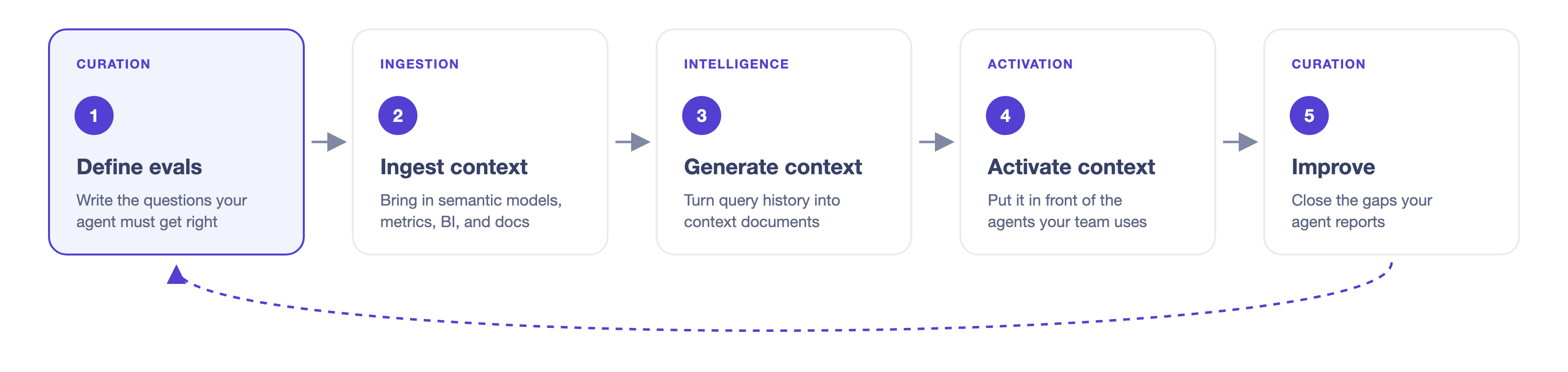
Diagram: define evals, ingest context, generate context, activate context, context feedback and improvement, and back to evals.
Every step after the first is measured against your evals, so you'll always know whether a change helped.
How people will ask questions
In step 4, you choose how people reach your context. The three options differ in who does the reasoning.
| Option | How it works |
|---|---|
| a. Use Ask DataHub directly | People ask in DataHub, Slack, or Teams. DataHub does the reasoning and runs the SQL. |
| b. Connect your agent to a DataHub agent | Your agent, such as Claude, ChatGPT, or a LangChain app, hands data questions to DataHub. |
| c. Connect your agent to DataHub tools | Your agent uses DataHub's search and context tools, guided by DataHub's open-source skills, and does the reasoning itself. |
We recommend a or b. With either, the instructions, scope, and evals your data team maintains in DataHub apply to every answer.
Where you're starting from
If you have a semantic layer (dbt, Snowflake semantic views, Looker, or Cube), bring it in and keep it as your source of truth. It remains the best answer for your most frequent, high-value questions. DataHub builds on it and covers the long tail across every domain, where maintaining semantic models by hand doesn't scale.
If you don't, you don't need to build one first. DataHub drafts context from the queries your analysts already run, and your evals verify it. Your experts refine what's there instead of starting from a blank page.
Roll out one domain at a time
Start small: one domain, or at most three, each with a backlog of real questions and someone who cares about the answers. Take them through all five steps. When their teams trust the agent, repeat the path for the next domains.
Each domain gets its own evals, context, owners, and agent, so accuracy stays measurable and trust is earned one team at a time. Step 4 explains how to package a domain, and how to expose all data and context to a global agent.
If the people asking questions can't read SQL, build a domain agent. See Key Concepts.
Before you start
- DataHub Cloud with the Context add-on. Steps 1, 3, 4, and 5 use features from the Context add-on, currently in Public Beta. If you don't see Context in DataHub's left sidebar, contact your DataHub account team, or sign up for the Public Beta.
- Your warehouse, connected with query history. In DataHub, go to Data Sources, click + Create source, and select Snowflake, Databricks, BigQuery, or Redshift. Make sure query history is enabled: it shows DataHub how your team actually uses the data, and it powers step 3. See Ingestion and the example recipes. If your warehouse is on a private network, use a Remote Executor.
- A domain to start with, and an owner for it.
- Three roles:
- A platform team member who connects systems and publishes the agent
- A data expert for each domain (typically an analytics engineer or senior analyst) who writes the expected answers and verifies context
- A business stakeholder who knows which questions and metrics matter most
New to these ideas? Read Key Concepts. Have a question? See the FAQ.
Begin with Step 1: Define evals.