a. Use Ask DataHub Directly
People ask questions in Ask DataHub, in DataHub, Slack, or Teams. Ask DataHub finds the right tables and context, writes the SQL, and runs it in your warehouse.
Choose this option if you don't have an agent of your own, or you want the fastest path to a working data agent.
What you'll set up: a warehouse plugin. Add a custom agent only if you want to limit it to one domain.
1. Let DataHub run SQL
Connect your warehouse as an AI plugin, so Ask DataHub can run the SQL it writes.
- Go to Settings > AI > Plugins and click + Create.
- Select your warehouse and follow its guide: Snowflake, BigQuery, or Databricks.
- Use a read-only warehouse role.
With User OAuth or User API Key authentication, each query runs with the asking person's own warehouse permissions. A Shared API Key runs every query as one account. See authentication types.
Each person enables the plugin under Settings > My AI Settings, or directly from the chat.
2. Ask a question
Open Ask DataHub and try a few questions from your eval suite. Ask DataHub searches all the context the person asking can see, chooses the tables, writes the SQL, and runs it through your plugin.
Ask DataHub comes with built-in skills for navigating your context and writing SQL, so there's nothing to install. For a global agent, setup is complete. Keep your evals on the main Validation > Evals page; they measure the context Ask DataHub relies on.
3. Optional: create a custom agent for your domain
Create a custom agent when you want to:
- Limit it to one domain, so it searches only that domain's tables, metrics, and documents
- Limit its plugins, for example to a single warehouse
- Give it instructions specific to the domain, including what to do when it can't find an answer
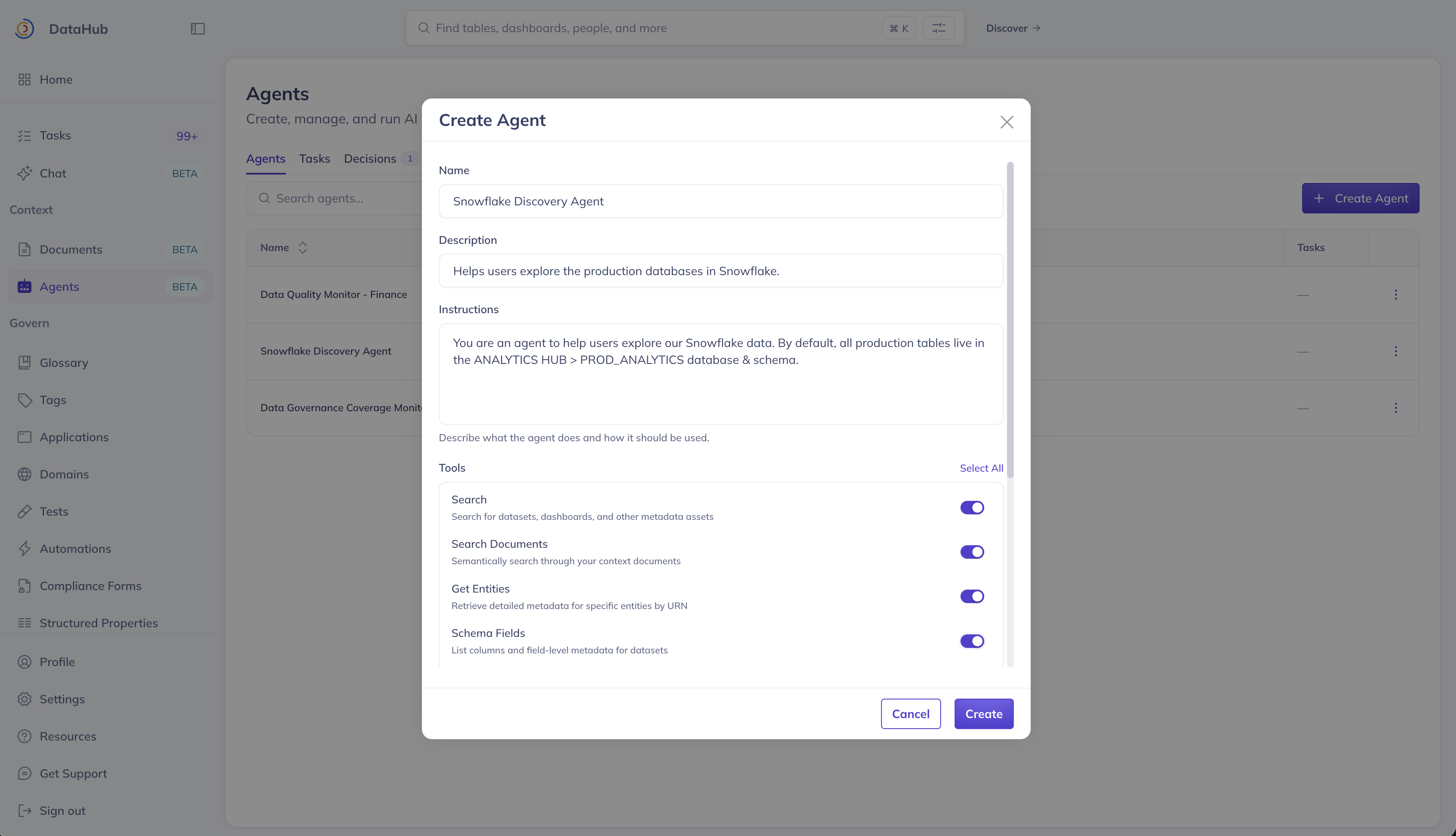
First, package your domain. Then go to Context > Agents, click Create Agent, and fill in:
| Field | What to enter |
|---|---|
| Name and Tagline | A name people will recognize, such as "Finance Analyst" |
| Description | What the agent does and when to use it. DataHub uses this to route questions, so write it as "Does X. Use when Y." For example: "Answers revenue, bookings, and retention questions using trusted Finance tables. Use for questions about ARR, NRR, or bookings." |
| Instructions | How to answer, and what to do when it doesn't know. See the example below. |
| Tools | The read-only tools. An analytics agent doesn't need to change metadata. |
| AI Plugins | The warehouse plugin from step 1 |
| Scope | By Domain, set to your domain |
| Show in Ask DataHub Chat | On, so people can select the agent in chat |
Example instructions:
Answer only from the Finance context available through your tools. If you can't find a relevant document, metric, or table, say that you don't have the context to answer, and suggest asking #finance-data. Never estimate a number.
Then open the agent's Evals tab and add your domain's evals. Evals added here run against this agent, with its scope, instructions, and plugins, so they reflect what the agent's users will get. Evals on the main Validation > Evals page continue to measure Ask DataHub.
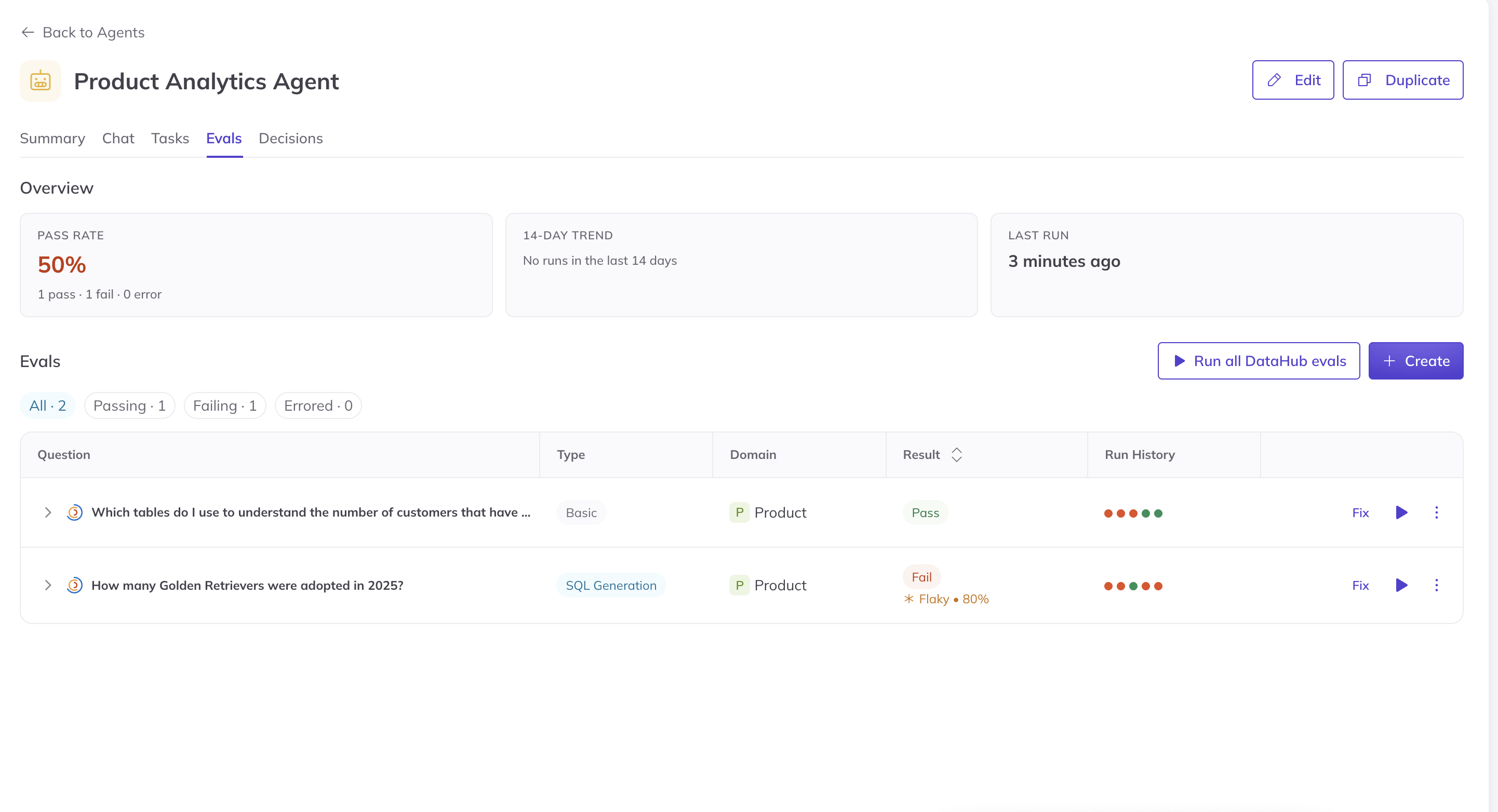
Screenshot: an agent's Evals tab, with pass rate and trend.
Custom agents are part of the DataHub Cloud Context add-on, currently in Public Beta.
4. Roll it out
- In DataHub, people use Ask DataHub, or select your domain agent in the chat.
- In Slack and Teams, people mention
@DataHubto ask where they already work.
Start with one domain's team, and expand to the next once they trust the answers.
To reach people in Claude, ChatGPT, or another agent as well, add option b. It exposes the same Ask DataHub or custom agent as a tool.
Check your work
- Your evals show a pass rate you're comfortable sharing.
- A question from outside the domain gets a clear "I can't answer that," not a guess.
- A small group of users has tried it for a week, including with difficult questions.