Step 5: Context Feedback & Improvement
This step uses features from the DataHub Cloud Context add-on, currently in Public Beta.
Your organization doesn't stand still. Tables are replaced, metrics are redefined, teams reorganize, and people start asking new questions. Context that was accurate at launch drifts unless someone maintains it. This step describes the practices that keep your context layer accurate over time.
Let your agents report gaps
The people and agents using your context are the first to notice when it falls short. Whenever an agent runs into a gap, it records a note in Context Feedback:
| Type | Meaning |
|---|---|
| Missing | It couldn't find what it needed. |
| Incorrect | What it found was wrong or out of date. |
| Conflicting | Two sources disagree. |
| User correction | A user said the answer was wrong, and explained why. |
Ask DataHub and your custom agents report gaps automatically. Your own agents do too when they use the datahub-sql-workflow skill. You'll find the notes under Validation > Feedback.
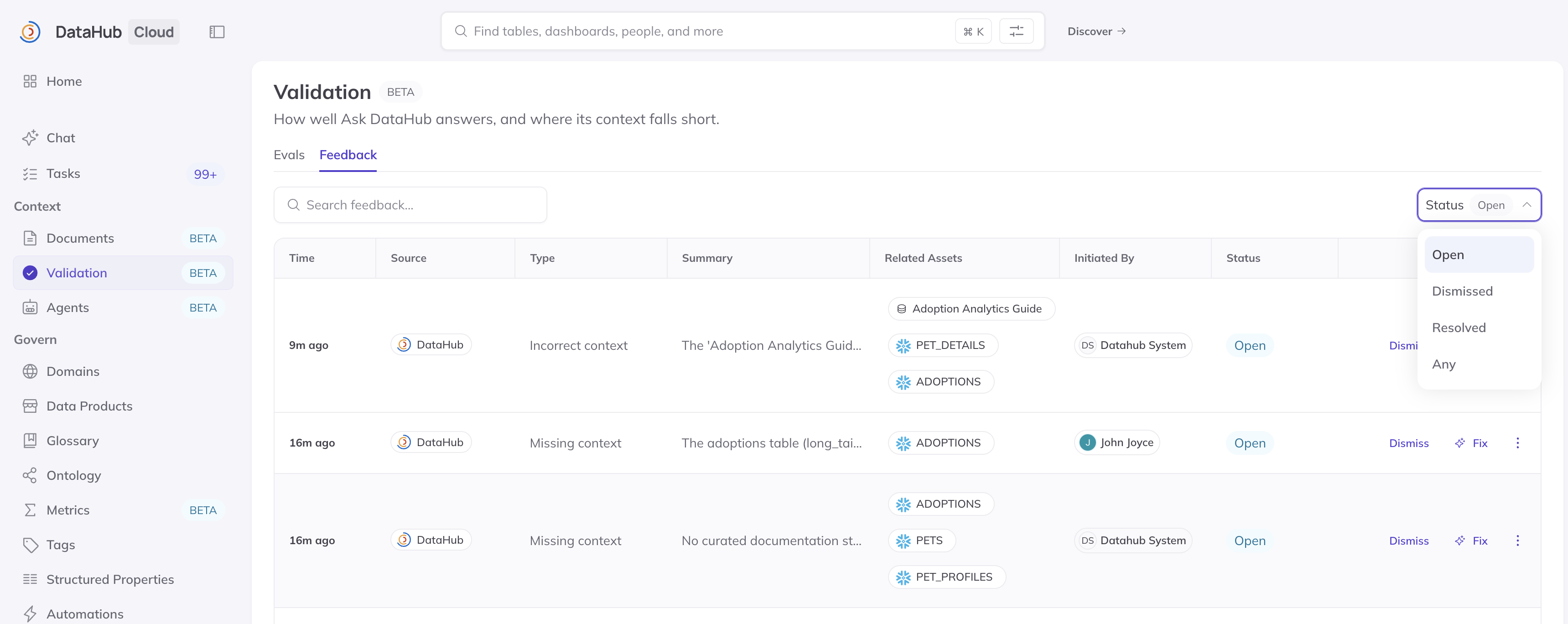
Screenshot: open feedback reported by agents.
Close each gap, and keep it closed
Make reviewing feedback part of how your domain's owners work, at whatever cadence suits your organization. For each item:
- Confirm it's real. If it isn't, dismiss it.
- Fix the context. DataHub's assistant can investigate and propose the smallest change that would help, such as a new document, a clearer description, or deprecating an outdated table. Nothing changes until you approve it.
- Add an eval for the question that exposed the gap.
- Resolve it.
Adding an eval turns a one-time fix into a lasting one. Over time, your eval suite comes to reflect the questions your organization actually asks.
Group feedback by asset. Several notes about the same table usually point to a single underlying problem.
Invite everyone to suggest fixes
People don't need edit rights to improve your context:
- In DataHub, anyone viewing a document they can't edit can propose a change.
- In chat, people can ask Ask DataHub or their own agent to "propose an edit to the churn definition." This also works in Slack and Teams.
Suggestions go to the context's owners for review, and they can test changes against your evals before approving. See Reviewing Context Changes.
Keep context in step with your data
Much of maintenance can run on its own:
- Scheduled ingestion keeps your technical context current as tables, dashboards, and owners change.
- Scheduled Context Generation captures new query patterns as your team's analysis evolves. Documents a person has edited are never overwritten.
- Custom agent tasks can handle recurring upkeep, such as flagging undocumented tables in a domain.
- Clear ownership means every domain, table, and document has someone responsible for it, so changes are reviewed by people who know the data.
When your organization changes, such as a new data source, a retired system, or a redefined metric, update the affected context, deprecate what's outdated, and add or update evals to match.
Watch your evals
Your evals are the early-warning system for drift. On the Evals page, watch:
- Pass rate, which should hold steady or rise as your context improves
- Failing evals, each of which should have an owner or a known cause
- Flaky evals, which alternate between passing and failing, and usually signal conflicting documents or an ambiguous question
If the pass rate drops suddenly, review what changed just before: newly published documents, a schema change, or a refreshed job.
Expand to the next domain
Once the agent meets your target pass rate and the first domain's team relies on its answers, take the next domain through the same path: define its evals, ingest and generate its context, and activate it for that team. Each domain goes faster than the last, because the practices are already in place.
Signs of a healthy context layer
- Your first domain agent is in regular use, limited to its domain
- Your eval suite grows from real questions and real failures
- Evals run daily, with a pass rate you're comfortable sharing
- Ingestion and Context Generation refresh on a schedule, verified by evals
- Every domain has owners who review feedback and proposed changes
- The next domain is chosen, with an owner ready to begin