Context Feedback
Context Feedback is part of the DataHub Cloud Context add-on and is in Public Beta. Details on this page may change as the feature evolves.
Agents know when they're uncertain. When an agent can't find a definition, finds two that disagree, or is corrected by a user, it records a note in Context Feedback. The notes collect in one place, so your team can see where your context falls short in real use, fix each gap once, and add an eval so it stays fixed.
How feedback works
- While answering a question, an agent runs into a gap in your context.
- It records a short note: the kind of gap, the question that triggered it, and the assets involved. Notes never include data values or query results.
- The note appears under Validation > Feedback for your team to review.
- A reviewer fixes the underlying context, adds an eval for the question, and resolves the note.
Agents report four kinds of gaps:
| Type | Meaning |
|---|---|
| Missing context | The agent couldn't find what it needed. |
| Incorrect context | What it found was wrong or out of date. |
| Conflicting context | Two sources disagree. |
| User correction | A user said the answer was wrong, and explained why. |
Ask DataHub and custom agents report gaps automatically. Your own agents can report them through the DataHub MCP server; the open-source datahub-sql-workflow skill instructs them to.
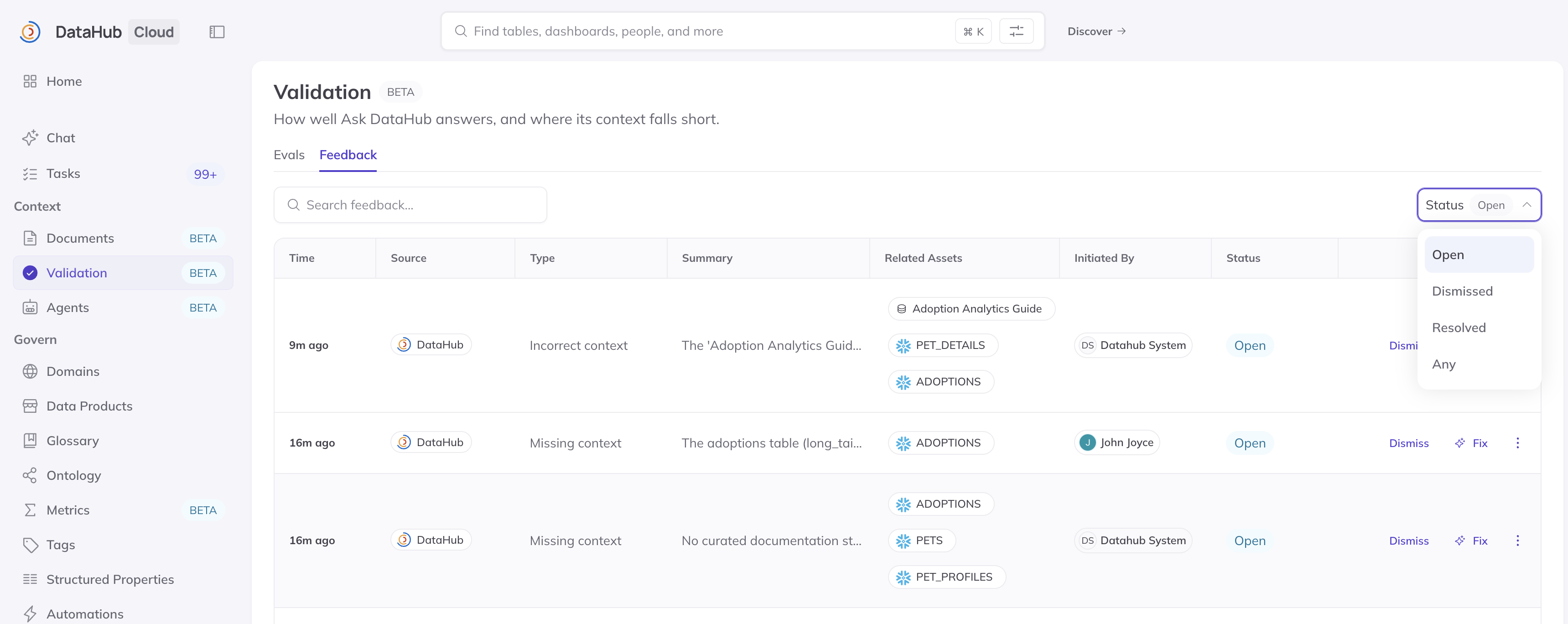
Screenshot: reviewing feedback in Validation > Feedback.
Acting on feedback
Open Validation > Feedback to see what agents have reported. For each note, confirm that the gap is real, then fix the context behind it, for example by writing a missing definition, clarifying a description, or deprecating an outdated table. DataHub's assistant can investigate a note and propose the smallest change that would help. Nothing changes until you approve it.
Once the context is fixed, add an eval for the question that exposed the gap, and resolve the note. Over time, your eval suite comes to reflect the questions your organization actually asks.
Several notes about the same table usually point to one underlying problem, so it's worth reviewing them together. See Step 5: Context feedback & improvement for how feedback fits into maintaining your context over time.
API access
You can also manage feedback programmatically with the DataHub GraphQL API, including listing feedback and updating its status.
FAQ
No feedback is showing up.
Check that feedback collection is turned on under Settings > AI. External agents report gaps only when they're instructed to, for example by the datahub-sql-workflow skill.
Do thumbs up and down in Ask DataHub create feedback? No. Those ratings help DataHub improve the product. Context Feedback comes from agents noticing gaps in your context, often because a user corrected them.
Who can review feedback? Anyone with the Manage Context Feedback privilege, which Admins and Editors have by default.