Context Evals
Context Evals are part of the DataHub Cloud Context add-on and are in Public Beta. Details on this page may change as the feature evolves.
Context Evals measure whether an agent can answer your real business questions correctly using the context in DataHub. Each eval pairs a question with the answer an expert would give. DataHub runs your evals on a schedule, and an AI judge scores every response. When an eval fails, it usually points to a gap in your context: fix the gap, and the next run passes.
We recommend defining evals before you add any context, so every change can be measured against them. See Step 1: Define evals in the Build a Data Agent guide.
How evals work
- Each eval has a question, such as "What was net revenue retention last quarter?", an expected answer (usually SQL), and optional rules, such as tables a correct answer must or must not use.
- An agent answers the question using your DataHub context, just as it would for a user.
- An AI judge compares the response with the expected answer. For SQL, it checks whether the queries are equivalent, rather than identical.
- Results roll up into a pass rate, with the reasoning behind each verdict, so you can see what context was missing.
By default, a built-in DataHub agent answers your evals. Evals attached to a custom agent run against that agent instead.
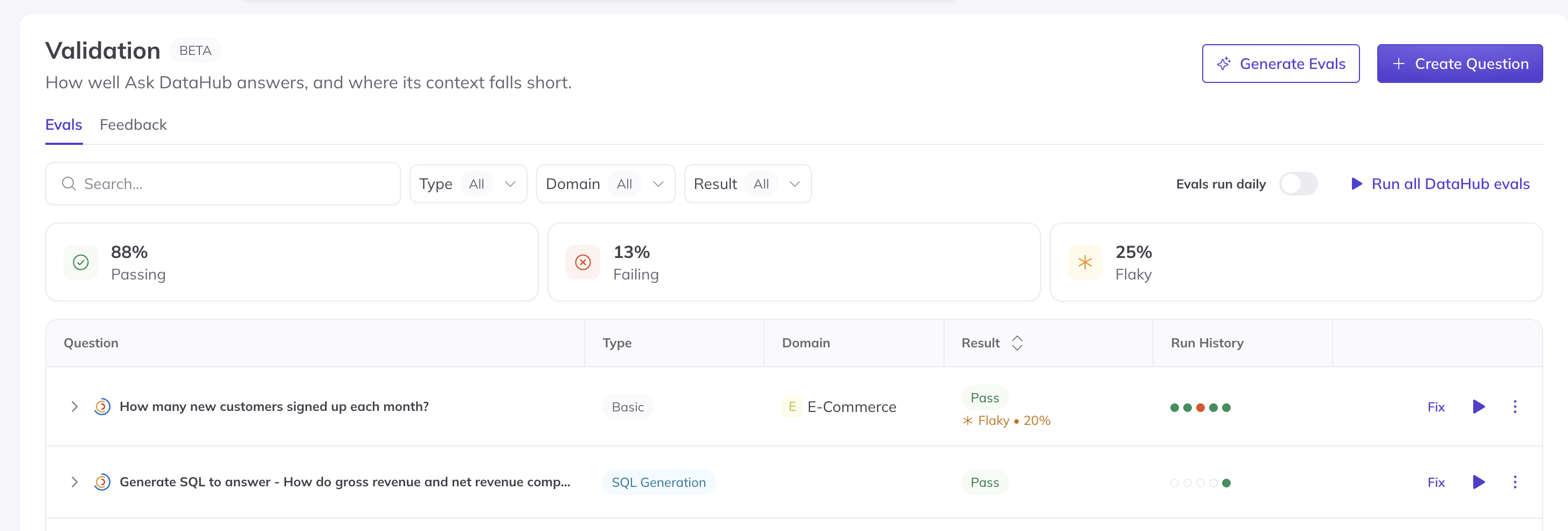
Screenshot: tracking eval results in Validation > Evals.
Creating evals
Evals live under Validation > Evals. You can create them in three ways:
- Write them yourself from the questions your team actually asks. This is the best way to start, with 20 to 50 questions written or reviewed by a data expert.
- Generate them from your published context documents. DataHub drafts questions and expected answers, and an admin reviews each one before it's added.
- Define them in code, in YAML, and manage them from CI with the evals CLI.
Evals for a custom agent can also be added from that agent's Evals tab.
Running evals and reviewing results
Run evals on demand, or turn on daily runs so a change that breaks an answer shows up the next morning. You can also run evals against a proposed change before it's published. See Reviewing Context Changes.
When an eval fails, open it to compare the agent's answer with the expected one, and read the judge's reasoning. Most failures trace back to missing or unclear context, such as an undocumented metric or two documents that disagree. Occasionally the eval itself is too strict, for example requiring one table when several are valid; in that case, update the eval.
If your agent runs outside DataHub, your own test harness can report its answers to DataHub for grading, so every agent is measured the same way.
API access
You can also manage evals programmatically with the DataHub GraphQL API, including creating, updating, and running evals and reading their results.
FAQ
Do evals use AI Credits? Yes. Each run consumes AI Credits, because an agent answers the question and an AI judge grades it. Keep your suite focused on the questions that matter most.
We already have an evals platform. Why use DataHub evals? DataHub evals focus on one question: can an agent find and use the right context in DataHub? They complement end-to-end agent evals in tools such as Langfuse or LangSmith.
Who can create and run evals? Anyone with the Manage Evals privilege, which Admins and Editors have by default.