Grouping Lineage by Lens
Group by is in Public Beta. Lineage filters are in Private Beta. Features, UI, and configuration options are subject to change.
Lineage graphs with many assets can be difficult to navigate. Often you want a high-level view of how data flows, e.g. which platforms it passes through, which domains consume it, or where Gold-tier data comes from.
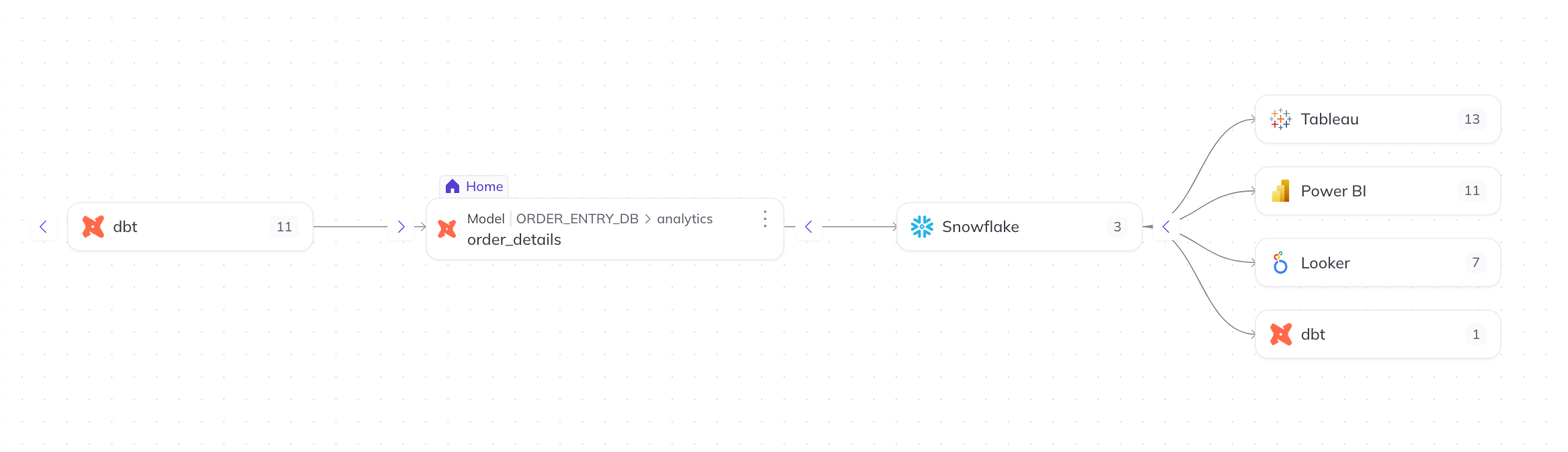
Group by merges connected assets that share a value, such as a platform, domain, or glossary term, into a single group node that shows the number of assets it contains. For example, a lineage spanning dozens of tables, models, and dashboards can be viewed as PostgreSQL (12) → Spark (12) → S3 (12) → Spark (11) → Snowflake (11). Each group can then be expanded to explore further.
Available in DataHub Cloud v2.4.0 and later.
Key Concepts
| Term | Definition |
|---|---|
| Lens | Determines how the graph is grouped. DataHub provides three built-in lenses: Platform, Domain, and Glossary Term. Admins can also create custom lenses. |
| Group | A set of connected assets that share a lens value, displayed as a single node with a count. The asset whose lineage you are viewing is never grouped. |
| Pass-through | An asset with no value for the lens (e.g. an asset with no domain). It is not displayed or counted, but lineage continues through it. |
| Filter | A condition, e.g. Platform is Snowflake or Glossary Term is PII, that limits which assets are grouped and counted. Assets that don't match are passed through. |
Groups are computed on the server one hop at a time, so Group by supports lineage graphs that are too large to display asset by asset.
Next Steps
- Using Group By: select a lens, expand groups, and view the assets in each group.
- Filtering Grouped Lineage: limit a grouped graph to assets that match specific criteria.
- Creating Custom Lenses: define your own lens, e.g. one that groups by Medallion tier.
Enabling This Feature
Contact your DataHub representative to enable this feature for your instance.
For self-managed deployments, set the following environment variables on GMS and restart it:
# Group by on the lineage graph
LINEAGE_GROUP_BY_ENABLED=true
# Filters on grouped lineage (Private Beta); requires LINEAGE_GROUP_BY_ENABLED
LINEAGE_FILTERS_ENABLED=true
Or via Helm:
global:
  datahub:
    lineageGroupByEnabled: true
datahub-gms:
  lineageFiltersEnabled: true
Setting global.datahub.lineageGroupByEnabled also enables the get_lineage_groups, get_lineage_group_members, and list_lineage_lenses tools on DataHub's MCP server, which allow AI agents, e.g. Ask DataHub, to summarize lineage using groups. If you set the environment variable instead, set LINEAGE_GROUP_BY_ENABLED to the same value on both GMS and the integrations service.
When Group by is disabled, the Group by section is hidden from the lineage graph, and shared links that specify a lens open the ungrouped graph.
Related Reading
- Lineage: how DataHub captures lineage.
- Managing Lineage via UI: viewing and editing lineage edges.
- Lineage Impact Analysis: a searchable list of all assets upstream or downstream of an asset.