Knowledge Catalog Metadata Sync Automation
This feature is currently in Public Beta in DataHub Cloud. Reach out to your DataHub Cloud representative if you face any issues configuring or validating the capabilities outlined below.
Introduction
Knowledge Catalog Metadata Sync is an automation that synchronizes DataHub Tags, Glossary Terms, and Structured Properties with Google Cloud Knowledge Catalog. This enables you to manage metadata centrally in DataHub and automatically propagate it to Knowledge Catalog, where it appears as custom aspects, native Business Glossary terms, and entry links on your BigQuery assets. This automation is exclusively available in DataHub Cloud.
Use Cases
- Maintain consistent metadata across DataHub and Google Cloud Knowledge Catalog
- Improve data discovery by making DataHub governance metadata visible in the Google Cloud console
- Enhance data governance by syncing DataHub Glossary Terms to Knowledge Catalog Business Glossary terms with full category hierarchies
- Streamline data classification by syncing DataHub Tags to Knowledge Catalog custom aspects
- Propagate DataHub Structured Properties to Knowledge Catalog for unified metadata views
- Support compliance efforts by automatically associating glossary terms with data assets via entry links
Sync Capabilities
| DataHub Source | Knowledge Catalog Target | Sync Direction | Notes |
|---|---|---|---|
| Column Tags | Custom Aspect (datahub-tags) | DataHub → Knowledge Catalog | Stored as key-value map in a custom aspect on the Knowledge Catalog entry |
| Column Glossary Terms | Native Business Glossary Term | DataHub → Knowledge Catalog | Creates native glossary terms, categories, and entry links |
| Table Glossary Terms | Native Business Glossary Term | DataHub → Knowledge Catalog | Creates native glossary terms, categories, and entry links |
| Structured Properties | Custom Aspect (datahub) | DataHub → Knowledge Catalog | All structured properties synced as a single map aspect |
- Table-level Tags are not synced to Knowledge Catalog custom aspects. Table-level tag propagation for BigQuery is handled by the BigQuery Metadata Sync automation via BigQuery Labels.
- Glossary Term hierarchy is preserved: DataHub Glossary Node hierarchies are mapped to Knowledge Catalog Business Glossary categories (up to 3 levels deep, per Knowledge Catalog limits).
- Term renames are detected and automatically synced — if a glossary term or category display name changes in DataHub, Knowledge Catalog is updated accordingly.
How It Works
Tags
When a Tag is applied to a BigQuery column in DataHub, the automation:
- Looks up the corresponding Knowledge Catalog entry for the BigQuery table
- Writes the tag as a key-value pair in a
datahub-tagscustom aspect, scoped to the column - Tracks the mapping via a platform resource for removal support
Glossary Terms
When a Glossary Term is applied to a BigQuery table or column in DataHub, the automation:
- Ensures the Knowledge Catalog Business Glossary exists (created once, named
datahubby default) - Recreates the DataHub glossary node hierarchy as Knowledge Catalog categories (up to 3 levels)
- Creates a native Knowledge Catalog glossary term under the appropriate category
- Creates an entry link between the glossary term and the BigQuery data asset (with column path for column-level terms)
- When a term is removed in DataHub, the corresponding entry link is deleted from Knowledge Catalog
Structured Properties
When Structured Properties are added or modified on a BigQuery asset in DataHub, the automation:
- Fetches all structured property assignments for the entity from DataHub
- Resolves display names from structured property definitions
- Writes all properties as a single
datahubcustom aspect map on the Knowledge Catalog entry
Prerequisites
Required GCP Permissions
Ensure your service account has the following permissions:
| Task | Required Permissions | Suggested Role |
|---|---|---|
| Knowledge Catalog Access | dataplex.entries.getdataplex.entries.updatedataplex.aspectTypes.createdataplex.aspectTypes.updatedataplex.aspectTypes.get | Knowledge Catalog Editor |
| Data Catalog Lookup | datacatalog.entries.get | Data Catalog Viewer |
| Business Glossary Management | dataplex.glossaries.createdataplex.glossaryTerms.createdataplex.glossaryTerms.updatedataplex.glossaryCategories.createdataplex.glossaryCategories.update | Knowledge Catalog Editor |
| Entry Link Management | dataplex.entryLinks.createdataplex.entryLinks.delete | Knowledge Catalog Editor |
| Project Number Resolution | resourcemanager.projects.get | Browser |
Note: Permissions must be granted in every GCP project where metadata sync is needed. The Data Catalog Viewer role is required because the automation uses Data Catalog to discover the GCP region of BigQuery assets (BigQuery URNs don't contain region information).
Connection Requirements
- Valid GCP service account credentials (or application default credentials)
- Network connectivity from DataHub to Google Cloud APIs
- BigQuery assets must already be registered in Knowledge Catalog (this happens automatically for BigQuery tables)
Setup Instructions
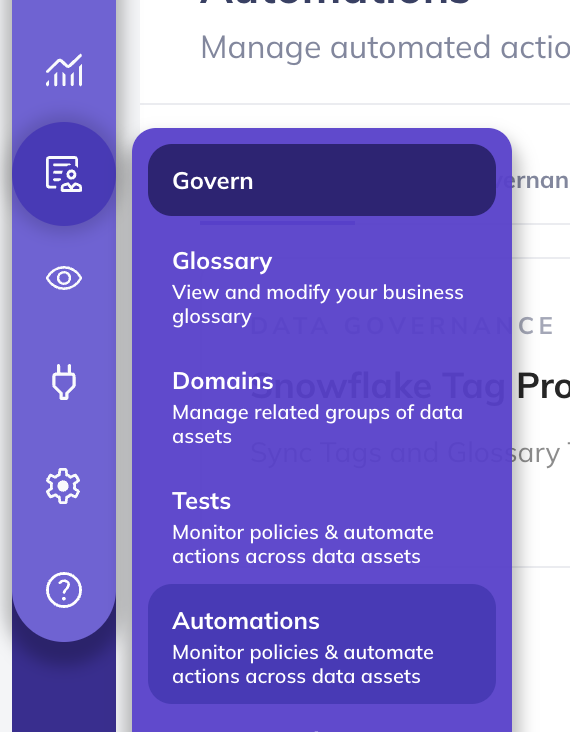
Step 1: Access Automations
- Navigate to Govern > Automations in the navigation bar.
Step 2: Create Knowledge Catalog Automation
- Click the Create button
- Select Knowledge Catalog Metadata Sync from the available automation types
Step 3: Configure Sync Options
Choose the types of metadata to synchronize:
| Propagation Type | Description |
|---|---|
| Tags | Sync DataHub column Tags to Knowledge Catalog custom aspects |
| Glossary Terms | Sync DataHub Glossary Terms to native Knowledge Catalog Business Glossary |
| Structured Properties | Sync DataHub Structured Properties to Knowledge Catalog custom aspects |
You can limit Tag and Glossary Term propagation to specific Tags or Terms. If none are selected, ALL Tags or Glossary Terms will be propagated. The recommended approach is to not specify a filter to avoid inconsistent states.
Step 4: Configure Connection Settings
Fill in the required fields:
- Service Account Credentials: GCP service account JSON key (or leave blank for application default credentials)
- Project ID: The GCP project where custom aspect types and the Business Glossary will be created
- Glossary ID: The Knowledge Catalog Business Glossary ID (default:
datahub) - Glossary Location: GCP region for the Business Glossary (default:
global)
Optional Filters
- Project IDs: Restrict sync to specific GCP projects
- Project ID Pattern: Regex pattern to filter projects
- Dataset Pattern: Regex pattern to filter BigQuery datasets
Step 5: Save and Run
Click Save and Run to activate the automation. The automation will:
- Create custom aspect types in Knowledge Catalog (
datahub-tagsanddatahub) if they don't exist - Begin listening for metadata change events in DataHub
- Propagate changes to Knowledge Catalog in real-time
Propagating for Existing Assets
To ensure that all existing Tags, Glossary Terms, and Structured Properties are propagated to Knowledge Catalog, you can backfill historical data. Note that the initial backfilling process may take some time, depending on the number of BigQuery assets you have.
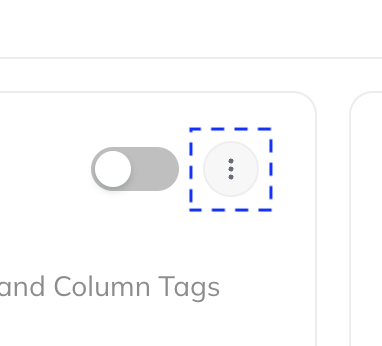
- Navigate to the Automation you created above
- Click the three-dot More menu
- Select Initialize
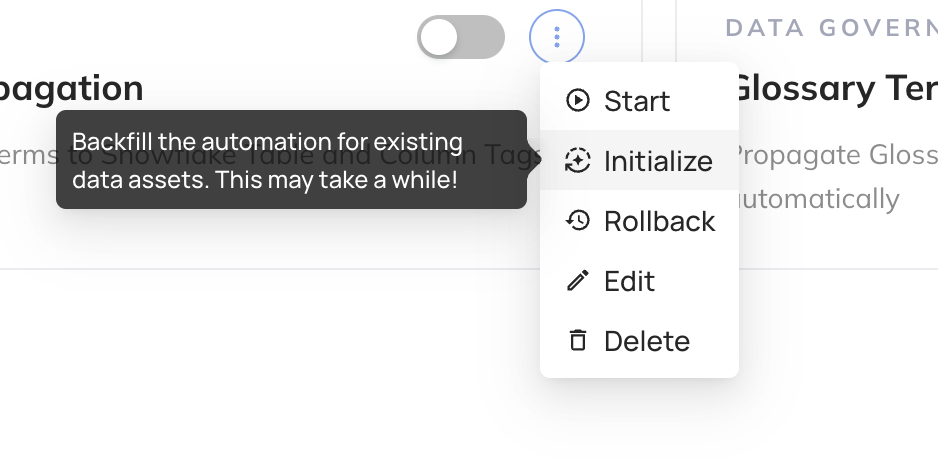
This one-time step will trigger the backfilling process. If you only want to begin propagating metadata going forward, you can skip this step.
Viewing Synced Metadata
Custom Aspects (Tags and Structured Properties)
Synced Tags and Structured Properties are visible in the Knowledge Catalog entry details in the Google Cloud console. Look for custom aspects named datahub-tags and datahub on your BigQuery entries.
Glossary Terms
Synced Glossary Terms appear in the Knowledge Catalog Business Glossary section of the Google Cloud console:
- Business Glossary: Named
datahubby default, contains all synced terms and categories - Categories: Mirror the DataHub Glossary Node hierarchy (up to 3 levels)
- Terms: Linked to data assets via entry links, visible on the entry's relationships
Troubleshooting
Q: What BigQuery assets are supported?
A: The automation supports BigQuery tables. The asset must be discoverable via Data Catalog (which is automatic for BigQuery tables). The automation uses Data Catalog to resolve the GCP region, then constructs the Knowledge Catalog entry path.
Q: Why do I need Data Catalog Viewer permissions?
A: BigQuery URNs in DataHub don't include GCP region information (e.g., us-east1, eu). The automation uses the Data Catalog LookupEntry API to discover which region a BigQuery table is in, then constructs the Knowledge Catalog entry path from that.
Q: What happens if a Glossary Term hierarchy is deeper than 3 levels?
A: Knowledge Catalog Business Glossary supports a maximum of 3 nested category levels. If a DataHub Glossary Term has a hierarchy deeper than 3 levels, the sync is skipped for that term and a warning is logged.
Q: Where should I manage my Business Glossary?
A: Author and manage the glossary in DataHub. Glossary terms in Knowledge Catalog should be treated as a reflection of the DataHub glossary, not as the primary source of truth.
Q: Are there limitations on resource IDs?
A: Knowledge Catalog resource IDs must match ^[a-z][a-z0-9-]{0,62}$. The automation automatically sanitizes DataHub names to comply: lowercasing, replacing special characters with hyphens, collapsing consecutive hyphens, and prefixing with t- if the result starts with a digit. Names are truncated to 63 characters.
Q: What happens if I rename a Glossary Term in DataHub?
A: The automation detects display name changes and updates the corresponding Knowledge Catalog glossary term or category. The resource ID (derived from the original name) remains unchanged — only the display name and description are updated.
Q: How frequently are changes synced?
A: Changes are synced in real-time (within a few seconds) when they occur in DataHub. The automation listens for metadata change events and processes them immediately.
Q: What happens if Knowledge Catalog API calls fail?
A: The automation has built-in error rate limiting. If more than 15 errors occur within an hour (configurable), it will temporarily stop processing events to avoid cascading failures. Transient errors (like permission denied or network issues) are logged but don't permanently block sync.
Q: Can I use this alongside BigQuery Metadata Sync?
A: Yes. Table-level tag propagation is handled by BigQuery Metadata Sync (as BigQuery Labels), while Knowledge Catalog Metadata Sync handles column-level tags (as custom aspects), glossary terms (as native Business Glossary), and structured properties. The two automations are complementary.