Backfill Assertion History
Introduction
When you enable Anomaly Detection on a new assertion, the underlying ML model needs historical data to learn what "normal" looks like before it can make accurate predictions. Without historical context, the model has nothing to train on: the assertion must collect 14 days of history through real-time evaluations before it starts alerting.
Backfill Assertion History solves this by running the assertion against historical data at the time of creation. Instead of waiting for the model to accumulate enough data points through scheduled evaluations, the system queries your warehouse for past data and populates the assertion's metrics history in one go. This means you get accurate anomaly detection thresholds from day one, with full awareness of daily, weekly, or monthly seasonality in your data.
Because Backfill works by issuing warehouse queries, it is only available on Snowflake, Redshift, BigQuery, and Databricks.
Backfill is available for the following assertion types:
| Assertion Type | Backfill Support |
|---|---|
| Volume Assertion with Anomaly Detection | Yes (requires time-series bucketing) |
| Column Metric Assertion with Anomaly Detection | Yes (requires time-series bucketing) |
| Freshness Assertion | No |
| Schema Assertion | No |
| Custom SQL Assertion | No |
How Backfill Works
When you create a bucketed assertion with backfill enabled, the following process occurs:
- Job creation: A backfill job is created in
PENDINGstate and queued for execution. - Job scheduling: A background fetcher runs every few minutes, picks up pending backfill jobs, and submits them for execution. To avoid overloading your warehouse, a maximum of 4 backfill jobs run concurrently.
- Chunked execution: The backfill queries your warehouse in chunks (approximately one month of data per chunk) using efficient
GROUP BYqueries. This balances query cost against resilience — if a single chunk fails, only that chunk needs to be retried rather than the entire backfill. - Progress tracking: After each chunk completes, progress is recorded (percentage complete and the last evaluated bucket). If the job is interrupted, it will resume from where it left off.
- Completion: Once all historical buckets are populated, the assertion's AI model trains on the backfilled data and begins generating predictions.
Backfill Limits
The maximum amount of historical data that can be backfilled depends on the bucket interval:
| Bucket Interval | Maximum Lookback |
|---|---|
| Daily | 365 days (1 year) |
| Weekly | 156 weeks (3 years) |
This lookback window is relative to the assertion's creation date
Backfill Statuses
You can track the progress of a backfill from the assertion detail page. A backfill job will be in one of the following states:
- Pending: The backfill job is queued and waiting to be picked up by the executor.
- Submitted: The job is about to start.
- Running: The backfill queries are actively executing.
- Complete: The backfill finished successfully.
- Failed: The backfill encountered an error. You can retry the backfill (see below).
- Rejected: The backfill was not attempted because it did not meet eligibility requirements (e.g., the assertion type does not support backfill) or backfill was disabled.
Backfilling large tables (> 1 TB) can be expensive in terms of warehouse compute. Consider starting with a shorter lookback period and extending it if needed.
Configuring Backfill
Via the UI
When creating a new assertion with Anomaly Detection and time-series bucketing enabled:
- Toggle Backfill historical data to on (this defaults to on when bucketing is enabled for Anomaly Detection).
- Select a backfill start date using the date picker. The date picker enforces the maximum lookback constraints (365 days for daily, 156 weeks for weekly bucketing).
- Complete the rest of the assertion configuration and click Save.
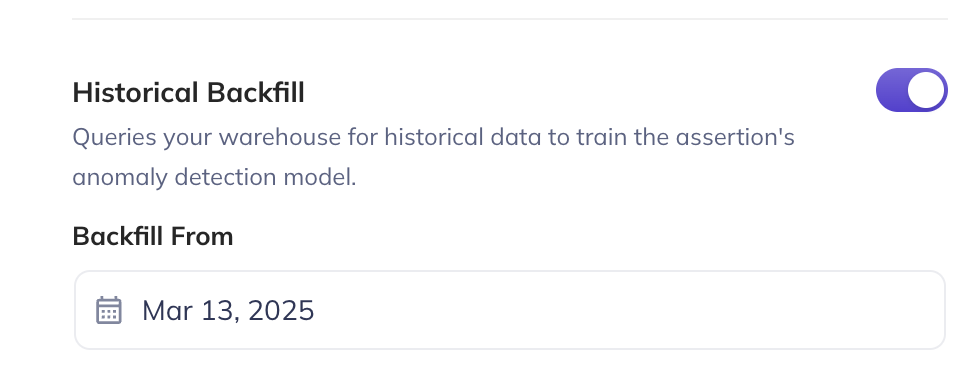
After creation, you can update the backfill start date, but you cannot change the bucketing configuration (timestamp column, bucket interval, or timezone).
Via the Python SDK
You can configure backfill using the backfill_config parameter on the sync_smart_volume_assertion and sync_smart_column_metric_assertion methods.
from datahub.sdk import DataHubClient
from datahub.metadata.urns import DatasetUrn

client = DataHubClient(server="<your_server>", token="<your_token>")
dataset_urn = DatasetUrn.from_string(
    "urn:li:dataset:(urn:li:dataPlatform:snowflake,database.schema.table,PROD)"
)

# Volume assertion with Anomaly Detection, daily bucketing, and 6-month backfill
assertion = client.assertions.sync_smart_volume_assertion(
    dataset_urn=dataset_urn,
    display_name="Daily Volume Anomaly Monitor",
    # Bucketing always requires a query-based source; information_schema and
    # DataHub Dataset Profile cannot be bucketed.
    detection_mechanism="query",
    sensitivity="medium",
    time_bucketing_strategy={
        "timestamp_field_path": "created_at",
        "bucket_interval": {"unit": "DAY", "multiple": 1},
        "timezone": "America/Los_Angeles",
    },
    backfill_config={
        "backfill_start_date_ms": 1688169600000,  # 2023-07-01T00:00:00Z
    },
    tags=["automated", "volume"],
    enabled=True,
)
The backfill_config parameter accepts:
- A dict with
backfill_start_date_ms(epoch milliseconds) - A
BackfillConfigPydantic model (supportsdatetimeobjects) - A raw
AssertionMonitorBootstrapConfigClassGMS model
from datetime import datetime
from acryl_datahub_cloud.sdk import BackfillConfig

# Using a BackfillConfig with a datetime object
backfill = BackfillConfig(backfill_start_date_ms=datetime(2024, 1, 1))

assertion = client.assertions.sync_smart_column_metric_assertion(
    dataset_urn=dataset_urn,
    column_name="user_id",
    metric_type="null_count",
    display_name="Null Count Anomaly Monitor - user_id",
    detection_mechanism="all_rows_query_datahub_dataset_profile",
    sensitivity="medium",
    time_bucketing_strategy={
        "timestamp_field_path": "created_at",
        "bucket_interval": {"unit": "WEEK", "multiple": 1},
    },
    backfill_config=backfill,
    enabled=True,
)
backfill_config requires time_bucketing_strategy to also be set. If you provide backfill_config without time_bucketing_strategy on a column metric assertion the configuration will be rejected, and the assertion will not be created.
Retrying a Failed Backfill
If a backfill fails (due to a warehouse timeout, network error, etc.), you can retry it from the assertion detail page. There are two retry modes:
- Soft retry (default): Resumes the backfill from the last successfully evaluated bucket. Only the remaining gaps are filled in.
- Hard reset: Restarts the backfill from scratch, re-evaluating all buckets and overwriting any previously collected metrics. Use this if you suspect the existing backfilled data is incorrect. This currently only available via the GraphQL API.
Via the UI
Navigate to the assertion detail page. The backfill status will appear near the top of the page, alongside the error encountered. Click Retry.
Via GraphQL
mutation retryMonitorBackfill {
  retryMonitorBackfill(
    input: { monitorUrn: "urn:li:monitor:your-monitor-id", hardReset: false }
  )
}
Set hardReset: true to perform a full re-backfill from scratch. This is useful if you recently ran a job that added/updated entries and backdated them.
Prerequisites
- Remote Executor: Backfill requires the Remote Executor at version v0.3.17-acryl or later.
- Warehouse connection: An Ingestion Source must be configured for your data platform (Snowflake, BigQuery, Redshift, or Databricks) under the Integrations tab.
- Permissions: The actor must have
Edit AssertionsandEdit Monitorsprivileges for the target dataset.
FAQ
Q: Does backfill run queries against my warehouse?
Yes. For bucketed assertions, the backfill process issues GROUP BY queries against your warehouse to compute historical metrics. Queries are batched in chunks (approximately 28 days per chunk) to balance cost and resilience.
Q: Can I change the backfill start date after creation? Yes. The backfill start date can be updated after creation. However, the corresponding bucketing parameters (timestamp column, bucket interval, timezone) cannot be changed without recreating the assertion.
Q: What happens if my warehouse goes down during a backfill? The backfill will fail and can be retried. Because progress is tracked per-chunk, a soft retry will resume from the last successful chunk rather than starting over.
Q: Does backfill affect my scheduled assertion evaluations? No. Backfill runs do not interfere with your normal assertion evaluation schedule.